






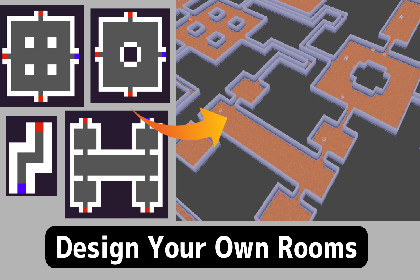
Procedural dungeon generator powered by Wave Function Collapse. Draw rooms as small PNG images and the engine connects them into a unique, fully playable dungeon — in 2D or 3D — every run.DungeonTool brings procedural dungeon generation to Unity with almost no setup. Inspired by the MarkovJunior WFC (Wave Function Collapse) algorithm, it reads your hand-drawn room layouts from PNG files and assembles them into fully connected dungeons — corridors, a start point, and a goal included — from a single method call. It ships with four ready-to-run demo scenes (2D Prefab, 2D Tilemap, 3D Block-based, 3D Edge-based) built on free Kenney (CC0) art, so you can play a finished dungeon the moment you import.Try it in one click. Every demo scene has an on-screen control panel: press Generate for a new dungeon, Play Demo to drop in and walk it with WASD (reach the stairs), and reproduce any layout you like by its seed (on-screen seed display, seed input, and copy-to-clipboard). Zoom and pan the bird's-eye overview, then press ESC to return. In the Editor you generate straight from the Inspector with a button — no menu digging, no scripting required to see it working.Design rooms your way. Each room is a small pixel-art PNG where color encodes the tile type — white = wall, dark gray = floor, red = exit, blue = entrance, transparent = wildcard. Add as many rooms as you like; the engine handles placement, rotation, reflection, and corridor connection automatically. No scripting is required to add or change rooms.2D and 3D from the same rooms. The generator is designed for 2D top-down games first, but the exact same room set can be laid out flat on the XY plane for 2D or on the ground (XZ) plane for 3D — just swap the prefabs. 3D supports both block-based pieces and edge-based (modular) wall panels.Two output modes. Choose Prefab mode to instantiate GameObjects, or Tilemap mode to write directly into a Unity Tilemap for lightweight rendering and built-in collider support.Optional autotiling. In Tilemap mode, an optional wall atlas classifies every wall cell by its neighbors and picks the matching art — straight runs, corners, T-junctions, and pillars — while a floor atlas scatters random floor variants for visual variety. Leave them empty to use a single tile everywhere.Built-in post-processing. Dead-end removal trims corridor branches that lead nowhere, and floating-wall trimming cleans up stray border tiles — giving you polished output without manual cleanup.Populate it in seconds. The included Prop Placer scatters chests, barrels, decorations, or pickups across the dungeon using simple rules — area size, max count, spawn chance, rotation, and automatic avoidance of the start and goal tiles. For full control, FloorPositions and WallPositions expose every tile's world-space coordinate, and the OnGenerated event lets you drop in enemies, treasure, or traps from your own code in a few lines.Made for large dungeons. In 2D prefab mode, the Wall Collider Merger combines hundreds of per-cell colliders into a single CompositeCollider2D to keep physics fast.Runtime-ready API. Call Generate() from code at any time to build the next floor on the fly, with optional fixed-seed support for reproducible layouts.Ideal for roguelikes, dungeon crawlers, puzzle games, and maze-based experiences. The generation core is pure C# with no third-party dependencies, making it easy to extend and integrate into any project.Requirements: Unity 6 (6000.3) or later — developed and tested on 6000.3.15f1. Uses the Universal Render Pipeline (URP), 2D Tilemap Extras, and the Input System package.A note on runtime generation. In the Editor, generation works out of the box. To generate at runtime in a standalone (desktop) build, one extra step is needed: (1) move your room PNG folder into a StreamingAssets folder (e.g. Assets/StreamingAssets/MyDungeon), (2) set Room Folder to that StreamingAssets path, then (3) build and run. No code changes are required. Runtime generation is not supported on mobile (Android/iOS). Dungeons pre-generated in the Editor and baked into your scenes run on all platforms.Key FeaturesWFC (Wave Function Collapse) dungeon generation based on the MarkovJunior algorithmRoom layouts defined as PNG files — no scripting required to add or edit roomsAutomatic room placement, rotation, reflection, and corridor connection, with start and goal pointsWorks in 2D (XY plane) and 3D (XZ ground plane), including block-based and edge-based 3D wallsPrefab output mode and Tilemap output modeOptional neighbor-aware wall autotiling (straights, corners, T-junctions, pillars) and random floor-variant tilingDead-end removal and floating-wall trimming as toggleable post-processing stepsProp Placer for rule-based scattering of chests, barrels, decorations, and pickupsWall Collider Merger combines 2D wall colliders into a single CompositeCollider2D for large dungeonsFloorPositions / WallPositions data and OnGenerated event for spawning enemies and itemsFixed-seed support for reproducible dungeon layoutsOne-click demo control panel — Generate, Play Demo, and reproduce-by-seed with no scriptingSeed reproducibility tools — on-screen seed display, seed input, copy-to-clipboard, and an Inspector "lock this layout" buttonGenerate and Reload Rooms buttons right in the Inspector; optional verbose logging keeps the Console cleanFour demo scenes and free Kenney (CC0) sample art for both 2D and 3DPure C# core (DungeonEngine) with no third-party dependenciesIncluded ScriptsWFCManager — Main MonoBehaviour. Configure and run generation from the Inspector (Generate / Reload Rooms buttons) or via code.DungeonDemoController — Drives the demo scenes' on-screen buttons (Generate / Play Demo / Copy Seed / Merge Colliders), the seed display & input, the Random toggle, and the overview↔play camera switching.DungeonEngine — Pure C# WFC interpreter core (no Unity dependencies).RoomConverter — Converts room PNGs to the engine's internal format.WallAutotiler / WallTileAtlas — Neighbor-bitmask wall classification and per-mask tile lookup.FloorTileAtlas — Pool of floor-tile variants chosen per cell for visual variety.WallColliderMerger2D — Merges per-cell 2D wall colliders into a single CompositeCollider2D.DungeonPropPlacer — Rule-based scattering of props and pickups onto a generated dungeon.PlayerSpawner — Spawns a player prefab at the dungeon start tile.PlayerController2D / PlayerController3D — Minimal WASD controllers for the 2D and 3D demos.FollowCamera — Shared follow camera used by both the 2D and 3D demos.GoalTrigger / GoalTrigger3D — Detects when the player reaches the goal tile (2D / 3D).RequirementsUnity 6 (6000.3) or later (tested on 6000.3.15f1)Universal Render Pipeline (URP)2D Tilemap Extras (com.unity.2d.tilemap.extras)Input System (com.unity.inputsystem)Runtime generation: Editor and standalone desktop builds (desktop builds require room PNGs in StreamingAssets). Not supported at runtime on mobile — pre-generate in the Editor and bake into scenes, which runs on all platforms.Supported Platforms: All Platforms (dungeons generated/baked in the Editor). Runtime generation is desktop-only.AI coding assistants (Claude) were used to help write, implement, and debug the C# scripts and core generation logic during development. All code was reviewed and tested by the author before release.

