






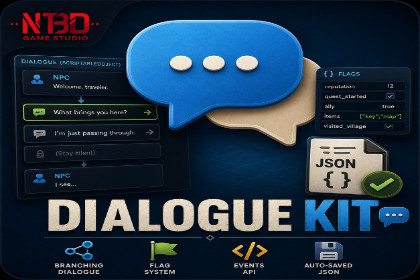
A lightweight, flag-driven branching dialogue system. Author conversations as Scriptable Objects, subscribe to events, drive any UI.DialogueKit is a focused branching-dialogue system for Unity. Author every conversation as a ScriptableObject in the Inspector, drop one DialogueManager component into your scene, and subscribe to events to drive your own UI. There is no node graph editor, no required Canvas prefabs, and no boilerplate.A flag system handles narrative state. Any node or choice can be gated on flag values using comparison operators (Equals, GreaterThan, Contains, Exists, etc.). Choices can set, increment, or toggle flags. The whole flag store is saved as JSON automatically.IS THE CONTENT CUSTOMIZABLE?Yes, extensively. DialogueKit ships with full C# source code, no DLLs, and is built to be extended:- Dialogues are plain ScriptableObject assets. Add fields or write custom inspectors without touching package internals.- Flag comparison operators are open-ended. Compare strings, numbers, or use the Exists check for simple presence gating.- All state changes raise C# events you can subscribe to from your UI, audio, animation, analytics, or save system.- Mission integration is event-based. When a choice has a missionToUnlock value, DialogueKit fires OnMissionUnlockRequested with that string. Subscribe from MissionKit or your own mission system - DialogueKit stays decoupled.- Save data is JSON. Use the built-in file save, or pull state out via GetSaveData() and plug into your own save system.- Custom Dialogue Editor window is full source. Edit templates and defaults to match your authoring style.- Two assembly definitions isolate DialogueKit's compilation. You can modify the package safely without slowing your game's incremental builds.IS IT SUITABLE FOR A PARTICULAR GENRE?DialogueKit is intentionally genre-agnostic. It makes no assumptions about combat, inventory, factions, or world structure. The runtime handles dialogue tree traversal, flag-based branching, choice consequences, custom event firing, and JSON persistence. Everything else is up to you.Because of that, it fits cleanly into:- RPGs and CRPGs (NPC conversations, story branches, reputation gating)- Adventure and narrative games (visual novels, walking sims, interactive fiction)- Survival games (dialogue with traders, faction representatives, story characters)- Tutorial sequences with branching question/answer flow- Tools where you need flag-driven decision trees (not just dialogue)- Game jam prototypes that need working conversation systems in under an hourKEY FEATURES- Drop-in setup: one DialogueManager component, auto-initializes on Awake- Dialogues authored as ScriptableObjects in the Inspector - no code required- Branching by player choice, with optional consequence hints shown on each button- Flag-driven conditions on dialogues, nodes, and choices (8 comparison operators)- 5 flag actions: Set, Add, Subtract, Multiply, Toggle- Mission integration via OnMissionUnlockRequested event - works with MissionKit or any custom mission system- 7 dialogue categories: Story, SideQuest, Tutorial, Merchant, Reward, Ambient, Custom- Repeatable dialogues, optional voice-over clips per node, speaker portraits- Custom event triggers per node and per choice for cutscenes, camera moves, SFX- Built-in JSON save and load, with full choice history for debugging or analytics- C# events for dialogue start, node displayed, choices available, choice made, flag changed, custom event, dialogue ended, and mission unlock requested- Custom Dialogue Editor window for authoring and Play-mode testing- One-click demo scene generator (Tools > DialogueKit > Setup Demo Scene)- Full C# source code, no DLLs, no obfuscation- Two assembly definitions for fast incremental compilationWHAT IS INCLUDED- Full C# source code (about 2,000 lines)- Custom Dialogue Editor window- One-click demo scene generator- Sample branching dialogue asset and runnable demo controller- Two assembly definitions (runtime and editor)- Offline PDF documentation with setup guide, full script reference, authoring guide, and troubleshooting- README inside the package with quick-start examplesREQUIREMENTS- Unity 2022.3 LTS or newer- Zero external dependencies. No DOTween, no TextMeshPro requirement, no other paid assets required.- Compatible with the built-in render pipeline, URP, and HDRP- Works on every platform Unity supports- Drop-in setup: one DialogueManager component, auto-initializes on Awake- Dialogues authored as ScriptableObjects in the Inspector — no code required- Branching by player choice, with consequence hints per choice- Flag-driven conditions on dialogues, nodes, and choices (8 comparison operators)- 5 flag actions: Set, Add, Subtract, Multiply, Toggle- Mission integration via OnMissionUnlockRequested event — works with MissionKit or any custom mission system- 7 dialogue categories plus a Custom value- Repeatable dialogues, optional voice-over clips, speaker portraits- Custom event triggers per node and per choice (for cutscenes, SFX, camera)- Built-in JSON save and load with full choice history- C# events for every dialogue state transition- Custom Dialogue Editor window for authoring and Play-mode testing- One-click demo scene generator (Tools > DialogueKit > Setup Demo Scene)- Full C# source code, no DLLs, no obfuscation (approximately 2,000 lines)- Two assembly definitions (DialogueKit + DialogueKit.Editor) for fast incremental compilation- Code organized in DialogueKit and DialogueKit.Editor namespaces — no global-scope collisions- Fast Enter Playmode compatible (Unity 6.6+ with Domain Reload disabled)- Offline PDF documentation with setup guide, full script reference, authoring guide, and troubleshooting- Unity 2022.3 LTS or newer- Compatible with built-in render pipeline, URP, and HDRP- Works on every Unity-supported platform- Zero external dependencies — no DOTween, no TextMeshPro requirement, no other paid assets requiredThe core runtime of this package — the dialogue data model, the flag system, the dialogue manager state machine, the save/load layer, the static event API, and the custom Dialogue Editor window — was written by the publisher before any AI tool was involved. These files are: DialogueData.cs, DialogueEvents.cs, DialogueFlags.cs, DialogueManager.cs, DialogueSaveData.cs, and Editor/DialogueEditor.cs.The following files were drafted with the assistance of Anthropic's Claude (claude-sonnet-4-6) and were reviewed, edited, and integrated by the publisher before submission:- Samples/DialogueKitDemoController.cs — a demo controller MonoBehaviour that renders an OnGUI panel exercising the dialogue flow and event API.- Samples/DialogueKitDemoNote.cs — an empty MonoBehaviour exposing an Inspector help message in the demo scene.- Editor/DialogueKitDemoSetup.cs — an editor utility that programmatically creates the demo scene and a sample DialogueData asset with a branching conversation via a Tools menu item.The following non-code files were also drafted with Claude's assistance: README.md, the package's asmdef files (DialogueKit.asmdef, DialogueKit.Editor.asmdef), and an initial pass at the store listing copy. The store listing copy was subsequently rewritten by the publisher.Modifications and additions made by the publisher beyond AI generation: namespace organization across the full package, the OnMissionUnlockRequested event decoupling (replacing direct MasterController calls with an event-based hook so DialogueKit ships without external dependencies), the autoInitializeOnAwake and persistAcrossScenes fields, the RuntimeInitializeOnLoadMethod static-state resets on DialogueManager, DialogueFlags, and DialogueEvents for Fast Enter Playmode compatibility, sample dialogue authoring (speaker lines, choice text, flag actions), and verification that the package compiles in isolation with no warnings.AI was not used to generate any visual content, audio, models, animations, or trained model weights. No customer or third-party data was used in training or generation. The package contains no AI-connected runtime functionality.

