






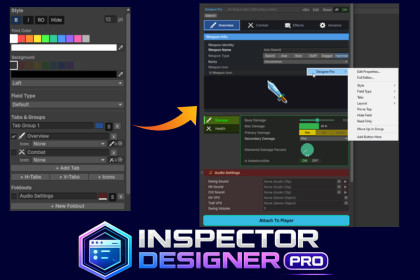
Zero-code inspector customization for Unity. Drag, style, and organize your inspector fields with tabs, foldouts, presets, and live preview with Visual Editor.Inspector Designer Pro: The Complete Visual Inspector Customization Tool for UnityStop writing boilerplate custom editor code. Inspector Designer Pro lets you fully customize any MonoBehaviour inspector through a visual editor window, no C# scripting, no custom drawers, no PropertyAttributes. Just right-click any field, pick your options, and see results instantly.Whether you're a solo indie developer, a technical artist on a AAA team, or a designer who needs clean, organized inspectors, this tool saves hours of editor scripting and keeps your project inspectors consistent, readable, and professional.[DOCUMENTATION] | [VIDEO TUTORIAL]KEY FEATURESVisual Inspector Editor — Zero Code RequiredCustomize any MonoBehaviour inspector from a dedicated editor window or directly through right-click context menus. Change field types, colors, fonts, grouping, layout, and validation — all saved as reusable ScriptableObject profiles.12 Built-In Field Type OverridesTransform how your fields are displayed in the inspector. Override any compatible field with:Slider — with custom fill, track, and thumb colorsMin-Max Slider — dual-handle range selection for float pairsProgress Bar — visual percentage display with custom colors and format labelsKnob — rotary dial control for numeric valuesCurve Editor — inline AnimationCurve editingPercentage Field — display floats as percentagesToggle Button — stylized on/off switch replacing default checkboxesDropdown — styled enum popup with custom background and text colorsButton Tabs — toolbar-style tab selector for enums and ints with full color themingReorderable List — drag-and-drop list management for arraysImage Preview — inline texture/sprite preview with adjustable heightSmart type filtering ensures you only see field types compatible with each property — no guesswork, no errors.Tab Groups with Full StylingOrganize fields into tabbed layouts with three orientation modes: Horizontal, Vertical, and Icon-Only. Every visual detail is customizable:Active and inactive tab colorsTab text colors and font sizeTab bar background colorSelected tab outline color and widthContent area background, border color, and border widthGradient backgrounds with custom start and end colorsPer-tab content styling overridesCustom tab height and paddingFoldout Groups with Header & Content StylingGroup related fields under collapsible foldouts with full visual control:Header background and text colorFont size and bold toggleBuilt-in icon picker for header iconsContent area background colorContent border color and widthContent paddingHeaders, Separators & Layout ElementsInsert visual structure between fields:Headers — with custom background color, text color, font size, bold styling, and built-in iconsSeparators — horizontal dividers to visually separate sectionsSpaces — adjustable vertical spacingBox Groups — bordered containers with background and border colorCustom Buttons with Rounded CornersAdd clickable buttons to your inspector that call any public method on the target component. Full styling control over:Button label and target method nameBackground color, text color, and outline colorCorner radius for rounded buttonsCustom width, height, font size, and bold toggleFlexible placement — before any field or at the bottom of the inspectorAudioClip In-Editor PlaybackAudioClip fields get an automatic play/stop button right next to the object field. Preview audio clips directly in the inspector without entering Play mode.Dropdown StylingOverride the default Unity enum dropdown appearance with custom background and text colors. A custom-drawn dropdown arrow ensures visibility regardless of your color choices.Field Styling & AppearancePer-field visual customization including:Font color, size, bold, and italicBackground colorText alignment (left, center, right)Field icons using Unity built-in iconsCustom display names and tooltipsConditional VisibilityShow or hide fields based on other field values. Supports 8 condition operators: Equals, Not Equals, Greater Than, Less Than, Greater or Equal, Less or Equal, Is True, and Is False.Field Validation RulesAdd validation to any field with visual error feedback:Range validation (min/max)Not Null check for object referencesNot Empty check for stringsPositive number enforcementCustom validation with configurable messagesPinned Fields & SearchPin important fields to the top of the inspector for quick access. Built-in search bar lets you instantly find fields by name in components with many properties.Marquee Multi-Select with Bulk ActionsClick and drag to select multiple fields at once. Apply styling, grouping, and field type changes to your entire selection in one action — no repetitive clicking.Right-Click Context MenusRight-click any field to access quick actions: change display name, add to tab or foldout groups, change field type, move up/down, pin, hide, open the full editor, and more. Right-click rename on headers, foldouts, and tabs.Field ReorderingRearrange fields in your inspector through drag-and-drop ordering. Move fields up or down within groups for the exact layout you want.7 Built-In Style PresetsJump-start your inspector design with professionally crafted themes:Minimal, AAA Dark, Designer Friendly, Technical, Mobile UI, Modern Pro, and RPG StyleEach preset configures global styling, tab colors, foldout appearance, headers, and field fonts — apply with one click, then customize further.Full Undo SupportEvery single change you make is fully undoable with Ctrl+Z. Over 80 undo recording points cover all profile modifications — colors, grouping, field types, layout changes, renaming, and more.Global StylingSet project-wide defaults for background color, font color, font size, and field spacing. Individual field overrides take priority when set.Reusable ScriptableObject ProfilesAll customization is stored in lightweight ScriptableObject profiles — one per MonoBehaviour type. Profiles are project assets that can be shared across teams, version-controlled, and reused across scenes.USE CASESGame Designers — Create clean, organized inspectors for gameplay scripts without waiting for programmer supportTechnical Artists — Build material-editor-quality inspectors for shader property scripts and tool componentsSolo Developers — Save hours of custom editor code on every projectTeam Leads — Enforce consistent inspector layouts across the entire projectAsset Developers — Ship professional-looking inspectors with your assets without writing editor scriptsRapid Prototyping — Quickly iterate on inspector layouts during game jams or pre-productionEducational Projects — Make student-friendly inspectors with clear labels, tooltips, and validationLarge Component Inspectors — Tame components with 50+ fields using tabs, foldouts, search, and pinningWHAT PROBLEMS DOES THIS SOLVE?Writing custom editors and PropertyDrawers for every component is slow and repetitiveUnity's default inspector is flat and unorganized for complex componentsNon-programmers on the team can't modify inspector layoutsCustom editor code adds maintenance burden and potential build issuesInconsistent inspector styling across different scripts in the same projectNo built-in way to add tabs, foldouts, or styled controls without codeCompatibilityUnity 2021.3 LTS and newer (all LTS and Tech Stream versions)Compatible with Unity 6 and all current Unity versionsWorks with all render pipelines (Built-in, URP, HDRP)Zero Build ImpactThe entire package is editor-only (includePlatforms: ["Editor"])No runtime scripts, no runtime assemblies, no build size increaseWill never cause build failures or runtime errorsSafe to include in any project regardless of the target platformArchitectureBuilt on Unity's IMGUI system using EditorWindow, SerializedObject, and SerializedPropertyScriptableObject-based profile system — one profile per MonoBehaviour typeModular field drawer architecture with FieldDrawerBase and FieldDrawerRegistryReflection-based AudioClip preview using Unity's internal AudioUtil class (with safe fallbacks)PerformanceNo per-frame texture allocations — cached Texture2D dictionary for style overridesRounded corners rendered via Handles.DrawSolidDisc (no GC-heavy texture generation)Dropdown arrows rendered via Handles.DrawAAConvexPolygon (zero allocation)No editor lag — lightweight IMGUI drawing with minimal overheadProfile SystemProfiles stored as .asset files in your projectFully serializable — works with version control (Git, Perforce, PlasticSCM)No scene dependencies — profiles are project-level assetsAutomatic profile discovery and assignment by target type namePackage ContentsEditor scripts only (~35 C# files)7 built-in style presets3 demo MonoBehaviour scripts for testing (RPGCharacter, WeaponSystem, EnvironmentSettings, AIBehavior)Built-in icon library with Unity editor icon pickerComplete documentationCode QualityClean namespace: InspectorDesignerProAssembly definition scoped to Editor platform onlyNo third-party dependenciesNo use of reflection on user code (only on Unity internal AudioUtil for audio preview)Full Undo.RecordObject support for all modifications

