






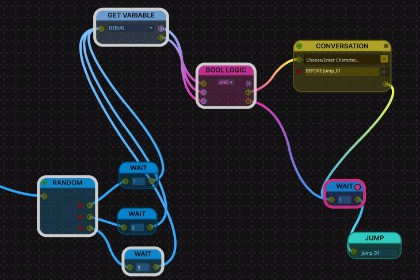
See which EasyTalk dialogue node is running, live in the node editor during play mode.Live Node View highlights the dialogue node currently being processed in the EasyTalk node editor while your game runs in play mode. Similar to how Mecanim or behavior-tree tools show the active state.No setup required. Enter play mode, open your dialogue in the EasyTalk editor, and the active node is framed in real time. It follows the flow across GOTO jumps into other dialogue assets, and highlights only the asset that is actually playing.A toggle button inside the node editor turns the live view on or off.This is an editor-only tool. It adds nothing to your build and does not modify any EasyTalk source files.Requires EasyTalk Dialogue System (sold separately).- Editor-only: excluded from builds (no runtime footprint in your game).- Does not modify EasyTalk source files; works alongside your existing setup.- Tracks the active node across GOTO jumps and additively loaded scenes.- On/off toggle inside the EasyTalk node editor.- Tested with Unity 6 LTS (URP/HDRP/Built-in compatible; editor UI only).- Requires the EasyTalk Dialogue System asset (not included).

