






Easy Notes - Scene Notes, Tasks & Team Annotations
Birich Studio
$5.99
$6.99
14%OFF
(no ratings)
Jump AssetStore
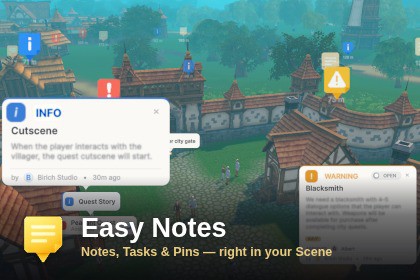
In-scene notes, tasks, and annotations for the Unity Editor. Drop color-coded cards, pin them to GameObjects, assign teammates — all from the SceneView.Easy Notes - Scene Notes, Tasks & Team AnnotationsYou spot a broken prop, a placeholder that needs replacing, a spawn point that feels wrong. Three days later you're staring at the same scene trying to remember what it was.Easy Notes turns the Unity SceneView into a review board. Drop a note next to the problem, pin a task to the GameObject itself, and everything stays where you left it — searchable, filterable, and visible right where the work is.KEY FEATURESPin notes to GameObjects - move the object, the note follows. Link lines show what belongs to what.Notes and tasks in one list - states, importance levels, tags, comments, and full undo/redo.Built for version control - per-author files mean no merge conflicts. Your notes are never overwritten by a teammate's.Readable at any distance - cards expand on hover, collapse to labeled dots at range, and fade instead of vanishing behind geometry.Search and filter everything - by category, state, author, assignee, or tag.Nothing ships with your game - notes are editor-only ScriptableObjects. Zero runtime cost, zero GameObjects in your scene.HOW IT WORKSYour notes live with your project, not on someone else's server. No account, no subscription, no sync service to configure — if your team already uses Git or Unity Version Control, Easy Notes works the moment you import it. Teammates see your notes when they pull, the same way they see your code.COMPATIBILITYUnity 6 or newer. All render pipelines (URP sample included). Windows, macOS, and Linux editors.TECHNICAL DETAILSArchitectureTwo assemblies: BirichStudio.EasyNotes.Editor and BirichStudio.EasyNotes.Runtime. Only Runtime ships in builds, and it contains nothing but [Serializable] data classes — no MonoBehaviours, no runtime initialization, no build footprint.Compile-time guard fails the build on unsupported editors (Unity 6+ required).Data & persistenceOne ScriptableObject per author, per scene (…/EasyNotesData/{sceneGUID}/{authorKey}.asset), loaded and unloaded automatically via [InitializeOnLoad] + EditorSceneManager hooks. Files are discovered wherever they live, so demo/sample data can ship inside the package folder. Stale references are pruned when a scene closes.Persistence tiers: EditorPrefs (personal visual preferences), EasyNotesSettings.asset (team-shared behavior and user roster), the per-author data assets (the notes and comments themselves), and rotating local backups in EasyNotesBackups~/ (outside version control).Additive multi-scene support: notes from every open scene are merged into one list.Version control & collaborationPer-author storage: each scene's notes are split into one file per author, so concurrent note and comment additions never touch the same file — no merge conflicts in the common case. The author key is a deterministic hash of the display name, stable across machines.Ownership: a note is editable only by its author; anyone can comment on any note, and the comment is written to the commenter's own file (referenced by note id), never to another author's file.Safe by default: a notes file that fails to load (unresolved Git conflict markers or corruption) is never overwritten — an in-window banner offers Reload / Open file / Restore last backup, and a rotating local backup is kept outside version control.Automatic migration: legacy single-file scene data is split into per-author files the first time a scene is opened (embedded comments moved to their authors), with the old file backed up first.Note modelNote / Task types with Open / In Progress / Done states.Importance: Info / Warning / Critical, or None.Tags, threaded comments, and per-note custom card color plus independent title and body colors.SceneView renderingDrawn with the Handles API. Distance-aware cards scale with proximity, expand on hover, and collapse to an "X m" dot beyond a configurable threshold. Dark / light themes.Tasks show a progress ring; up to three tag pills render per card with an overflow indicator; the assignee is shown on expanded cards.Occlusion (ghost mode) drops occluded notes to 60% opacity; the selected note stays fully opaque. Occlusion is probed with HandleUtility.RaySnap and cached per camera pose, so a parked camera casts no rays.Performance: frustum culling (GeometryUtility.TestPlanesAABB), distance-based LOD, cached screen-space projection, and event-driven repaints.Every selected card opens at full size regardless of distance; overlapping selected cards are pushed apart in screen space (visual only — note positions are never changed) and ease back on deselect.Configurable presentation via EditorPrefs: card scale, dot scale, max draw distance (up to 1000), dot-only distance (up to 500), collapsed-title width, and card opacity. A global toggle and a per-note eye toggle hide notes without deleting them.PlacementSurface Snap uses scene raycasts for placement and dragging, with a placement-ray preview and a leash model (cached camera-to-note distance) that prevents distant teleporting. Configurable normal offset (0 – 0.5).GameObject pinningLink via the Inspector ObjectField or the in-scene Pick mode (gold hover outline). Tracks renderer bounds, draws a dashed gold link line, stacks and surfaces all of an object's notes together, and optionally auto-deletes with the host.The note-data asset has a custom inspector showing its linked scene (name, path, note count) with Ping / Open Scene actions.Search, filter, sortCase-insensitive (ordinal) search across title, body, and tags.Combined filters: importance, authors, assignees (including Unassigned), and tags, with an active-filter badge.Sort by creation date, importance, GameObject, author, or type; optional group-by-state (stateless notes sort to the bottom). Sort/group preferences persist via SessionState.Editing & inputMulti-selection: Ctrl/Cmd-click to toggle, Shift-click to range-select in the list, and Shift/Ctrl-click cards in the SceneView; delete removes the whole selection.Every mutation is routed through Undo.RecordObject, including SceneView drags.Shortcuts (Delete, F2, Esc) registered through Unity's Shortcut Manager and remappable via Edit > Shortcuts.RequirementsUnity 6 or newer. URP 17.3.0 and Input System 1.18.0 included as samples; works with any render pipeline.UI Toolkit (UIElements) interface. Editor-only — no runtime dependencies.Linux, macOS, and Windows editors supported.Built with AI-assisted coding and manually refined AI-generated icons.

