





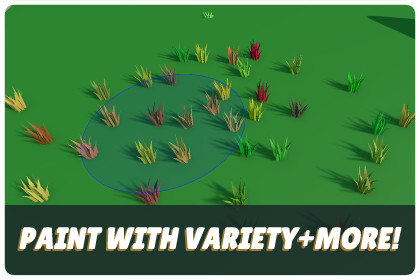
Prefab Painter: Placement & Variation Tool
DPTGames
$12.49
$24.99
50%OFF
(no ratings)
Jump AssetStore
Paint prefabs directly in the scene view on any mesh with a collider, full brush controls, randomisation, per-instance colour variation, and zero extra draw calls via Unity 6's GPU Resident Drawer.Pipelines: URP & Shader Graph ready.Performance: SRP Batcher Compatible and fully supports the Unity 6 GPU Resident Drawer.Minimum Version: Requires Unity 6000.3.8f1 or newer. (Note: This specific version is required because the architecture utilizes the new Renderer Shader User Value).Architecture: Textureless workflow. Reads Base Color from Vertices & PBR from packed UV channels.The DPT Prefab Painter is a powerful Unity 6 editor tool designed for dressing scenes quickly and efficiently. Paint prefabs directly onto any surface with a collider in the Scene View with absolute control over brush dynamics, randomized transforms, and advanced instance placement. Simply drag in individual assets or entire folders to start building immersive environments instantly.Advanced Placement & Stroke ToolsLine Painting: Hold Ctrl + Alt + Click + Drag to preview and drop perfectly spaced sequences along a guide vector.Path Mode: Place dynamic nodes to automatically generate smooth, curved paths of objects.Scatter & Grid Modes: Quickly populate massive areas with density-controlled clumps or organized, edge-aligned grid patterns.Square Brush: Toggle to a square brush shape for precise, architectural alignment.Square Brush: Toggle to a square brush shape for more precise, architectural, or edge-aligned painting.Smart Clearance: Integrated collision logic ensures assets do not overlap, maintaining clean environment spacing.Post-Placement Control: Apply rotation adjustments to individual objects or groups immediately post-placement for fine-tuning.Contextual Hotkeys: Maintain your flow with hotkeys for physics placement, randomizing scale, and cycling spacing thresholds.Intelligent Palette & Library ManagementVisual Prefab Library: Manage your assets with an intuitive thumbnail-based UI. Hover over any thumbnail to reveal a larger preview and the item name.Drag & Drop Workflow: Drag assets directly from the palette into the Scene View. Use marquee selection (click and drag) to multi-select assets within the palette for batch operations.Spawn Weight Control: Select any palette prefab to reveal per-item spawn weight settings. Increase a prefab's weight to make it appear more frequently during painting relative to others, giving you precise control over the density and variety of your placed environments.Smart Groups: Organize your workspace into distinct categories. Group 1 acts as your base library, with support for adding and toggling custom groups on the fly.Right-Click Functionality: Access advanced options directly from the palette, including creating prefab variants, opening source prefabs instantly, and toggling individual prefabs on or off without removing them from the palette.Naming Conventions: Automated sequential naming ensures your hierarchy remains clean and organized as you populate your level.Intelligent Physics & PrecisionReal-Time Physics Fall Simulation: Let assets settle naturally using gravity at paint time. The tool isolates and runs a scoped Editor physics cycle, pausing other active scene rigidbodies to ensure clean, performance-safe collisions.Precision Pivot Correction: Toggle collider-bottom calculation to seamlessly align the lowermost edge of an asset's bounds with a surface, eliminating floating objects or manual pivot offsetting.Placement Previews: Real-time UI updates show the estimated number of prefabs that will spawn for Scatter, Grid, Line, and Path modes, dynamically adjusting based on existing painted objects within your brush radius.Optimized PerformanceFlexible Material Architecture: Choose the workflow that fits your project. Ship custom assets with the included VCCore material for maximum efficiency, or use standard out-of-the-box Unity shaders (like the URP Lit shader).Pure GPU-Driven Variation (VCCore): Per-instance brightness and HSV tint modulation are pushed via native Renderer Shader User Value (RSUV) buffers directly to Unity 6's GPU Resident Drawer. Paint thousands of unique variations in a single, uncompromised render batch without material clones.Automatic MPB Fallback (Standard Shaders): Automatically defaults to Material Property Blocks (MPB) when using standard URP Lit or third-party shaders, applying randomized adjustments at paint time without duplicating materials.Automatic MPB Fallback (Standard Shaders): If using standard URP Lit or custom third-party shaders, the system automatically defaults to Material Property Blocks (MPB). This applies randomized tint, hue, saturation, and brightness adjustments at paint time without creating hard material duplicates.Toolset FeaturesColor & Brightness Shift: Fine-tune scene aesthetics using per-instance randomness. The system supports multi-layered nested hierarchies, ensuring the closest parented variation component governs child meshes without overriding sub-assemblies.Texture Channel Packer: Combine metallic, AO, and smoothness maps in under 15 seconds, with automatic roughness-to-smoothness inversion.Robust Scene Management: Full support for clean undo/redo stacks, custom parent hierarchy sorting, and optional recursive layer/tag overrides.Full Documentation Here: Prefab Painter GuideAlso Included WithThe DPT Prefab Painter is bundled with the following packs at no extra cost:Stylized Harvestable Nature: Forest Assets & Prefab PainterStylized Interactive Prop System: Break, Open & LootMarketing material and screenshots feature environmental and building assets for demonstration purposes only. These buildings are not included in the toolset or bundles.Core Stroke Mechanics & Brush EngineTri-Mode Contextual Tooling: Features Paint, Erase, and Recolor stroke operations computed via real-time scene-view viewport raycasting. Continuous painting patterns are throttled by an internal millisecond counter mapped to an editor-side spawn rate configuration (0.01s to 1.0s intervals) to optimize processing overhead.Single-Gesture Linear Painting: Integrates an interactive guide vector routine mapped to Ctrl + Alt + Click + Drag. The engine records a linear path from the mouse-down hit origin to the current mouse position, calculating precise interpolation points based on your minimum spacing value via Vector3.Lerp to drop aligned prefab sequences instantly.Scene View Hotkey Matrix: Allows full workspace manipulation without moving focus away from the viewport to the inspector window. Scene-view keyboard inputs bind directly to underlying properties, enabling instant switching for scatter toggles (U), normal alignment (N), Y-axis randomization (Y), bounds snapping (P), and stacking allowance (K), alongside an interactive spacing step-cycler (M) that increments through 0.5, 1.0, 2.0, 4.0, and 8.0 unit thresholds.Placement Architecture & PhysicsIsolated Editor Physics Simulation: Embeds a granular simulation engine operating outside of Unity's runtime environment. When enabled, it provisions temporary rigidbodies and convex mesh colliders onto spawned objects, advancing the physics clock manually via Physics.Simulate. To preserve scene state integrity, the system interrogates the active scene hierarchy, caches all native rigidbodies, and marks them kinematic during the evaluation window, seamlessly restoring their exact initial physical constraints upon simulation cleanup.Precision Pivot & Bounds Alignment: Includes a placeByCollider calculation framework designed to remedy offset or poorly centered pivot points. The routine samples every collider component across the entire instantiated object hierarchy, constructs a unified bounding volume using Bounds.Encapsulate, isolates the absolute bottom edge, and applies a corrective offset vector to position the object flush with the target surface geometry.Automated Script Attachment Pipeline: Contains a decoupled component provisioning engine allowing any number of MonoScript assets to be attached to objects upon impact. Includes targeting rules for RootObject allocation, full hierarchical replication via AllChildren, or specific string-matched NamedChild routing, combined with duplicate detection filters to prevent redundant component instances.Optimization & Rendering PipelineDual-Method Instance Variation Engine: Designed to provide extreme rendering performance without restricting asset setup or material choice. The tool dynamically interrogates the material configuration of a prefab upon instantiation to route color data through the most efficient hardware pipeline available.Native Unity 6 RSUV Pipeline with Hierarchy Protection: When painting prefabs utilizing the included VCCore material architecture, the tool bypasses material clones entirely. It writes per-instance color, saturation, and brightness parameters straight into native Renderer Shader User Value (RSUV) arrays, preserving single-batch rendering compatibility within Unity 6’s GPU Resident Drawer. Features a bottom-up verification filter (rend.GetComponentInParent() == this) to completely protect nested child assets (e.g., animated weapon fuses) from being overridden or cleared by parent-root scripts.Intelligent Material Property Block (MPB) Fallback: For assets configured with standard out-of-the-box Unity materials (such as the default URP Lit shader) or legacy custom shader graphs, the tool handles compatibility automatically. It instantiates a localized MaterialPropertyBlock routine, mapping the randomized HSV shift and brightness scalar properties straight to the object's Renderer component. This guarantees full aesthetic variation support across standard workflows without requiring manual shader modification or project asset migrations.Dual-Axis Color Optimization & Animation Tracking: Computes procedural variation data using a specialized HSV shift process. The calculation maps random variances across hue boundaries using a wrapping cycle (Mathf.Repeat) and clamps saturation values cleanly (Mathf.Clamp01), outputting smoothly into either the native RSUV tracking components or the local MPB cache. Includes native runtime tracking (lastInstanceColor) to explicitly intercept Animator timeline alterations that bypass standard public C# properties.Performance-Safe Runtime Lifecycle Toggle: Integrates an optimization switch (isAnimated) on the DPT_ShaderVariation component. When disabled for static world scenery (e.g., barrels, crates, rocks), the script pushes the color data once at startup and completely deactivates its internal Update() loop (enabled = false). This eliminates native-to-managed CPU lifecycle overhead across thousands of background props, ensuring zero drain on main-thread framerates.Decoupled Assembly Compilation Footprint (.asmdef): Enforces a strict modular compilation boundary by isolating the entire toolset within a standalone assembly definition (DPT.PrefabPainter). This configuration completely eliminates compilation overhead inside the global project environment during workspace script changes. By explicitly restricting the platform target exclusively to the Unity Editor, the architecture ensures that all UnityEditor namespace dependencies are automatically dropped by the pipeline during player generation, preventing fatal compilation crashes during standalone game builds.Asset Ingestion & Data ManagementHierarchical Palette Allocation: Features a robust asset management system supporting up to 10 active Prefab Groups assigned directly to alpha keyboard hotkeys 1-9 and 0. Toggling a hotkey isolates that group palette instantly for rapid multi-biome object painting.Recursive Folder Parsing: Drag-and-drop mechanics accept individual GameObject assets or parent Unity folders (DefaultAsset). Folder paths are read via AssetDatabase validation routines, executing precise filtering queries (t:Prefab) to automatically unpack and populate the library with valid assets instantly.PBR Texture Channel Packer: An integrated high-speed asset utility built to optimize runtime VRAM footprints. It maps independent grayscale texture sources (Metallic, Ambient Occlusion, and Smoothness) into a single, tightly packed RGBA output layout in under 15 seconds. Includes an internal bit-inversion toggle to process traditional legacy inverted roughness textures seamlessly.Enterprise Serialization & Undo Architecture: Every mouse gesture, variable change, transform manipulation, component injection, and object deletion interfaces cleanly with Unity's native SerializedObject and Undo recording API. This guarantees flawless Ctrl + Z history stacks, preventing window serialization data loss or accidental editor state corruption.System SpecificationsMinimum Unity Version: Unity 6.3.8 LTSSupported Render Pipeline: Universal Render Pipeline (URP)Compilation Footprint: Platform-restricted, decoupled Assembly Definition (.asmdef) with native Auto Referenced clearance enabled for seamless user-side API accessNamespace Architecture: DPT.PrefabPainter (Core Toolset), DPT.Core (Runtime Variation Framework), and DPT.Core.Editor (Shared Master Shader GUI)Editor Integration: Extends EditorWindow utilizing scene viewport interactions (SceneView.duringSceneGui)Operating Systems: Windows, macOS

