






Component Atlas: Contextual Memory for Unity
Tobias Froihofer
$14.99
$29.99
50%OFF
(no ratings)
Jump AssetStore
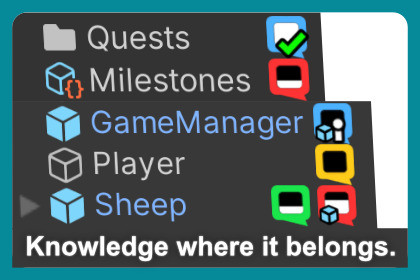
Attach warnings, documentation and notes directly to objects, prefabs, assets and folders. Your project never forgets.Forum | ContactA contextual memory system for Unity. Bugs, warnings, ideas and documentation stay attached to the objects they belong to, visible right where you work.You spot a bug mid-playtest. You finally work out why a system behaves the way it does. You set a value that must never change again. These moments matter, and they are easy to lose track of.Component Atlas keeps them inside your project, attached to the GameObject, component, prefab or asset they belong to. Open a scene and you see what needs attention before clicking anything. Come back weeks later and the context is already there.Your project never forgets.-----📌 Notes that stick with your objectsColoured icons appear directly in your Hierarchy and Project window, so you can instantly see:what has bugswhat’s in progresswhat has documentationwhat not to touch without reading firstThe context lives on the object, not in a separate window you have to remember to open.-----📝 More Than Todo NotesSome notes are temporary.Others become part of your project's memory.Warnings on sensitive settings.Explanations of complex systems.Balancing decisions from playtests.Important implementation details future-you should not have to rediscover.Examples:A rigidbody note saying: "Do not enable gravity. Controlled by script."A note on a data holding object: "Value X reduced to 40 for these reasons, do not increase again"A note on a complex object: "[Documentation] Here is how this works" so future-you can quickly remember.This is knowledge attached directly to the object that needs it.-----💡 What This Looks Like in PracticeMid-playtest.Enemy pathfinding looks wrong.Press Shift+F12. The game pauses and the Scene View snaps to exactly where you were looking. Click the enemy. Add a note: "Bug: not navigating around corners correctly." The next time that enemy appears in your scene, the bug indicator is already visible in the Hierarchy.Returning to old code.You come back to the inventory system after three weeks away.Click InventoryManager and immediately see the notes you left yourself about pooling decisions and serialization quirks. Back up to speed in five minutes.A decision that stick."Boss HP reduced from 4000 to 800 after 15 playtests." That note stays attached to the Boss prefab. Future-you immediately understands why the number is what it is.A bug that affects every instance.Attach a bug note to the prefab asset instead of one instance, and every instance in every scene shows it. No tracking the same bug twice.A focused workspace in one click.Open a note with asset references, click New Page, and a focused Pinboard workspace with everything for that task opens instantly.Document recurring workflows, reference the assets involved, and reopen everything you need with a single click.-----⚡ Capture Notes Without Breaking FlowAdding a note takes three clicks: select object, Add Note, type a title.Most notes are just a one-line title and a type (Bug, Feature, Warning, Documentation, and more). Everything else is optional. Description and Key Takeaway fields are often very useful.-----✨ Core Features📌 Notes that live where you work.Indicators in the Hierarchy, Project window, Inspector and Scene view.▶️ Capture during play modeShift+F12 pauses, snaps the Scene View to your camera, and lets you attach a note, including directly to prefab assets so the issue shows on every instance.🔎 Find anything instantlySearch and filter by type, state, priority, tags, deadline and scene. 15 built-in filter presets, plus your own.🧩 Understand systems before changing themComponent dependency graphs, with notes attachable to components and their relationships.📌 Pinboard. Named pages that group the assets, prefabs and references for a task, so you can reopen a full workspace in one click.-----🚀 Works Solo. Supports Teams.Component Atlas works fully offline from day one. No account, no setup, no configuration.Notes are stored as JSON and work with Git, Perforce and Plastic SCM. Rename assets, reorganise folders or move prefabs, and notes stay attached through Unity's internal GUID system.If you later work with others, optional Firebase integration adds realtime syncing inside Unity: notes update instantly, comments stay attached to the work, and @mentions notify teammates. Setup takes about 15 minutes through the built-in wizard.Start solo. Add collaboration later if your team grows.-----❓ Common QuestionsIs this overkill for a solo project?No. Even a few notes on important systems can save hours later. Most developers use it lightly and add notes only where context truly matters.Will this slow me down?Adding a note takes seconds. Usually faster than switching to another app and searching for the right card or document.I'm still learning Unity. Is this for me?Yes. Leave notes explaining why you set something up a certain way, and you build documentation inside your project as you go.Unity compatibility?Unity 2021.3 LTS and newer.Do I need Firebase?No. It works completely offline. Firebase is only for realtime collaboration.Version control friendly?Yes. JSON storage works with Git, Perforce and Plastic SCM.Can I export notes?Yes. JSON, CSV and TSV export are supported.Are there ongoing costs?No subscriptions. Component Atlas is a one-time purchase.Firebase also has a generous free tier which is enough for most small teams.-----🎁 Why This ExistsI built Component Atlas because I needed it myself. I kept forgetting what systems did, losing ideas during playtests, and hunting for the same assets again. I wanted that context to live inside the project, on the objects it belonged to, instead of somewhere I had to go looking for it.Over time, your project becomes easier to return to, understand and maintain.Component Atlas. Because forgetting what you were thinking is expensive.Technical RequirementsUnity 2021.3 LTS or newerFor teams - optional but recommended: Firebase account (free tier sufficient for most teams)Compatible with other hierarchy tools like vHierarchyChatGPT and Claude was used to speed up the coding process and for brainstorming

