





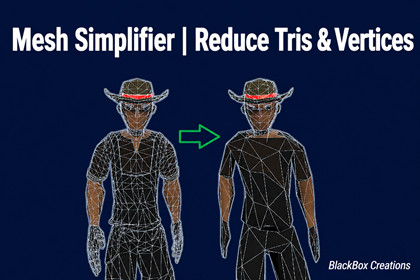
Mesh Simplifier | Reduce Tris & Vertices
BlackBox Creations
$12.99
$25.99
50%OFF
(no ratings)
Jump AssetStore
High poly meshes killing your FPS?
Reduce tris, optimize vertices, and improve performance instantly inside Unity.
One click. Real results.
No external tools. No complexity. Just one click.Mesh Optimizer — Polygon ReductionReduce triangle counts directly inside Unity using the same QEM algorithm behind industry-standard 3D tools.What it does:Attach the component, drag the Quality slider, click Optimize Now. That's the full workflow. The algorithm collapses edges intelligently — prioritizing geometry that matters least — so silhouettes, hard edges, and important surface detail survive at even aggressive reduction targets.Features:Three-tier UV protection — a single slider controls how aggressively textures are guarded:Normal mode — maximum polygon reduction, minor UV shift possibleUV Preserve mode — geometry simplifies, UV coordinates stay exactly as-isUV Lock mode — edges crossing UV seams are completely blocked from collapsingVertex welding — merges duplicate vertices before simplification for cleaner input geometry and better reduction quality.Protection zones — place spheres or oriented boxes over areas (face, hands, logos) to lock their detail while the rest of the mesh reduces freely. Supports falloff and per-zone preserve weights.Skinned mesh support — bone weights survive edge collapse; safe to use on rigged characters.Multi-submesh — handles meshes with multiple material slots without breaking submesh boundaries.Parallel processing — large meshes use multi-threaded quadric building automatically.Live preview — see changes in real time as you adjust settings. Auto-disables on meshes over 100k verts to prevent editor slowdown, and re-enables automatically once the optimized result drops under the limit.Export — save as a Unity Mesh Asset, export to FBX (requires the free official FBX Exporter package), or both.Non-destructive — full Undo support and a one-click Reset to Original.Honest expectations:Hard-surface props (vehicles, props, architecture) typically reach 60–80% reduction with clean textures. Organic characters with dense UV seams will see less — roughly 20–35% in UV Lock mode. Disabling seam protection allows higher reduction on those assets when visual accuracy is not critical.Known limitations: Blend shapes are not preserved. Non-manifold geometry may produce unexpected results. FBX export splits vertices at seams, so vertex counts in the exported file will differ from Unity's count — this is normal FBX behavior.Version 1.1 — Latest UpdateNew Features• Added Texture Shape Preservation modesMode 1 (0–19): Normal optimization modeMode 2 (20–39): Better UV and texture preservationMode 3 (40): Maximum texture protection• Improved optimization speedFaster processing for large meshes (50,000+ polygons)Reduced editor lag and garbage collectionHeavy meshes now optimize much faster• Added instant export feedbackProgress bar appears immediately during exportBetter editor responsiveness while saving prefabs• Improved quality presetsUltra, High, and Medium presets now work as quick-select buttonsSliders can still be adjusted manually after selecting a presetQuick TroubleshootingIf textures look distorted after optimization:Disable “Enable Vertex Welding”Set Texture Shape Preservation slider to 39Optimize the mesh againSupport: PDF documentation included. Free lifetime updates. Direct email support.────────────────────────────COMPATIBILITY────────────────────────────Unity 2021.3 LTS and newerBuilt-in Render PipelineURPHDRP• FBX export requires the Unity FBX Exporter package (free,available in the Package Manager). The MeshAsset export modeworks without it.AI tools were used to assist with development, documentation, and some visuals. The asset itself is fully tested, refined, and entirely owned by the publisher.

