






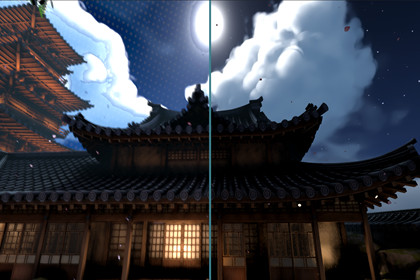
Stylized post-processing toolkit for Unity. Combine outlines, painterly filters, chromatic effects, and grid overlays to create unique comic or artistic visuals with full control and easy setup🎨 Prymara Post ProcessStylized Rendering Toolkit for UnityTransform any Unity scene into a bold, painterly, comic-inspired, or cinematic stylized world with Prymara Post Process — a modular post-processing toolkit built for artists, developers, and technical artists who want full control over their game’s final visual style.Whether you want subtle polish or a fully stylized look, Prymara lets you combine outlines, painterly filtering, oil-like surface smoothing, RGB motion distortion, and grid overlays to create a distinctive art direction directly inside Unity.✅ Supports All Unity Render PipelinesBuilt-in Render PipelineUniversal Render Pipeline / URPHigh Definition Render Pipeline / HDRPUse it across different Unity projects without being locked to a single rendering workflow.✨ Key Features🖊️ Stylized Edge OutlineAdd strong comic-style or soft illustrative outlines to your scene.Features include:Near and far edge coloringAdjustable thicknessEdge strength controlSoftness and threshold tuningDepth-aware outline controlPerfect for comic, cel-shaded, anime-inspired, architectural, and stylized environment rendering.🌈 Chromatic AberrationCreate RGB color separation for a more dynamic, energetic image.Useful for:Motion stylizationDreamy or surreal visualsScreen distortion effectsGame transitionsMagical or cinematic momentsThe effect can be subtle or exaggerated depending on your style.🔲 Background Grid OverlayAdd a stylized grid or halftone-like background effect to your scene.Great for:Comic-book visualsSci-fi overlaysUI-heavy scenesStylized sky/background treatmentGraphic novel presentationIncludes control over grid size, alpha, softness, depth, and color.🎨 Kuwahara Painterly FilterCreate a soft, brush-like painterly look while preserving important edges.As shown in the screenshots, this can turn environments into a dreamy illustrated scene with softened clouds, painterly rooftops, smooth foliage, and stylized lighting.Controls include:Kernel sizeSector countSharpnessVariance powerAnisotropyEdge sensitivityIdeal for watercolor, anime, illustration, and hand-painted visual styles.🖌️ Oil Painting FilterApply an oil-paint-inspired post-process effect for heavier stylization.Useful for:Abstract visualsPainterly environmentsArtistic cutscenesStylized promotional screenshotsNon-photorealistic renderingIncludes radius and thickness controls for tuning the final result.🧩 Modular Effect StackEach effect can be enabled, disabled, and adjusted independently.Mix and match:Outline onlyPainterly filter onlyOil + outlineGrid + chromatic aberrationFull stylized post-process stackBuild anything from clean comic rendering to a soft illustrated night garden, dreamy fantasy world, or surreal painterly scene.⚙️ Easy SetupPrymara is designed to integrate quickly into Unity projects.Depending on your render pipeline, setup may involve assigning the included material, enabling the required render pass or camera effect, and adjusting the effect parameters in the inspector.No complex custom rendering pipeline is required.📸 Screenshot-Ready ResultsThe included effects are especially useful for creating visually striking environments like:Stylized Japanese gardensNight scenes with glowing windows and lanternsPainterly skies and cloudsSoft cinematic architectureComic-style outlined buildingsDreamlike foliage and blossomsBefore/after comparison shots🎯 Best ForStylized gamesAnime-inspired projectsComic-style renderingPainterly environmentsCozy / fantasy / casual gamesVisual novelsUI-heavy gamesExperimental art directionScreenshots and trailersNon-photorealistic rendering workflows🚀 Create Your Own LookUse it to create clean outlines, soft painterly visuals, oil-painted scenes, motion-based RGB distortion, or layered post-process styles that define your game’s identity.From subtle enhancement to full artistic transformation, Prymara helps you build a memorable visual style directly inside Unity.Technical DetailsAsset Type: Post-processing render featureShader Type: Fullscreen post-process shaderIncludes:Edge OutlineChromatic AberrationBackground GridKuwahara FilterOil FilterSupports:Modular feature togglesDepth-based maskingTexture-based and procedural grid modesCustom material inspectorPerformance:Edge Outline: lightweightGrid: lightweightChromatic Aberration: moderateKuwahara / Oil: heavy depending on radius/kernel size

