






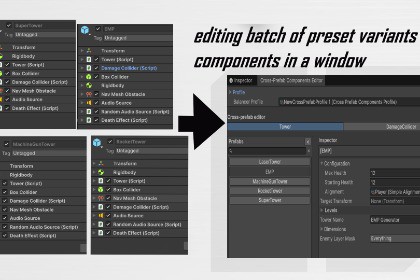
Edit shared component fields across multiple prefabs in one editor window: group prefabs, pick common component tabs, and tune values like the Inspector—without opening each prefab one by one.Cross-Prefab Components Editor helps you iterate faster when the same component type appears on many prefabs.What you getOne window to browse prefabs and edit a selected component’s fieldsComponent tabs based on types shared by your prefab listOptional profile asset to save your prefab group and tab selectionDrag prefabs from the Project window into the list areaHow it works (quick)Open Window → EasyTools → Cross-Prefab Components EditorAdd prefabs (or drag them in)Select shared component types for tabsPick a tab, select a prefab, edit values on the rightNotesOnly component types present on all listed prefabs can appear as tabs (intersection).Works on prefab assets (typical workflow).Unity Editor extension (Editor-only window)Target: prefab assets + components on prefab hierarchySerialization: uses Unity’s standard Inspector serialization path (SerializedObject / SerializedProperty)Profile: optional ScriptableObject asset to store prefab list + selected component tabsDependencies: none beyond Unity Editor assembliesSRP/URP/HDRP: not applicable (Editor tooling)Tech Consultant

