






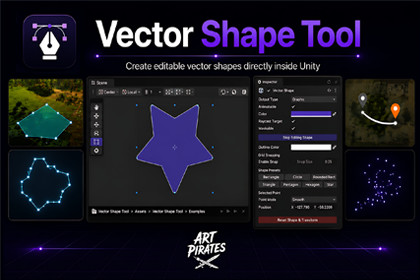
Create and animate vector shapes with bezier curves in Unity. One component, 9 output modes: Renderer, UI, Particles, Colliders, and more.Compatible with Built-in, URP, and HDRP. No pipeline-specific shaders or render features are used - all rendering relies on standard Unity components (MeshRenderer, MaskableGraphic, LineRenderer, ParticleSystem). No extra setup needed when switching pipelines. For URP/HDRP, assign a compatible material to the Renderer output.# Vector Shape Tool for UnityCreate and animate vector shapes with bezier curves directly in Unity.One unified component with 9 output modes, full scene-view editing,shape presets, and Timeline integration.## What's New in v1.0.1- Shape data is now embedded - no separate asset file needed- Full shape transform in edit mode: Move, Rotate, and Scale the entire shape directly in the Scene View (Photoshop-style handles)- Scale from center with Alt/Option modifier- Rotation handles on bounding box corners (inner zone)- Dynamic bounding box updates in real time during all edit operations- Graphic and RawImage output types now initialize at correct size- HDRP compatibility fix for RawImage texture generation- Unity 6 inspector compatibility## Features- **Unified Component** - Single Vector Shape component with dropdown to select output mode. No extra assets to manage.- **9 Output Modes** - Renderer, Sprite Renderer, UI Graphic, Raw Image, Line, Particle, Collider, Edge Collider, Sprite Mask- **Bezier Editing** - Add, move, and delete points with Corner / Smooth / Symmetric tangent modes- **Shape Transform Handles** - Move, rotate, and scale the entire shape in the Scene View without touching the GameObject transform- **Scene View Handles** - Visual editing directly in the scene with bezier and tangent handles- **Shape Presets** - Rectangle, Circle, Rounded Rectangle, Triangle, Pentagon, Hexagon, Star- **Animation Ready** - Toggle animatable mode to keyframe individual shape points. Shapes morph smoothly between keyframes.- **Timeline Support** - Dedicated Timeline track for shape animation clips with smooth blending- **Production Ready** - Zero-allocation rebuilds, proper resource cleanup, no memory leaks- **Mobile Friendly** - Minimal CPU/GPU overhead- **Universal Compatibility** - Unity 2020.3+, Built-in RP, URP, HDRP, Unity 6## Requirements- Unity 2020.3 or later- Compatible with Built-in RP, URP, HDRP## Quick Start1. Add the **Vector Shape** component to any GameObject2. Choose your **Output Type** from the dropdown3. Click **Edit Shape** to enter scene-view editing mode4. Click a preset (Rectangle, Circle, Star, etc.) to start with a ready-made shape## Scene Editing ControlsWhen Edit Shape is active:- Click a point to select it and drag to move- Drag yellow tangent handles to adjust bezier curves- Shift+Click on a segment edge to add a new point- Delete/Backspace to remove the selected point- Drag the 4-arrow icon at center to move the whole shape- Hover the INSIDE of a bounding box corner to rotate the shape- Drag blue bounding box handles to scale the shape- Hold Alt/Option while scaling to scale from center## Output ModesRenderer - MeshFilter + MeshRenderer - World-space with materialsSprite Renderer - MeshFilter + MeshRenderer - 2D sorting layersGraphic - MaskableGraphic - Drop-in UI Image replacement on CanvasRaw Image - RawImage - Rasterized texture for UILine - LineRenderer - Shape outline as LineRendererParticle - ParticleSystem - Shape mesh for particle emissionCollider - PolygonCollider2D - Physics collider from shapeEdge Collider - EdgeCollider2D - Edge-based physics colliderSprite Mask - SpriteMask - Shape-driven sprite masking## Animation1. Enable the Animatable toggle on the Vector Shape component2. Open the Animation window and enter record mode3. Click shape presets or move points to create keyframes4. Shapes morph smoothly between keyframes## Timeline Integration1. Add a Vector Shape Track to your Timeline2. Create clips and assign VectorShape assets to each clip3. Shapes blend smoothly between clips## SupportFor questions, issues, or feature requests, please contact usthrough the Unity Asset Store page.• 9 output modes: MeshRenderer, Sprite Renderer, UI Graphic, Raw Image, LineRenderer, ParticleSystem, PolygonCollider2D, EdgeCollider2D, SpriteMask• Single unified Vector Shape component - shape data embedded directly, no separate asset file to manage• Visual bezier editing in the Scene View with point and tangent handles• Full shape transform in edit mode: Move, Rotate, and Scale the entire shape with bounding box handles (no GameObject transform affected)• Scale from center with Alt/Option modifier (Photoshop-style)• Rotation via inner bounding box corner zone with snap to 15° increments (Shift)• 7 built-in shape presets: Rectangle, Circle, Rounded Rectangle, Triangle, Pentagon, Hexagon, Star• Animate individual shape points and tangents in Unity's Animation window - shapes morph smoothly between keyframes• Timeline track for blending between shape clips• Zero-allocation mesh rebuilds with version-guarded updates• Mobile friendly - minimal CPU/GPU overhead, no memory leaks• Supports Unity 2020.3 and later, including Unity 6• Works with Built-in RP, URP, HDRP, and Custom RP• Full undo/redo support in the Editor• Grid snapping for precise point placement• Dynamic bounding box updates in real time during all edit operationsAI assistance (GitHub Copilot / Cursor) was used during development to accelerate code writing, suggest optimizations, and help debug editor scripting issues. All code was reviewed, tested, and validated by the developer. AI was not used to generate any assets, artwork, or documentation content automatically - all features, architecture decisions, and final implementations were designed and verified by the developer.

