






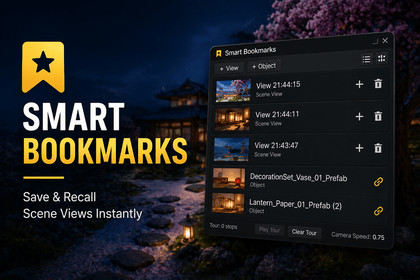
Smart Bookmarks is a Unity Editor productivity tool that lets you visually bookmark, organize, and navigate Scene View camera states and important GameObjects.Smart Bookmarks is an editor-only productivity tool and does not interact with rendering features. It works independently of render pipeline and is compatible with Built-in, URP, and HDRP projects.Smart Bookmarks is a Unity Editor productivity tool designed for developers who frequently work in the Scene View.It allows you to visually bookmark Scene View camera states and important GameObjects, making it easy to navigate large or complex scenes, confirm layouts, and perform quick walkthroughs.The tool supports visual thumbnails, robust object tracking, and an automated Tour mode to move through bookmarked views sequentially. Bookmarks can be organized, filtered, favoritedSmart Bookmarks is editor-only, lightweight, and works independently of the render pipeline. No runtime scripts or external dependencies are required.Engine & CompatibilityUnity Version: 2021.3 LTS or newerSupported Pipelines:Built-in Render PipelineURP (3D & 2D SceneView supported)Editor Only: Yes (no runtime impact, no build-time scripts)Core FunctionalitySave Scene View camera states (position, rotation*, zoom)Save GameObject bookmarksJump instantly to saved views or objectsSmooth camera transitions between bookmarksBookmark Favorites for quick accessTour Mode for automated camera walkthroughs* Rotation is automatically ignored in 2D SceneView (Unity limitation)Tour SystemSequential playback of bookmarked viewsTwo-phase timing model:Camera Speed – travel time between views (seconds)View Time – hold duration at each view (seconds)Works in both:3D SceneView (position + rotation)2D SceneView (position + zoom only)SceneView Support3D ModeFull position, rotation, zoomScene thumbnails captured from SceneView2D ModePosition and zoom supportedRotation safely ignoredUses placeholder thumbnailsNo editor warnings or crashesUI & WorkflowUnity UI Toolkit–based EditorWindowList View & Gallery View modesContext menu actions:Add to TourAdd to FavoritesRenameUpdate ThumbnailDeleteQuick-action icons:Add to TourDeleteTooltips for clarity (no confirmation popups)

