






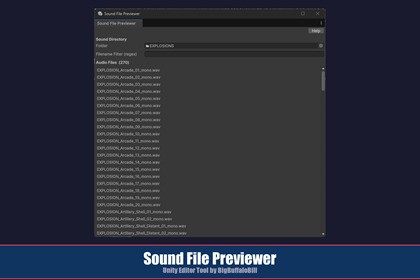
Sound File Previewer is a editor utility window that lets you instantly browse and audition every audio clip inside any folder in your project very quickly.Note: This tool will eventually be offered as part of a package of Editor Utilities, but I don't know how soon. If you do buy this now any amount paid will be deducted from the package amount later only to a maximum discount (if you had bought multiple individule tools) that the package is free. But, if you buy the package later you get all the tools therein plus any new ones added over time.Tool DocumentNote on ExpectationsSound File Previewer is a editor utility window that lets you instantly browse and audition every audio clip inside any folder in your project — just drag the folder in and use your arrow keys to step through the list, hearing each clip play the moment you land on it. No clicking Play over and over, no hunting through the Project panel — just fast, keyboard-driven audio browsing right inside your layout.Key FeaturesAudition your whole library in seconds — arrow-key through dozens of clips faster than you could find and click them one at a time. Ideal for evaluating a new sound effects pack the moment you import it.Perfect for rapid iteration — keeping this window open beside your scene while swapping footsteps, UI clicks, or explosion variants lets you pick sounds without ever breaking your flow.Every audio format supported — WAV, OGG, MP3, AIFF, AIF, FLAC, XM, MOD, IT, and S3M. If it's a valid format for import, Sound File Previewer will find and play it.Non-modal and fully dockable — behaves exactly like any other panel. Dock it, float it, drag it to a second monitor.Real-time regex filtering — type any regular expression to narrow the list instantly. The file count updates live. Invalid regex is highlighted so you always know why the list changed.Copy any file path in one click — right-click any row and choose “Copy Full File Path” to copy the complete OS path to your clipboard.Drag any clip directly where you need it — drag straight from the list onto an AudioClip field in the Inspector, a GameObject in the Hierarchy, or any folder in the Project window. When dropping into the Project window, the file is copied to the destination — your original is never moved or removed.Zero scene setup, zero runtime impact — a pure Editor tool. It adds nothing to your scenes, prefabs, or builds.RequirementsVersion: 2021.3 LTS or later (uses AudioUtil.PlayPreviewClip, an internal Editor API consistent across 2021 through 6; tested and recommended on 2021.3+)Render pipeline: Any (URP, HDRP, Built-in) — this is an Editor-only tool with no runtime dependenciesDependencies: None. Uses only built-in editor APIs Platform: Works on all platforms supported by the editor (Windows, macOS, Linux)InstallationTypical Package Manager InstallationAfter purchasing Sound File Previewer on the asset Store, click the Open button on the store page. This automatically opens the Package Manager window in youreditor and navigates to My Assets with the package selected.In the package details panel, click Download to download the package to your machine. A progress bar will appear while the download completes.Once the download finishes, the button changes to Import. Click it to begin importing.The Import Package dialog appears with all package contents pre-selected. Optionally uncheck any items you do not want to include, then click Import.The Package Manager places the imported files into your project’s Assets folder, where they are accessible from the Project window.After ImportAllow to compile the newly imported scripts. Once compilation finishes, the tool is ready to use — no additional setup is required. The following assets will be present in your project:Assets/BBB/SoundFilePreviewer/├── Editor/│ └── SoundFilePreviewer.cs├── SoundFilePreviewer_AssetDoc.html└── ImportantNoteAboutSupport.htmlAI used as a reference like google for coding API details and minor bits of boilerplate. All design and creative via my experience as a career software engineer.

