






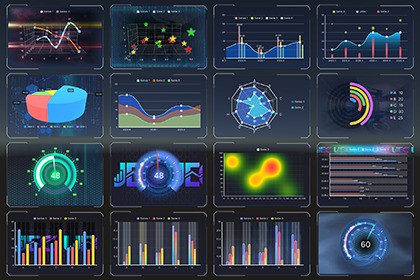
EasyChart Pro — Unity Professional Charting Solution🎯 Zero-Code + Production-Grade Visuals All configurations completed in the Inspector—no coding required to achieve professional-grade visual effects. Drop in a ChartProfile, and professional charts render instantly.⚡ Minimal Workflow, Maximum Efficiency Configure → Clone → Change Data → DoneOne ChartProfile drives both UI Toolkit and UGUI, eliminating duplicate configuration efforts. Edit once, sync across the entire project. Designers and developers work in parallel without blocking each other.🏗️ Core ArchitectureSingle Source of Truth One ChartProfile asset powers both UI Toolkit and UGUI.Edit once, render anywhere—eliminate platform-specific repetitive work.Library — Enterprise-Level Design System HubVisual Library Editor: Centralized management of all chart Profiles, supporting create, edit, delete, rename, and categorize.Live Preview: Select a Profile for instant rendering preview—no need to enter Play Mode, what you see is what you get.Cross-Project Reuse: The Library exists as a standalone asset, allowing multiple projects to share a unified design system, ensuring brand consistency.Design-Time/Runtime Dual Mode: Real-time adjustment of animation parameters in Play Mode with automatic rollback on exit; persistent saves when not in Play Mode.Version Control Friendly: The Library is a Unity Asset with readable Git diffs, enabling conflict-free team collaboration.Configuration-Driven Architecture Chart configurations are Unity assets, reusable across scenes via drag-and-drop.All styling is configured in the Inspector, with no hardcoding in scripts.Runtime JSON data injection fully decouples business logic from the presentation layer.✨ Pro Professional Features🎨 Advanced Visual EffectsTexture Fill System: Gradient, noise, and pattern fills to create unique visual styles.Texture Animation System: Multi-layer texture animation overlay for rich dynamic effects.Background Animation Support: Multi-layer background texture animations, supporting shortcuts like single/batch cloning and copy-paste editing.Advanced Styling: Shadows, glows, and rounded corners for refined visual adjustments.📊 Extended Chart TypesBasic Charts: Line, Bar, Scatter, Pie, Radar.Advanced Charts: Heatmap, Candlestick, Gauge, Funnel, Ring.3D Series: Pie3D, Line3D, Bar3D, Scatter3D (supporting auto-rotation and interactive controls).🎬 Animation SystemSmooth entry/exit transition animations.Data update animations.Interactive animation feedback.🚀 Performance OptimizationsVector rendering (crisp and clear at any resolution).Automatic Draw Call batching.Core rendering path with zero per-frame GC allocations.3D rendering optimization (smart RenderTexture refreshing).🛠️ Enterprise-Grade SupportPriority technical support.Faster update frequency.Customization within a limited scope (aligned with plugin development direction).💡 Why Choose EasyChart Pro?Pain Points of Traditional Solutions:Hand-writing Mesh → tweaking vertices → hardcoding styles → rewriting for a different UI system.Designers rely on developers to implement effects, resulting in high communication costs.Charts for different platforms require duplicate configuration, making maintenance difficult.EasyChart Pro Advantages: Drop Asset → Library Visual Editing (Texture, Animation, 3D) → One-Click Sync → Done.Designers independently produce professional-grade results, developers focus on business logic, and project delivery efficiency is improved by 10x.Unity Version: 6000.53+Render Pipelines: All supported (URP, HDRP, Built-in)Platforms: All Unity-supported platformsDocumentation: English & Chinese

