






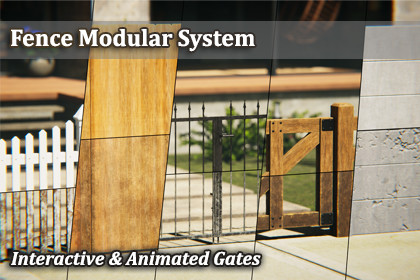
Supports also Unity 6.0 and higher.Fence Modular SystemBuild complete fence systems directly in the Scene View - no manual prefab placement, no tedious alignment. The Fence Modular System is an Editor tool that lets you construct, extend, and modify modular fences through a guided, snap-based workflow. Just click, preview, and build.✨ Key Features- Scene View Construction:Build fences entirely within the Scene View. Direction arrows guide your placement and a real-time ghost preview shows exactly what will be built before you commit.- Automatic Placement Validation:The ghost start post automatically detects invalid surfaces - slopes, obstacles, or objects that would prevent proper construction. Invalid placements are visually indicated before you even click. When no surface is detected, the post automatically snaps to Y0.- Continue Build Mode:Extend any existing fence from its end posts. Select a post, pick a direction, and keep building - the system seamlessly connects new segments to your existing structure.- Corners:90° corners are fully integrated into the building workflow. The system places the correct corner post and adjusts orientation automatically depending on your build direction.- Close Loop:Connect the end of a fence back to an existing post to form a closed circuit. The system detects proximity, highlights the connection in green, and replaces posts with the correct type on commit.- Animated Gates:Single and double gates are included for every fence type - fully integrated into the snap-based workflow with matching post connections. All gates feature working open/close animations.- Flip:Flip entire fences or individual elements to mirror their appearance. Gate animations are automatically flipped along with the visuals.- 5 Fence Types with Seamless Switching:Switch entire fences between five distinct types with a single click: Picket Fence, Privacy Fence, Wrought Iron Fence, Split Rail Fence, and Concrete Fence. Each type comes with 4 Clean and 4 Worn texture sets. All types share standardized snap points - switching is a seamless prefab swap with no repositioning required.- Smart Selection & Deletion:Clicking a section automatically co-selects its connected posts for visual clarity. Shift-click to multi-select sections - posts between them are highlighted automatically. Deleting a section triggers automatic post repair: orphaned end posts are converted to the correct type, maintaining a clean structure.- Post Protection:Posts cannot be accidentally deleted. The system intercepts delete commands on posts to prevent broken fences.- Full Undo:Every action - including full Continue Build sessions - is grouped into a single undo step. Ctrl+Z reverts the entire operation, not individual pieces.- Slope Tolerance:A built-in 1° slope tolerance ensures fences are only placed on flat surfaces.- Performance-Friendly:Each fence type uses only 1 material regardless of length or complexity. Combined with Unity's Static Batching, draw calls stay minimal even in large scenes.🧱 Post TypesThe system includes three post types that are automatically managed during construction:- End Post (E) - Placed at the start and end of every fence segment- Middle Post (M) - Connects two sections in a straight line- Corner Post (C) - 90° connection between two sections🎯 Built for FencesPurpose-built for modular fence construction - every feature, from snap logic to automatic post type management, is designed around how fences actually work in real-world applications.📦 What's Included- Complete Editor tool - no runtime dependencies- 5 Fence Types: Picket, Privacy, Wrought Iron, Split Rail, Concrete- 200 Textures total: 4 Clean and 4 Worn texture sets per type- Normal and BaseColor maps for all pipelines, MaskMap for HDRP, AO and MetallicSmoothness for Built-In and URP- All post types, straight sections, corners, and single/double animated gates per fence type- Full Built-In, URP, and HDRP render pipeline support***Background Environment by Blue Dot Studios***🧱 Topology🔹SectionB:- LOD0: ∅1000 Tris- LOD1: ∅500 Tris- LOD2: ∅100 Tris🔹Single-Gate:- LOD0: ∅3000 Tris- LOD1: ∅1500 Tris- LOD2: ∅300 Tris🔹Double-Gate:- LOD0: ∅6000 Tris- LOD1: ∅3000 Tris- LOD2: ∅500 Tris🔹Posts:- LOD0: ∅200 Tris- LOD1: ∅100 Tris- LOD2: ∅20 Tris🎞 Animated- All gates are fully animated - open and close.🎨 PBR Textures- 40x BaseColor/Albedo Map (2048x2048) - All Pipelines- 40x Normal Map (4096x4096) - All Pipelines- 40x Metallic/Smoothness Map (2048x2048) - URP & Built-In- 40x Ambient Occlusion Map (2048x2048) - URP & Built-In- 40x MaskMap (2048x2048) - HDRP🧩 Materials- fence_V1_new1_MAT- fence_V1_new2_MAT- fence_V1_new3_MAT- fence_V1_new4_MAT- fence_V2_new1_MAT- fence_V2_new2_MAT- fence_V2_new3_MAT- fence_V2_new4_MAT- fence_V3_new1_MAT- fence_V3_new2_MAT- fence_V3_new3_MAT- fence_V3_new4_MAT- fence_V4_new1_MAT- fence_V4_new2_MAT- fence_V4_new3_MAT- fence_V4_new4_MAT- fence_V5_new1_MAT- fence_V5_new2_MAT- fence_V5_new3_MAT- fence_V5_new4_MAT- fence_V1_worn1_MAT- fence_V1_worn2_MAT- fence_V1_worn3_MAT- fence_V1_worn4_MAT- fence_V2_worn1_MAT- fence_V2_worn2_MAT- fence_V2_worn3_MAT- fence_V2_worn4_MAT- fence_V3_worn1_MAT- fence_V3_worn2_MAT- fence_V3_worn3_MAT- fence_V3_worn4_MAT- fence_V4_worn1_MAT- fence_V4_worn2_MAT- fence_V4_worn3_MAT- fence_V4_worn4_MAT- fence_V5_worn1_MAT- fence_V5_worn2_MAT- fence_V5_worn3_MAT- fence_V5_worn4_MAT- GhostPreview_MAT🧾 Texture Format: PNG📦 Mesh Format: FBXThe scripting was created with the assistance of AI tools.

