


TieDye - Procedural Animated Gradient Flow Shader (URP)
Sparks of Humanity
$15.00
$19.99
25%OFF
(no ratings)
Jump AssetStore
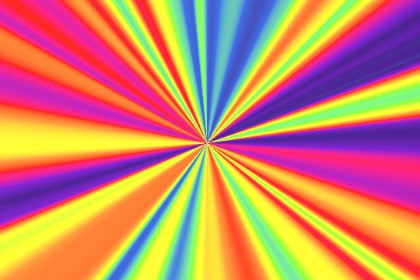
Turn any surface into living, animated color. Now with shaped patterns, transparency, and soft edge fades. No code, no UV setup.This shader was built for use in URP environments - use of this shader outside of URP may result in unexpected outcomes. Bring your materials to life with animated color that flows, pulses, and swirls across any surface. Whether you are building a neon stylized world, a trippy VFX accent, a magic energy field, or a glowing water plane, you can set it up in seconds.TieDye flows a gradient across your mesh, so you get endless color with full control over how it moves. Send it along X, Y, Z, XZ, or straight out from the center, then layer in flow distortion, noise, and emission until it feels right. No texture hunting. No UV headaches. No code.New in 1.2: TieDye Shapes. Turn the dye into crisp, concentric shapes, like a heart nested inside hearts, that grow outward or shrink inward. Choose from 16 shapes: Heart, Circle, Rounded Square, Diamond, Triangle, Hexagon, Polygon, Star, Sparkle, Flower, Daisy, Clover, Gear, Cross, Drop, or your own. Dial in 3 to 16 points or petals, sharpen them into sparkles or soften them into blossoms, and keep the bands crisp or melt them into smooth gradients. Color them with a palette of up to 4 colors or any gradient texture.Tile it. Repeat your shape in grids of up to 32 × 32, stagger the rows like bricks, make neighbors grow and shrink in a checkerboard, or knock every cell out of sync for a living, pulsing pattern.Wrap it seamlessly. Spherical mode wraps spheres and rounded meshes with no seam at all. Per-face projection keeps hard-surface models crisp, and UV mode is perfect for quads and planes.Use your own art. The new Shape Profile Baker turns any image silhouette (a sprite, an icon, a logo) into a custom TieDye shape in a couple of clicks.Put it in your UI. TieDye Shapes UI brings the same animated bands to Canvas Images for menus, panels, and title screens.Make your own gradients. The built-in Gradient Texture Generator lets you mix custom palettes right inside Unity.TieDye - Fades: fade it out. Flip any material to transparent and choose how it disappears. Radial fade is built for flat surfaces like planes, decals, and particle cards. Fresnel fade is built for round, solid shapes like spheres and capsules. Fade toward the edges or toward the center, whichever the shot needs. Emission now glows with Bloom and fades right along with the surface.TieDye Patterns: shape the flow. Bend the flowing dye into six pattern shapes: Spiral, Diamond, Concentric, Diagonal, Warp, and Wave, plus None for pure flow. Patterns project per face, so a spiral on a cube gives every face its own swirl instead of one big spiral wrapped around the whole shape. Slide the pattern center where you want it for off-center sunbursts, tile it tighter or looser, and sharpen each face for hard surfaces or soften it on spheres and capsules.The result is materials that feel handcrafted and alive, and you never touch a line of code.Great for:Stylized environments and world-buildingMagic effects, energy shields, and portalsAbstract backgrounds and motion artAnimated UI backgrounds, menus, and title screensRetro, groovy, and pop-art looksLiquid, lava, plasma, and water surfacesTransparent water, glass, and fading dissolvesTie-dye, holographic, and iridescent looksVFX accents, decals, and animated UI elementsFour shaders: TieDye - Fades, TieDye Patterns, TieDye Shapes, and TieDye Shapes UITieDye Shapes: 16 shapes with adjustable points or petals (3 to 16) and depthConcentric shape bands that grow or shrink, with crisp or soft edgesTwo band styles: Scaled Copies and Offset OutlinesPalette (up to 4 colors) or gradient-texture coloringGrids up to 32 × 32 with row stagger, alternating direction, and per-cell timingSeamless Spherical mapping, per-face Object projection, or UV mappingShape Profile Baker: create custom shapes from your own imagesTieDye Shapes UI for Canvas Images (respects Image color and sprite alpha)TieDye Shapes uses no shader keywords: change any setting at runtime with no variant hitchesSix flow pattern shapes: Spiral, Diamond, Concentric, Diagonal, Warp, and Wave, plus None for pure flowPer-face pattern projection, so shapes sit correctly on every face of a meshPattern controls for sharpness, tiling, and a movable centerProcedural gradient flow along X, Y, Z, XZ, and Radial axesSmooth, seamless flow at any speed or scaleEven, uniform color bands across the surfaceTransparency support with a per-material Opaque or Transparent switchEdge fading in two styles, Radial and Fresnel, each fading toward the edge or the centerTrue emission that works with Bloom and fades with transparent surfacesBuilt-in Gradient Texture Generator, no external textures neededFlow system with speed, strength, and an on/off toggleNoise distortion with strength and scale controlsEmission, metallic, and smoothness supportContext-aware custom inspectors with tooltips on every controlPrecompiled shader variants included to cut first-use load hitches40+ ready-to-use example materials and 15 gradient texturesTwo demo scenes and a Quick Start guide for fast setupFull URP support, built for Unity 6.3 LTSBeginner friendlyAI was used to create helper scripts (custom inspectors, Gradient Texture Generator, Shape Profile Baker), the TieDye Shapes shader code and graphs, fixes to the existing shader graphs, documentation drafts, and the demo video. The TieDye - Fades and TieDye Patterns shader graphs, concept, design, and creative direction are human created. All AI-assisted work was reviewed, tested, and tuned by the creator. All tools created by Sparks of Humanity require a human user to produce assets - we do not replace creatives, we enhance them.