






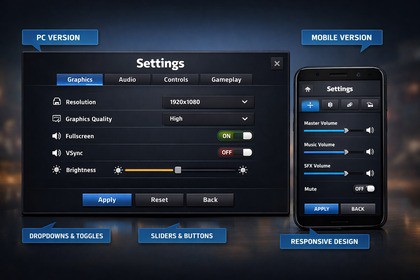
Unity Settings Menu with presets, localization, key rebinding, accessibility, audio preview, and safe resolution apply.This package provides a, production‑ready Settings Menu system for Unity. It covers graphics, audio, controls, gameplay, and localization in a single, easy‑to‑integrate solution, designed to look and behave like a game settings screen. All options are fully interactive, saved automatically, and can be applied instantly at runtime.Key FeaturesGraphics: Resolution, refresh rate, fullscreen, VSync, quality levels, anti‑aliasing, shadow quality, shadow distance, gamma, contrast, FPS limit.Safe Resolution Apply: Confirmation panel with countdown and automatic revert if the user does not confirm.Audio: Master/Music/SFX sliders, mute toggle, AudioMixer support.Audio Preview: Play test clips for Master/Music/SFX directly from UI.Controls: Mouse/touch sensitivity, invert X/Y.Key Bindings: Rebind keys at runtime with UI buttons, save and restore defaults.Input System Support: Works with Legacy Input and Unity’s New Input System.Localization: JSON‑driven localization with a simple key system.Presets: Built‑in profiles (Low/Medium/High/Ultra) plus custom user presets saved to JSON.Profiles: Save/load full settings to file for portability.Accessibility: Text scaling and URP color‑blind filters.Demo Tools: FPS counter and quality visualizer for showcasing settings impact.Included ScriptsGameSettingsManager.cs – Main controller for all settings and UI.SettingsData.cs – Serializable settings container.SettingsPresetLibrary.cs – Loads preset JSON files.LocalizationManager.cs – JSON localization system.LocalizedText.cs – Attach to TMP texts for localization.KeybindManager.cs + KeybindUI.cs – Runtime key rebinding.AccessibilityManager.cs – Text scale + color‑blind filters.AudioPreviewPlayer.cs – Audio preview buttons.Demo utilities: FPSDisplay, DemoQualityVisualizer, TestPlayerController.Easy SetupDrop GameSettingsManager into a scene.Hook up UI fields in the inspector.(Optional) Assign AudioMixer, URP Volume, and presets.Press Play and test immediately.This package is suitable for both indie and professional projects and provides a clean starting point that you can expand or reskin for your game’s style.Unity Version: 2021.3 or newerPlatforms: PC (Windows/Mac/Linux), Mobile (iOS/Android)Render Pipelines:Built‑in pipeline supported out of the boxURP supported (optional features: Bloom/MotionBlur/Gamma/Contrast + Color‑Blind Filters)Input SupportLegacy Input Manager supported by defaultNew Input System supported via #if ENABLE_INPUT_SYSTEMKey rebinding uses InputActionReference when the new Input System is enabledData StoragePlayerPrefs for all runtime settingsJSON for presets and profilesPresets in Resources/SettingsPresets/*.jsonCustom presets in persistentDataPath/SettingsPresetsUser profile saved as settings_profile.jsonAudio SystemWorks with AudioMixer (Master, Music, SFX groups)Mixer parameters must be exposed and named to match:MasterVolume, MusicVolume, SFXVolumeAudioPreviewPlayer supports playback routed through mixer groupsGraphics SettingsResolution / Refresh Rate (PC only)Fullscreen / VSyncQuality levelsAnti‑AliasingShadow Quality (dropdown)Shadow DistanceGamma / Contrast (URP optional)FPS LimitSafe Apply for ResolutionConfirmation panel with countdownAuto‑revert if not confirmedConfigurable timeoutLocalizationJSON‑driven localization (Resources/Localization.json)LocalizedText component updates all TMP texts by keyLanguage selection saved in PlayerPrefsAccessibilityText scaling via sliderOptional color‑blind filters (URP Channel Mixer)Key BindingsRuntime rebinding through UI buttonsDefault bindings + save to PlayerPrefsReset to defaults supportedDemo ToolsFPSDisplay for on‑screen FPSDemoQualityVisualizer for showcasing quality changesDependenciesTextMeshPro (built‑in Unity package)Optional: Unity Input System packageCode StructureScripts organized into folders:Scripts/CoreScripts/LocalizationScripts/InputScripts/AccessibilityScripts/AudioScripts/UIScripts/Demo

