






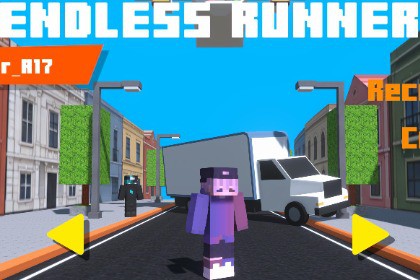
Modular endless runner framework for Unity with lane movement, jumping, sliding, procedural voxel animation, mobile support, character skins, and shader-based visual effects.This asset is authored exclusively for the Universal Render Pipeline (URP) and uses URP-specific shaders. Built-in Render Pipeline and HDRP are not supported.Demo WebGL Itchio: itch.ioBuild Endless Runner Games FasterVoxel Run is a modular endless runner framework for Unity designed to provide a clean and extensible foundation for developers building 3D endless runner games.It includes the essential gameplay systems for automatic forward movement, lane switching, jumping, sliding, double jumping, obstacle interaction, power-ups, coins, procedural voxel animation, character customization, and infinite environments.The framework is designed to be expanded and customized rather than being a complete game ready to publish.Core Runner FeaturesMovement SystemAutomatic forward movementLane-based horizontal movementJump mechanicSlide mechanicDouble jump supportGround detectionObstacle collision handlingInspector-based movement configurationThe controller is specifically designed for endless runner gameplay and is not intended to function as a free-roam 3D character controller.Character SystemVoxel Run includes a modular character system with interchangeable character skins.Features include:20 included character skinsRuntime skin switchingCustom skin supportModular voxel body structureProcedural animationNo Animator Controller requiredNo Humanoid rig requiredCharacters can be visually replaced while keeping the gameplay and movement systems independent.Procedural Voxel AnimationThe character animation system is code-driven and does not rely on traditional animation clips or an Animator Controller.This provides:Lightweight runtime animationModular body-part animationEasy character replacementReduced animation setupSupport for custom voxel charactersShader-Based Visual EffectsVersion 4.0.0 introduces a shader-based visual effect system that adds a visual rendering effect to the runner environment.The effect is handled through shaders rather than CPU-based deformation, providing a lightweight visual approach while keeping the gameplay physics independent from the visual effect.The shader effect is optional and can be configured according to the needs of your project.Power-Up SystemThe framework includes example power-up implementations:ShieldMagnetPlaneDouble CoinsSpeed BoostPower-ups are handled through a modular system and can be expanded with additional types.Example Gameplay SystemsThe package includes optional example systems for:Coin collectionCoin magnet effectDifficulty progressionPower-upsInfinite groundObstacle spawningCar obstaclesCamera shakeAudio poolingObject poolingGame managementCharacter skinsThese systems are modular and can be modified or removed independently.Developer-Focused ArchitectureVoxel Run is structured around modular and event-driven systems.The architecture includes:Modular C# systemsEvent-driven communicationInspector-configurable parametersDecoupled gameplay modulesObject poolingScriptable configuration where applicableOrganized project structureThis allows developers to extend gameplay without having to modify the core movement system for every new mechanic.Mobile SupportVoxel Run includes mobile-oriented architecture and touch/swipe input support.The package can be configured for Android and iOS projects.Performance will depend on the complexity of the project, visual assets, lighting, effects, target hardware, and project-specific modifications.A mobile optimization guide is included with recommendations for:URP configurationQuality settingsTexture configurationAudio optimizationSpawn balancingBuild settingsPerformance profilingIncludedEndless Runner ControllerLane Switching SystemJump SystemSlide SystemDouble Jump SystemProcedural Voxel AnimationCharacter Skin SystemCharacter SkinsCoin SystemPower-Up SystemDifficulty SystemInfinite Ground SystemObject PoolingAudio PoolingCamera Shake SystemShader-Based Visual EffectExample Demo SceneMobile Optimization GuideDocumentationQuick SetupVoxel Run is not a one-click game ready for publishing.A small initial configuration is required, including project settings, tags, layers, player configuration, and scene setup.The included documentation provides a step-by-step installation and configuration guide.The included example scene can be used to verify the framework before customizing the systems for your own project.Supported Unity VersionsUnity 6 LTSInputUnity Input SystemKeyboard inputTouch/swipe input for mobileRender PipelineUniversal Render Pipeline (URP)Shader-based visual effectsCustom shader included for the visual effectThe asset is authored for URP. Built-in Render Pipeline and HDRP compatibility should be verified according to the materials and shaders included in the package.ArchitectureModular C# architectureEvent-driven systemsInspector-configurable systemsDecoupled gameplay modulesObject poolingCoroutine-based timed systemsState-based player behaviorMain ComponentsPlayerControllerGameManagerDifficultyManagerObstacleSpawnerInfiniteGroundManagerPowerUpManagerAudioManagerItemsCameraShakeManagerCurvedWorldControllerSkin SystemCharacter SystemModular voxel character structureProcedural animationRuntime skin switching20 included character skinsCustom skin supportNo Animator Controller requiredNo Humanoid rig requiredNo animation clips required for procedural character animationMovementAutomatic forward movementConfigurable lane distanceLane switchingJumpDouble jumpSlideGround detectionObstacle collision handlingPower-Ups5 example power-up types:ShieldMagnetPlaneDouble CoinsSpeed BoostOptimizationObject poolingPooled audioLightweight procedural animationReduced runtime allocationsShader-based visual effectsMobile optimization recommendationsIncluded DocumentationQuick Start GuideSetup GuideCustomization GuideExtensibility GuideMobile Optimization GuideTroubleshooting GuideScripts ReferenceTarget PlatformsWindowsmacOSLinuxAndroidiOSDependenciesUnity 6 LTS or newerUnity Input SystemTextMeshProUniversal Render Pipeline recommendedPackage StructureScriptsCoreGameplaySpawningAudioEffectsUIUtilsShadersPrefabsMaterialsTexturesAudioScenesDocumentation

