






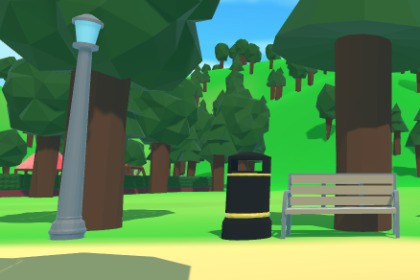
This is a Low Poly Video Game Asset pack. The theme of this pack is a park and contains multiple objects along with the LOD Component already attached to the prefabs.This pack contains the following 22 objects:Park BenchPicnic BenchBlack BinSquare BinFountain - This object is Modular. There are multiple different centrepieces and centrepiece bases you can choose from and they are all children of the main object and placed in the correct place - No need to mess about with the transform.GazeboJungleGymLampposts - This object is modular. You can choose from two different lamp heads - one being round and one being square. Lighting will need to be added manually.Metal SlidePotted Bush - LongPotted Bush - CornerRoundaboutSand Pit - This object also comes with a couple of buckets and sand castles.Wooden Sign - This object comes with 3 different sign designs connected to a central post. These have the origin in the middle of the post so you can just rotate them, duplicate them and position them as needed. They also have a text component already added and sized for your directions!Swing - This model includes two models. One of them has a armature connected to the ropes of the swing and one does not. For simple animations you can use the none-armature model. The armature model has a bone structure you can edit and the ropes will bend with the armature when edited.Tree 1 - Resembling a Pine Tree.Tree 2 - Resembling an Oak.A few of these objects have been designed with the idea of modular parts so you don't have to choose from just one design. Everybody has differet tastes, so i've tried to accomodate as many as I can!Even modular objects like the Lamp-posts have got LOD settings attached and will switch out to a lower poly model when the correct distance is reached.Each object contains the LOD component and they have been set to (mostly) the default settings. The bounds of the LOD objects have also been calculated so you don't need to do that. Feel free to tweak theses as necessary. They all use the Crossfade Animation transition by default.Objects are set up with central pivot points for easy editing. For example - The sign post has a central pivot point allowing you to rotate them around the center so they are always connected to the post in the middle. You can rotate and move them up and down as you see fit and they also have a Text object attached so you can edit the directions easily.These objects do not work well with texturing. Using a hyper realistic texture will not produce good results as this is not something i was taking into account as the art style is Low Poly and Simple. Feel free to drag and drop your own coloured materials onto the objects to change them as you see fit.Lamps will need to have their lights attached manually and you'll need to set up the light layers so they do not interact with the post and housing etc. I wasn't able to find a way of being able to import them with their lights set up that would work on all machines with layers etc. If i set up certain layers, they will not import the way i plan them to and it means the lights will ignore whatever you have set up on that specific layer. This could be Enemies as an example so they will not be effected by the lights- if someone knows how to do this, let me know! i'll update the pack!Objects do not have hotboxes attached - I did attach a bunch at first, but I figured if people were using them as decorations they might want them set up differently to have any at all - so i kept them out so you don't need to go through and remove them all.You can simply drag and drop preabs into the world to use them and you'll find the LOD component in the root of the object hierarchy.The total poly count of all objects comes up to the following:LOD0:Vertices = 9,400Triangles = 15,539LOD1:Vertices = 4740Triangles = 7540LOD2:Vertices = 2,209Triangles = 3,777You will find a README file in the root of the Unity pack that breaks down every object in detail.

