






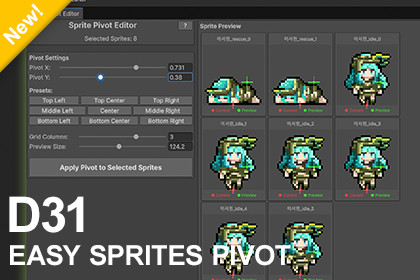
super easy set pivots of single and multiple sprites in Unity🎯 EASY SPRITES PIVOTQuick & Intuitive Sprite Pivot Editor for Unity════════════════════════════════════════Batch-edit sprite pivots with real-time visual preview.Perfect for game developers who need speed and accuracy!────────────────────────────────────────✨ KEY FEATURES📦 Batch Processing• Edit multiple sprites simultaneously• Works with single sprites and sprite sheets• Handles different sprite sizes in one go👁️ Visual Preview• 🔴 Red crosshair = Current pivot• 🟢 Green crosshair = New pivot (preview)• Real-time updates as you adjust• Maintains sprite aspect ratios🎯 Easy Controls• X/Y sliders (0-1 normalized values)• 9 preset buttons: Top/Middle/Bottom + Left/Center/Right• Adjustable grid layout (1-4 columns)• Preview size control (60-200px)⚡ Professional• Uses latest Unity Sprite Editor API• Preview-before-apply workflow• Success/failure reporting• All Unity image formats supported──────────────────────────────────────🚀 HOW IT WORKS1️⃣ SELECT sprites in Project window2️⃣ ADJUST pivot with sliders or presets3️⃣ PREVIEW with visual gizmos4️⃣ APPLY to saveThat's it!───────────────────────────────📦 WHAT'S INCLUDED• Main Editor Window• Multi-Language Help System• Complete Documentation (EN/KR/JP)• 🎬 Video Tutorials (on Asset Store page)─────────────────────────────Transform your sprite workflow today! 🚀══════════════════════════════━━━━━━━━━━━━━━━━━━━━━━━━━━━━━━━━━━━━━━━━━━━━━━━━━━━━━━━━🔧 TECHNICAL DETAILS━━━━━━━━━━━━━━━━━━━━━━━━━━━━━━━━━━━━━━━━━━━━━━━━━━━━━━━━📋 RequirementsUnity 2020.3 or higherUnityEditor.U2D.Sprites namespaceWrite access to Assets folder━━━━━━━━━━━━━━━━━━━━━━━━━━━━🎨 Supported FormatsSingle sprite modeMultiple sprite mode (sprite sheets)PNG, JPG, TGA, PSD, TIFF, etc.━━━━━━━━━━━━━━━━━━━━━━━━━━━━━⚙️ Core ComponentsSpritePivotEditorWindow.cs - Main editor windowSpritePivotEditorHelpWindow.cs - Help systemDocumentation.txt - User guideTotal size: ~100 KB━━━━━━━━━━━━━━━━━━━━━━━━━━━━🔌 Unity APIs UsedISpriteEditorDataProvider - Sprite data accessSpriteDataProviderFactories - Data provider creationTextureImporter - Apply pivot changesEditorGUI/EditorGUILayout - UI rendering━━━━━━━━━━━━━━━━━━━━━━━━━━━━📊 Pivot SystemFormat: Vector2 (normalized 0-1 values)X: 0=Left, 0.5=Center, 1=RightY: 0=Bottom, 0.5=Center, 1=Top━━━━━━━━━━━━━━━━━━━━━━━━━━━✅ CompatibilityUnity 2020.3 LTS ✓Unity 2021.3 LTS ✓Unity 2022.3 LTS ✓Unity 6000.0 LTS ✓Works with Built-in, URP, HDRP━━━━━━━━━━━━━━━━━━━━━━━━━━━📦 InstallationImport package → Open Tools > Easy Sprites Pivot━━━━━━━━━━━━━━━━━━━━━━━━━━━━AI/ML Usage in Package Creation Process:This package was developed with the assistance of GitHub Copilot, an AI-powered code completion tool. The development process involved:1. Code Generation: GitHub Copilot was used to assist in writing C# code for the editor windows, UI components, and sprite manipulation logic.2. Documentation: AI assistance was used to help create multi-language documentation (English, Korean, Japanese) and in-editor help system content.3. Code Structure: AI suggestions helped establish the overall architecture and implementation patterns following Unity's best practices.4. Developer Oversight: All AI-generated code was thoroughly reviewed, tested, and validated by a human developer. The developer made necessary modifications, bug fixes, and ensured code quality, security, and proper functionality.5. Quality Assurance: Manual testing was performed on multiple Unity versions (2020.3 LTS, 2021.3 LTS, 2022.3 LTS) to ensure compatibility and reliability.The final product represents a collaboration between AI assistance and human expertise, with the developer maintaining full responsibility for code quality, functionality, and user experience.No AI/ML models are included in the package itself. The tool is a standard Unity Editor extension that does not collect data or use any runtime AI features.

