





Quick Editor Pro - Focus OS for Unity
Jahn Star Games
$7.99
$15.00
47%OFF
(no ratings)
Jump AssetStore
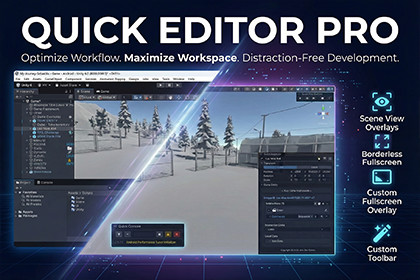
Single-monitor survival kit: Turn Inspector, Hierarchy, and Console into transparent Scene View overlays for a true borderless workflow.Version Specific Packages: This asset provides dedicated packages for Unity 2022 and Unity 6 to ensure peak performance and stability. If you are upgrading your project from Unity 2022 to Unity 6, you must re-download the asset from the Package Manager to get the correct version. Using the 2022 version in Unity 6 will lead to UI inconsistencies.Stop fighting with cramped Unity windows. Transform your Unity Editor into a distraction-free powerhouse designed specifically for laptop developers and single-monitor setups.Compatibility:Windows: Unity 2022 LTS & Unity 6+ (Full Support).Mac/Linux: Unity 6+ Only.Note: Fullscreen/Borderless features are Windows-exclusive.KEY FEATURES:Scene View Overlays: Access Console, Inspector, Hierarchy, and Play controls without leaving Scene View.Borderless & Fullscreen Mode: Eliminate window borders and maximize workspace (F11 and Alt+F11).Zen Mode Toolbar: Hide Unity's default toolbar (Ctrl+Shift+T) for a cleaner, modern UI experience.Flexible Layouts: Maximize Mode for immersive Level Design; Compact Mode for coding while keeping essential Unity tools visible.QUICK INSPECTOR:Edit & Focus: Edit selected objects and instantly focus on transforms with the dedicated Focus button.Inspector Lock: Lock specific GameObjects to keep their properties visible while navigating the scene.Dynamic Refresh: Real-time updates when adding or hiding components.Fluid Workflow: Full functionality without switching windows or losing focus.QUICK HIERARCHY:Favorites Section: Pin your most-used GameObjects for instant access in complex scenes.Enhanced Navigation: Navigate scene hierarchy efficiently with full drag-and-drop support.Optimized Performance: Smooth interaction even in heavy scenes.QUICK PLAY BUTTONS:Control Center: Play, Pause, and Step controls with a quick access menu directly in your workspace.Perfect for developers who want maximum screen real estate and a streamlined workflow. Develop games in true fullscreen without sacrificing functionality.SHORTCUTS:F11: Borderless ModeAlt+F11: Fullscreen ModeCtrl+Shift+T: Toggle ToolbarCtrl+Shift+Alt+R: Reset LayoutFour customizable Scene View overlays including Console, Inspector, Hierarchy and Play Controls. Borderless and fullscreen modes with F11 shortcut for maximum workspace utilization. Custom toolbar system with toggle capability via Ctrl+Shift+T. Drag-and-drop hierarchy editing within overlay with section header support using # hashtag prefix for visual organization. Real-time log filtering and script navigation from Console overlay. Component-based Inspector with expand/collapse states and local/global transform editing. Click-to-cycle header displaying asset name, company name or product name. Complete keyboard shortcut system for rapid workflow control. EditorPrefs-based preference persistence across sessions. One-click reset to default configuration via Ctrl+Shift+Alt+R.

