






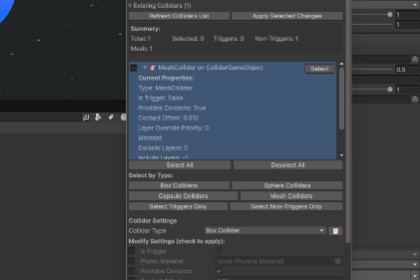
One-click collider management for complex scenes: batch add/edit/replace/remove with highlights, filters, and summaries.Collider Manager Tool provides a centralized, visual workflow for managing colliders directly inside the Unity Editor.Instead of manually adding and tweaking colliders one object at a time, this tool allows you to:Apply collider changes in bulkReplace existing colliders with different typesSelectively modify only the properties you wantAutomatically size colliders based on mesh boundsAnalyze collider usage across entire hierarchiesThe tool is non-destructive, fully Undo-safe, and designed to work with both static and dynamic objects. It intelligently handles Unity’s physics constraints, such as enforcing convex MeshCollider rules when triggers are enabled.This package is suitable for any genre, including:Open-world gamesSci-fi and space environmentsFirst-person and third-person gamesMobile and PC projectsLarge imported asset packsNo runtime scripts are included — this is a pure Editor tool with zero impact on builds.Key Features✅ Add colliders to multiple GameObjects at once✅ Edit existing colliders across entire hierarchies✅ Replace colliders with different collider types✅ Supports:BoxColliderSphereColliderCapsuleColliderMeshCollider✅ Selective property editing via per-setting toggles✅ Auto-fit colliders to mesh bounds✅ Safe MeshCollider handling (convex + trigger validation)✅ Batch remove all colliders from selected objects✅ Collider analysis with detailed summaries✅ Visual highlighting of selected objects and children✅ Per-collider replacement selection✅ Sync settings from existing colliders✅ Full Undo / Redo support✅ Works with inactive objects✅ Editor-only (no runtime overhead)CompatibilityUnity 2021 LTS and newerWorks with Built-in, URP, and HDRPNo third-party dependencies

