






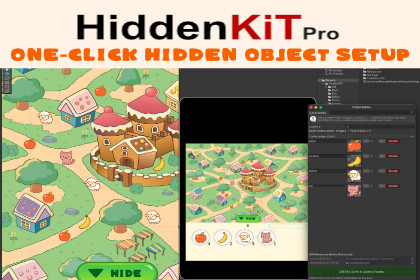
HiddenKIT Pro is an all-in-one toolkit for fast Hidden Object level creation in Unity, featuring one-click setup, scene validation, and designer-friendly tools for rapid iteration.ToolKIT Pro is a lightweight yet powerful toolkit for creating Hidden Object–style games in Unity, designed to drastically reduce setup time and eliminate repetitive manual work.With smart editor tools, automated object setup, and built-in validation, you can go from an empty scene to a fully playable level in minutes — not hours.🚀 Faster Level Setup, Less Manual WorkHiddenObjectKIT provides a designer-friendly workflow where most of the heavy lifting happens automatically:One-click generation of hidden objects directly in the sceneAutomatic slot assignment and object referencesGuided setup via a clear step-by-step checklistScene validation that detects common issues and attempts to fix themThe result is a clean, consistent level structure that’s easy to iterate on and hard to break.🧠 Smart Systems Built InBeyond editor tools, the kit includes everything needed to manage game state reliably:Automatic tracking of collectible objectsUnique ID assignment for all interactable itemsResources fallbackJSON-based save & load systemPersistent Data PathBuilt-in lives system (current / max lives)Object visibility and interaction state managementAll systems are modular, extendable, and designed to fit into existing projects with minimal friction.🎨 Designer-Friendly by DefaultHiddenObjectKIT is built with designers in mind:No complex setup or manual wiringClear editor windows and toolingEasy level data generation and updatesSafe iteration without breaking scenesPerfect for teams where designers and developers need to move fast together.📱 Cross-Platform ReadyDesigned for fast integration and smooth deployment on:PCmacOSAndroidiOSWebGL DemoOne codebase, consistent behavior across platforms.✨ Key FeaturesModular and extendable architectureOne-click hidden object setupAutomatic object tracking and slot assignmentScene validator with auto-fix supportStep-by-step setup checklistJSON save/load systemBuilt-in lives systemMobile & desktop compatibleClean namespace structure: mantis3de.HiddenObjectKITCollectible Object Tracking SystemAutomatically detects and manages all collectible objects in the scene using unique identifiers. This enables precise control over object visibility, state changes, and player interactions without manual registration.JSON-Based Save / Load SystemIncludes a complete JSON serialization layer for saving and loading:Collectible object statesPlayer livesLevel progressData is stored using Unity’s persistent data path, with an automatic Resources fallback for default or missing data.Editor IntegrationBuilt-in editor tools allow designers to:Generate default level dataExport the current scene configuration to JSONUpdate existing level data without writing codeThis significantly reduces setup time and iteration cost.Visibility & State ManagementEach collectible object maintains a persistent visibility state that is:Saved automaticallyRestored at runtimeApplied consistently across sessionsThis enables true hidden-object discovery progression.Lives SystemIncludes a modular lives component with:Configurable maximum and current life valuesAutomatic synchronization with saved dataEasy extension or replacement if neededModular ArchitectureAll systems are structured as independent, extendable modules under the namespace: mantis3de.HiddenObjectKITThis ensures clean integration, easy customization, and minimal coupling with project-specific code.Scene Auto-ScanningAt runtime, the framework scans the active scene for all registered collectible objects, ensuring that newly added or modified items are automatically included without additional configuration steps.Touch & Mouse CompatibilityInput handling works out of the box with:Touch input (mobile platforms)Mouse input (desktop platforms)Making the kit suitable for cross-platform search-and-find games.Editor-Safe DefaultsThe system automatically:Generates missing folders (e.g., Resources)Creates missing data filesRestores missing fields to safe default valuesThis prevents common runtime and editor errors during setup and iteration.Full C# Source CodeIncludes complete, clean, and readable C# source code with:Clear separation between runtime systems and editor toolingNo black boxes or locked logicFull flexibility for extension or customizationMost images included in this package were generated using AI tools and manually edited for use.

