






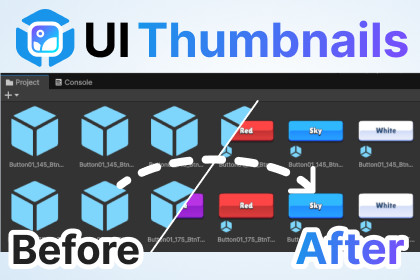
Replaces standard Prefab icons with real-time snapshots of your UI elements, allowing you to find the exact asset you need at a single glance without interrupting your workflow.👋 Say Goodbye to Generic Blue Cubes!Are you tired of searching through dozens of identical default Prefab icons just to find one specific button or popup?UI Thumbnails creates a visual workflow for your User Interface assets. It automatically generates high-quality preview images for your UI Prefabs directly in the Project View, allowing you to identify your assets at a single glance.✨ Key Features👁️ Instant Visual Identification See exactly what your UI looks like without opening the Prefab or adding it to the scene. Distinguish between different button styles, panels, and icons instantly.⚡ Fully Automatic Just work as usual. When you create, save, or modify a UI Prefab, the icon is updated automatically in the background. No manual clicks required.✨ Particle System Support UI Thumbnails simulates particle systems before capturing, ensuring your VFX, sparkles, and glowing UI elements are fully visible.🛡️ Zero Project Clutter (VCS Friendly) We know how important a clean project is.Thumbnails are stored in Unity’s local Library cache.No extra image files are added to your Assets folder.No conflict with Git, SVN, or PlasticSCM.Each team member generates their own local cache automatically.🚀 Optimized Performance Generation happens during Editor idle times to ensure your workflow remains smooth and uninterrupted.🛠️ How It WorksImport the asset.Enjoy! Technical RequirementsRoot RectTransform Required: To be identified as a UI element, your Prefab must have a RectTransform component on its Root object. Prefabs with a standard Transform at the root (even if they have UI children) are ignored to preserve your 3D asset icons.Documentationhttps://docs.google.com/document/d/1IrKl_uRSEIMPkgBJwZX2zJj0NWs3G4uV0lMZ0hxCAhsCoding Assistant

