






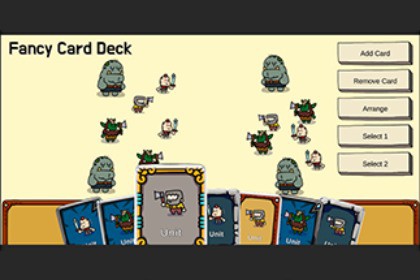
Fancy Card Deck UI. Great for TCG, RPG or any other game with card deck.StudioNAP FancyHorizontalLayout================================Description-----------FancyHorizontalLayout is a Unity UI component that creates a card-based horizontal layout similar to Hearthstone's hand. It provides smooth animations and interactive hover effects for arranging UI elements in a fan-like display.Key Features-----------1. Card Hover Effects - Cards automatically scale up and move upward when hovered - Neighboring cards shift sideways to make room - Smooth, configurable animations2. Fan Rotation Effect (Optional) - Cards can be arranged in a fan shape with rotation - Center cards remain straight (0 degrees) - Edge cards rotate based on distance from center - Creates a natural card-in-hand appearance3. Automatic Layout Management - Automatically arranges child RectTransforms horizontally - Handles dynamic card addition and removal - Adjusts layout in real-time4. Customizable Settings - Spacing and padding controls - Hover scale and offset configuration - Rotation angle and fan Y-offset adjustments - Animation duration controlHow to Use----------1. Click right mouse button and select Studio NAP/Fancy Deck.or1. Create an empty GameObject with a RectTransform component in your Canvas.2. Add the FancyHorizontalLayout component to the GameObject.3. Add child GameObjects (cards) as children of the FancyHorizontalLayout GameObject.4. Configure the layout settings in the Inspector: - Spacing: Distance between cards - HorizontalPadding: Left and right padding - HoverScale: Scale multiplier for hovered cards - HoverOffsetY: Vertical offset for hovered cards - NeighborOffsetX: Horizontal offset for neighboring cards when one is hovered - EnableFanRotation: Toggle fan rotation effect on/off - MaxRotationAngle: Maximum rotation angle for edge cards - FanYOffset: Y-offset for fan effect (cards get lower towards edges) - AnimationDuration: Animation speed in seconds5. Make sure your Canvas has a GraphicRaycaster component for hover detection.6. Cards will automatically arrange and animate when hovered.Programmatic Usage------------------You can also add cards programmatically:```csharpFancyHorizontalLayout layout = GetComponent();GameObject newCard = // your card GameObjectlayout.AddCard(newCard);```To set a selected card programmatically:```csharplayout.SetSelectedCard(cardRectTransform);```System Requirements------------------ Unity 2019.4 or higher- UI Canvas system (Unity UI)- EventSystem in the scene for hover detectionImportant Notes-------------- Child objects must have RectTransform components- A GraphicRaycaster component is required in the Canvas hierarchy for hover detection- Cards are automatically sorted based on hover state to prevent z-ordering issues- The component uses unscaled delta time for animations (works with pause)Support-------If you encounter any issues or need additional support, please use the contact feature on the Asset Store page.Version Information------------------ Current Version: 1.0.0- Last Updated: December 2025Key Features-----------1. Card Hover Effects- Cards automatically scale up and move upward when hovered- Neighboring cards shift sideways to make room- Smooth, configurable animations2. Fan Rotation Effect (Optional)- Cards can be arranged in a fan shape with rotation- Center cards remain straight (0 degrees)- Edge cards rotate based on distance from center- Creates a natural card-in-hand appearance3. Automatic Layout Management- Automatically arranges child RectTransforms horizontally- Handles dynamic card addition and removal- Adjusts layout in real-time4. Customizable Settings- Spacing and padding controls- Hover scale and offset configuration- Rotation angle and fan Y-offset adjustments- Animation duration control

