






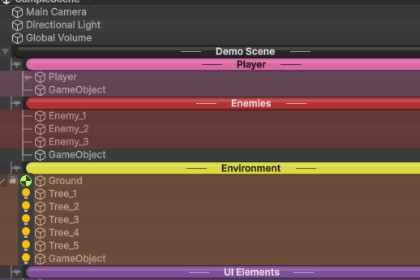
Organize your Unity hierarchy with colors, separators, icons, favorites, search, and bookmarks. Find any object instantly. Zero runtime overhead. Works with all render pipelines. Hierarchy Pro Lite is 100% render pipeline agnostic because 1. Editor-Only Code - All scripts are in Editor folders, meaning zero runtime overhead and no interference with rendering 2. No Shaders - Uses only Unity's built-in EditorGUI/GUI drawing methods 3. No Materials 4. No Runtime Components - The HierarchyLabel component stores data only; it doesn't render anythingHierarchy Pro Lite is an editor productivity tool, not game content. It enhances Unity's Hierarchy window to help you organize and navigate scenes faster. Is it customizable? Yes, fully: - Create your own color rules (by name, tag, layer, component) - Define custom icon mappings - Choose from 4 separator styles - 3 view modes (Default, Professional, Minimal) - Save/load presets for different workflows - Per-object overrides via HierarchyLabel component - Import/export settings as JSON for team sharing Genre/project suitability: Works with any project type: - 2D or 3D games - VR/AR applications - Architectural visualization - Simulations - Mobile, console, or PC - Any render pipeline (Built-in, URP, HDRP) Who benefits most: - Projects with 100+ scene objects - Teams needing consistent organization - Developers managing multiple scenes - Anyone tired of scrolling through cluttered hierarchies What it's NOT: - Not a runtime asset (no scripts in builds) - Not art, audio, or game content - Not tied to any specific genre or template Bottom line: If you use Unity's Hierarchy window, this tool makes it better—regardless of what you're building.● Key Features Visual Organization - Color-coded row backgrounds with automatic rules - 4 separator styles (Classic, Bubble, Underline, Left-Aligned) - Component icons with click-to-edit - Tree lines in Professional view mode - Prefab status indicators (overrides, variants, missing) - Zebra striping (alternating row colors) - Depth-based coloring (Rainbow, Gradient, Monochrome) Productivity Tools - Favorites system with persistent stars (F5) - Bookmarks with hotkeys (Ctrl+1-9) - Advanced search by name, tag, layer, component - Selection history navigation (Alt+Left/Right) - Batch rename with patterns ({name}, {index}, {parent}) - Object statistics (vertex/triangle counts) - Save/load view presets Quick Access - Alt+Click instant style popup - Visibility toggle (eye icon) - Lock toggle (padlock icon) - Child count, tag, and layer badges Configuration - Project Settings integration - JSON import/export for teams - Per-object control via HierarchyLabel component - 3 view modes (Default, Professional, Minimal) Performance - Tested with 5000+ objects - 0ms hierarchy repaint - Editor-only (zero runtime overhead) - All render pipelines supported

