






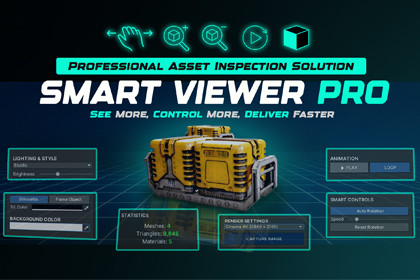
The ultimate professional suite to preview, inspect, and analyze 3D assets and animations instantly without leaving your workflow.📺 Watch Smart Viewer Pro in ActionSmart Viewer Pro is a fast and reliable inspection tool built to improve how you handle 3D assets in Unity. Whether you are a 3D artist, animator, or developer, this tool saves you time by providing a clean and high-quality preview window for your models and animations.Forget the hassle of dragging assets into the scene. With Selection Sync, you can simply click any asset in your project, and it shows up instantly in the viewer with all its technical details and lighting controls ready to use.🚀 Key Features:INSTANT INSPECTION: Click and preview any 3D asset instantly.SELECTION SYNC: Real-time synchronization between Project window and Viewer.ANIMATION MASTER: Dedicated playback controller with Play, Pause, and Loop support for clips.TECHNICAL SPECS: Live tracking of Polycount, Mesh data, and Material counts.URP & BUILT-IN READY: Native support for both pipelines with high-fidelity rendering.LIGHTING PRESETS: Multiple lighting setups to analyze your models in different environments.SILHOUETTE MODE: Advanced form analysis with a dedicated silhouette visualization.HI-RES CAPTURE: Take professional, clean screenshots of your assets with one click.🛠 Technical Compatibility:Supported Pipelines: Built-in & Universal Render Pipeline (URP).Unity Versions: 2022.3 LTS, and newer.Assets: Supports FBX, OBJ, and all Unity-supported 3D formats.Legal Disclaimer & Usage NotesNon-Destructive: Smart Viewer Pro is a previewing tool only. It will not modify, overwrite, or delete any of your original project assets.Image Capture Variation: Final image captures (Screenshots) may show slight variations in color saturation depending on your specific Project Settings (Gamma vs. Linear) and the active Render Pipeline.📖 Our Story: Built by Artists, for Artists"Smart Viewer Pro was born out of real production needs inside our studio. Our environment artists and technical developers frequently found themselves wasting hours on repetitive scene setups just to review models or animations. To solve this, our programming team developed this tool to streamline our internal workflow, bridging the gap between artistic creation and technical implementation. After seeing the massive boost in our studio's productivity, we decided to refine and share it with the Unity community."🌟 Check Out Our Other Workflow BoostersIf you found Smart Viewer Pro helpful, you might want to check out our other tools designed to keep your project clean and your workflow fast:Scene Fixer Pro: Your ultimate project cleaner. It features powerful Batch Renaming (Hierarchy & ProjectSmartSwap - Component Replacer: A powerful utility to swap multiple GameObjects or components instantly while keeping your scene settings intact.Smart Save Reminder: A lightweight, "life-saving" tool that ensures you never lose your progress with smart, non-intrusive save alerts.Key Features:Instant Preview: Seamlessly view 3D models and animations without scene placement.Intelligent Selection Sync: Real-time synchronization with the Unity Project.Animation Inspection: Integrated playback system with support for animation clips, looping, and play/pause controls.Mesh Analysis: Live display of technical data including, Triangle count, and Sub-mesh info.Material Tracking: Quickly identify the number of materials used per asset.Silhouette Visualization: Dedicated mode for checking model shapes and outlines.Environment Lighting: Built-in lighting presets to test asset reactions to different light setups.4K Snapshot Tool: Capture high-quality screenshots up to 4K resolution with the ability to choose your preferred saving location via a file browser.Pipeline Compatibility:Built-in Render Pipeline: Fully Supported.Universal Render Pipeline (URP): Fully Supported.Software Requirements:No External Dependencies: No additional plugins or third-party assets required.AI tools were used to assist with documentation, description, and minor syntax optimization. The core functionality, logic, and implementation of this package were developed, and finalized manually by the our development team.

