






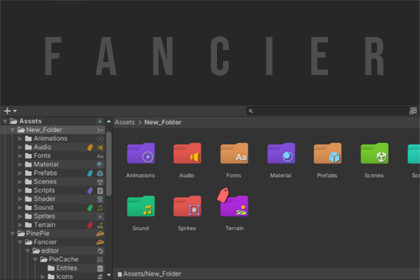
Fancier is powerful folder-enhancement tool that colorizes and customizes Unity’s Project Browser, adds smart icons and tags, and boosts workflow with quick organization.Colorized Project Browser — Make Your Unity Folders Instantly ClearA clean and friendly Project Browser upgrade for Unity creators who want their workspace to feel organized, colorful, and effortless to navigate.Bring visual clarity to your folders, highlight important assets, and streamline your workflow with smart icons, tags, shortcuts, and a fully customizable color/icon palette.🌟 Features🌈 Colorized FoldersGive any folder a clear visual identity with preset or custom colors.🗂️ Smart Folder IconsAssign icons manually or let the tool auto-detect the right icon based on folder name or content.🏷️ Asset TagsTag any asset with multiple tag types. Each tag has a tooltip so you instantly know what it means.📏 Indent Lines & Zebra StripesSubtle guides and alternating row shading make the Project tree easier to read—especially in large projects.⚡ Quick Grouping ShortcutsCtrl + G → Instantly group selected items into a new folderShift + G → Ungroup items back into their parentPerfect for quick cleanup and organization.🎛️ Customizable Icon & Color PopupAlt+Click any folder to open a clean palette where you can:Pick from preset colorsChoose built-in iconsAdd and use your own iconsAll neatly arranged and easy to navigate.💡 Fully Theme-FriendlyWorks beautifully in Light Theme and One-Column Mode without visual issues.Organize Faster. Work Happier.Your Project Browser becomes clear, colorful, and easy to read—so you can spend more time creating and less time searching.Tested on Unity 6.2.Compatible with PieTabs and Notes&DevLog.Built using UI Toolkit (Unity 2021.3+)Data stored in ScriptableObjects and Json for safety, persistence, and version controlFully editable source code includedSupports Light and Dark themesOptimized for One-Column Project BrowserUses lightweight editor-only utilities for minimal overhead

