






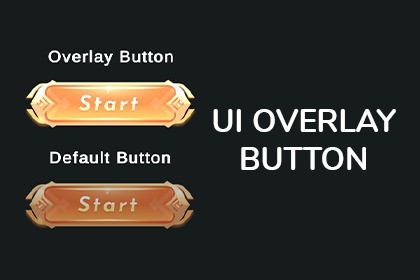
Create professional Photoshop-style Overlay Glow buttons in Unity. No sprite swapping needed—just pure, customizable, real-time blend modes.Level Up Your UI with Real-Time Overlay GlowSay goodbye to the boring, default Unity button and the old-school method of creating multiple sprites just to make a button shine.This asset brings the power of Photoshop's Overlay Blend Mode directly into Unity's UI system. Instead of swapping images, it uses a lightweight mathematical shader to calculate a smooth, high-quality glow that reacts to your button's colors naturally.Why use this asset?Save Time & Memory: No need to draw separate "Highlighted" or "Pressed" sprites for every button. The shader does the work for you.Professional Look: Get that juicy, high-contrast glow seen in top-tier RPGs and mobile games.Total Control: Adjust the glow intensity for Hover, Click, and Selected states directly in the Inspector.Easy to Use:Simply right-click in your hierarchy and go to UI > Button - Overlay Glow. It comes fully configured with TextMeshPro and the custom material ready to go!Features:Custom UI Shader: Implements the "Overlay" blend mode formula (math-based) for accurate visual blending.Custom Inspector: Easy-to-use sliders to control Highlight, Press, and Selection intensities (0 to 1).Native Integration: Inherits from the standard Unity Button, so all your OnClick() events and Navigation settings work exactly the same.Editor Tools: Includes a custom menu item (GameObject > UI > Button - Overlay Glow) for one-click creation.Performance: extremely lightweight shader, optimized for mobile and desktop.Requirements:Unity 2023.1 or higher (Script uses modern API).TextMeshPro (The prefab is pre-configured with TMP).Compatible with Built-in Render Pipeline, URP, and HDRP (Canvas based).Package Contents:1x Custom Shader (OverlayGlow_Real)1x C# Button Script1x C# Editor Script (for the menu item)Documentation (PDF/MD)AI assistance was used for the finalization and quality assurance of this package.Specifically, an AI language model (LLM) was leveraged to:Code Review and Optimization: Refine the custom C# scripts and Shader code to ensure maximum clarity, optimize method usage, and ensure strict compliance with Asset Store requirements (e.g., translation of all comments and error messages to English).Documentation & Storefront Text: Generate the final version of the product description, technical documentation, and keywords to ensure professional clarity and adherence to submission guidelines.The core logic of the asset—including the Overlay Blend Mode mathematics and the custom Button component design—was conceived and developed by the publisher.

