






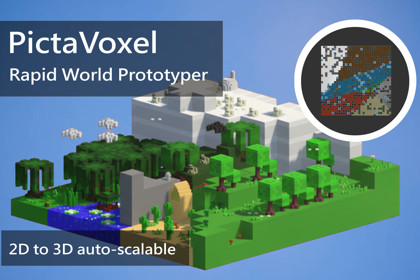
Intuitive 2D-to-3D Workflow: Paint your world, then bring it to life!This tool is designed for game developers who need speed and power. Its goal is to accelerate the prototyping and creation of voxel worlds, allowing you to rapidly iterate on level design ideas.Instead of placing blocks one-by-one, you will paint your world on a 2D map, defining topography, biomes, and asset locations with brushes, and then convert your map into a 3D scene with a single click.To master PictaVoxel, it's important to understand its three pillars:World Blueprint (ScriptableObject): Think of this as the floor plan for your world. It's an asset file that stores all the 2D information you paint: the elevation, biome ID, and assets for each "tile" on your map.Biomes (ScriptableObject): This is the heart of PictaVoxel's flexibility. Each Biome is a configuration file where you define the "rules" for a region: which voxel prefabs to use, what assets can appear, whether paths can cross it, if it has a special Point of Interest, etc.World Converter (Component): This is the engine that reads your World Blueprint and the rules from your Biomes to physically build the 3D world in your scene. This is where you control the global generation settings.The "World Forge" WindowThis is your main workspace.2D Canvas: The main area where you visualize and paint your map.Navigation: Use the middle mouse button to drag (Pan) and the mouse scroll wheel to zoom.Draggable Panels: All control panels can be dragged and repositioned.World Forge Editor: The main panel where you assign the Blueprint and Converter, and define global settings (Voxel Mode, Max World Height, etc.).Settings: Your toolbar. Here you select the layer you want to paint on (Topography, Texture, Assets, Floating), activate the Eraser, and adjust the brush size and elevation.Procedural Generation: Contains settings for the random map generation and the main Generate Procedural World button, which creates a new 2D map based on your biome rules.Fixed Palettes:Biome Palette (Bottom): Shows the available biomes from your WorldConverter's list. Select a biome here before painting on the "Texture" layer or before selecting specific assets.Asset Palettes (Top): These palettes are contextual. When the "Assets" layer is active, it shows the ground assets of the selected biome. When the "Floating" layer is active, it shows the floating assets.Features in DetailThe Biome SystemVoxel Prefabs: Drag the cubes that make up the terrain here.In OptimizedPerformance mode, the system uses the first prefab in the list and scales it to fill large areas of identical terrain, optimizing performance.In DetailedIndividual mode, for each 1x1x1 position in the world, the system chooses randomly from this list, allowing for great visual variation.Point of Interest Prefab: A special asset (e.g., temple, fountain) that is guaranteed to be instantiated at the origin point (or "Voronoi capital") of its biome region. Its most important characteristic is being unique and serving as a mandatory waypoint for the Smart Path system.Procedural Generation RulesWhen configuring a BiomeSO, you have access to the following rules that the procedural generator will obey:isIsolated: If checked, the generator will do its best to ensure this biome never touches the map's borders, ideal for special biomes that should be inland.affinityBiomes: Increases the probability that this biome will be generated near the biomes you drag into this list.exclusionBiomes: Prevents this biome from being generated adjacent to any biome you drag into this list.allowPath: Defines whether the Smart Path can or cannot cross this biome. If unchecked, the path will treat this biome as an obstacle and try to go around it.Voxel Generation ModesIn your WorldConverter, you can choose between two modes:OptimizedPerformance: This mode focuses on performance. It analyzes the map and groups large areas of identical tiles into a single, scaled block. This drastically reduces the number of objects in the scene and keeps the editor fast, making it ideal for prototyping and very large worlds.DetailedIndividual: This mode keeps the map entirely modular by building the world with individual 1x1x1 cubes. This exponentially increases the number of objects and the performance cost, but it is essential for games where the player can interact with or destroy each individual block ("mining-style" gameplay).

