






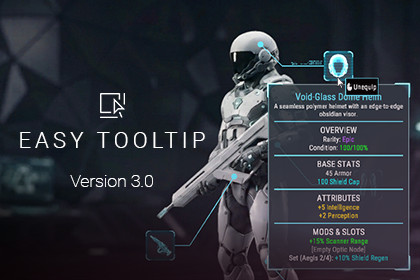
Easy Tooltip - UI Hover, Popup & Hint System
Ahmed Benlakhdhar (PixeLeader)
$12.99
Jump AssetStore
Stop fighting UI math. Instantly add responsive tooltips with smart screen clamping, auto-flipping anchors, live editor previews, zero-GC pooling, and a 1-line API. Zero setup required.Instantly add professional, responsive, and highly customizable tooltips to your Unity UI. Whether you are building complex RPG stat cards, strategy game interfaces, or simple menu hints, Easy Tooltip handles the hard work for you. Designed for both Artists (via a powerful custom Inspector with live previews) and Programmers (via a robust 1-line C# API).⠀⠀🎮⠀Play the Live WebGL Demo⠀⠀📖⠀Read the Online Documentation⠀⠀🎬⠀Watch the Video Showcase✨ KEY FEATURES🚀⠀Zero Setup: Just add the script to a UI element. The global manager auto-generates behind the scenes.👁️⠀Live Editor Previews: View and edit tooltips in the Scene view without entering Play Mode.💻⠀1-Line C# API: Populate dynamic UI inventories or spawn tooltips via code instantly.🛡️⠀Smart Screen Clamping: Tooltips automatically detect screen edges and flip or clamp to stay visible.🎯⠀Fixed & Relative Positioning: Choose "Follow Mouse" tracking, pin to 12 specific anchor points, or use Remote Target Overrides.✨⠀Dual-Tooltip Support: Includes a decoupled Hint Trigger for secondary cursor-following prompts (e.g., "[RMB] Equip").📏⠀Auto-Separators: Pass arrays of text and the system automatically injects scaled visual dividers.⚡⠀High-Performance Pooling: Recycles instances in-place to eliminate gameplay lag spikes.🎨⠀Visual Prefab Overrides: Swap layout styles per-item (Includes Default, Sci-Fi, Fantasy, and Tactical prefabs).🕶️⠀Native VR Support: Optimized for World Space canvases and tested for Meta Quest 2 pointers.📦 WHAT'S INCLUDEDClean C# Source Code (Fully documented).4 Customizable UI Prefabs (Ready to drop into your game).2 Interactive Demo Scenes (Game-Ready Showcase & Feature Sandbox).Event Hooks (UnityEvents) for seamless custom game logic.⚠️ Important Requirements:Requires the official TextMeshPro package.Follow-Mouse mode relies on screen coordinates (Desktop/WebGL). For VR, Fixed Positioning is required.📧 Need Support? Contact me directly at contact.pixeleader@gmail.com(Please include "[Easy Tooltip]" in the subject line).Asset uses Google Fonts (OFL), Material Icons (Apache 2.0), and Pixabay Audio.See Third-Party Notices.txt inside the package for details.Dependencies & Requirements:• Minimum Unity Version: Requires Unity 6000.0.80f1 or higher (Unity 6 LTS).• Required Packages: Official Unity TextMeshPro package (com.unity.textmeshpro).• Render Pipelines: The core UI system is 100% compatible with URP, HDRP, and Built-in RP. (Note: The included Demo scenes are pre-configured for URP, so background demo materials will require upgrading if opened in HDRP or Built-in RP).Input & Platform Compatibility:• Input Systems: Automatically detects and supports both the Legacy Input Manager and the New Input System package via preprocessor directives.• Supported Platforms: Windows, Mac, Linux, WebGL, Consoles, and VR.• VR Compatibility: Fully supports World Space Canvases. (Note: Fixed Positioning mode is required for 3D laser-pointer VR setups).• Mobile Note: Technically compatible with mobile, but standard "hover" interactions are designed primarily for Mouse/Cursor/Gamepad environments, not touch screens.Architecture & Performance:• Source Code: 100% clean, fully commented C# source code included. No compiled DLLs.• Namespace: All scripts are safely encapsulated within the PixeLadder.EasyTooltip namespace to prevent conflicts with your existing codebase.• Memory Management: Utilizes efficient in-place Object Pooling for tooltip instances, text blocks, and UI separators to completely eliminate runtime Instantiate/Destroy Garbage Collection spikes.• Canvas Scaling: UI Math dynamically accounts for Canvas Scaler resolution changes and parent object scale.• Canvas Render Modes: Supports Screen Space - Overlay, Screen Space - Camera, and World Space.

