






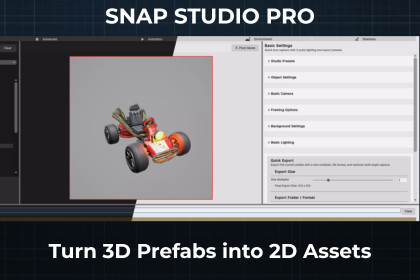
Turn 3D prefabs into icons, sprites and animation sheets with smart framing, lighting and batch export at scale — then into drop-in Unity prefabs that animate the moment you drag them in.Snap Studio Pro is built and tested for Unity 6.0 and above.It may not be compatible with Unity 2023.3 or earlier, due to significant API and pipeline differences.If you're using an older version of Unity, feel free to reach out — I'm happy to test it for you or confirm if a specific feature works in your setup.📸 SNAP STUDIO PRO — 3D TO 2D ASSET CAPTURE FOR UNITYA production Unity Editor tool for turning 3D prefabs into clean, consisten 2D assets — icons, sprites, thumbnails, animation sheets, directiona captures, and drop-in game-ready prefabs.Unlike simple screenshot tools, Snap uses a controlled preview pipeline wit smart framing lighting and camera systems, so every export stays visuall consistent whether you are capturing one asset or ten thousand.No Photoshop. No manual scene setup. No inconsistent results.--------------------------------------------------------🧠 CORE PHILOSOPHYConsistent output matters more than individual screenshots.The goal is not to capture images. It is a reliable production pipeline fo generating clean, repeatable 2D assets from 3D content, at scale: consisten framing, reusable lighting, stable camera positioning, repeatable exports and predictable results across an entire library.--------------------------------------------------------🎮 GAME-READY OUTPUT — DROP-IN UNITY ASSETS, NOT JUST IMAGESMost capture tools hand you PNGs and leave the rest to you: import them build an AnimationClip, add a controller, wire up a prefab.Snap does that last mile for you.Point Game-Ready at frames you have already exported and it hands back engine-native, drop-in Unity assets: trimmed, tightly-cropped Sprites, ready-to-play AnimationClips, an AnimatorController, and a prefab that animates the moment you drag it into a scene.It builds one of two shapes, auto-detected from the folder you select:EFFECT — a self-contained object: fire, explosion, pickup, spinning coin. One clip, one controller, one prefab. Directional effects get a direction-switching controller with a simple Direction integer.CHARACTER — one rig from many animations: idle, walk, attack, hit. Every animation becomes a state in a single controller, wrapped in a single prefab, with directional animations built into a MoveX/MoveY 2D blend tree so the character faces your movement vector out of the box.Every frame is trimmed to one shared crop, so sprites never jitter or resize between frames, and a bottom-centre pivot keeps feet planted.You get a fully-wired, facing-ready rig. You author the gameplay logic.A "Make Game-Ready" button sits beside the export on every capture tab — the natural next step, where you already are.--------------------------------------------------------🎬 DIRECTIONAL ANIMATION CAPTUREExport full animation controllers as sprite sequences, directional animations, GIF previews and spritesheets.4, 8 or 16 directional anglesConsistent bounds across every frameAutomatic pivot alignmentAnimation scrubbing and frame captureSpritesheet generationBuilt for side-scrollers, top-down games, RPGs and stylised 2D pipelines.--------------------------------------------------------📸 ICON & SPRITE EXPORTClean, perfectly framed 2D images from any 3D prefab — ready for UI icons, inventory systems, store thumbnails, asset packs, stylised previews and production sprites.--------------------------------------------------------🧠 SMART AUTO-FRAMINGSnap detects prefab bounds and frames assets within the capture area automatically — no manual camera tweaking per prefab. This is what makes batch exports and storefront thumbnails come out uniform across a large library.--------------------------------------------------------🎨 STYLE PRESETSApply complete visual styles instantly: solid backgrounds, linear and radial gradients, transparency, custom backgrounds, reusable lighting presets and camera style presets. Keep exports consistent across a whole project or asset pack.--------------------------------------------------------💡 FULL LIGHTING CONTROLA fully adjustable 3-point lighting system — key, fill and rim light, shadow control, exposure adjustment, light rotation and intensity. Clean presentation renders or stylised game-ready output, entirely inside Unity.--------------------------------------------------------📷 ADVANCED CAMERA SYSTEMPreset camera styles, orthographic and perspective support, manual framing overrides, zoom and angle adjustment, side-scroller and top-down presets, and multi-angle capture workflows. Smart automation with full manual override.--------------------------------------------------------🗂️ ASYNCHRONOUS BATCH EXPORTExport large prefab libraries without freezing the Editor: asynchronous processing, structured folder output, multi-angle export, filtered export workflows and reusable export presets.--------------------------------------------------------🌐 FULL RENDER PIPELINE SUPPORTBuilt-in Render Pipeline, URP and HDRP. Snap detects the active pipeline and routes capture through the matching implementation.No separate packages. No duplicate workflows. No pipeline-specific setup.Where a pipeline genuinely changes a capture — most notably how transparency is handled on URP — Snap warns you rather than letting you find out in the output.--------------------------------------------------------📚 DOCUMENTATIONThe full documentation site is public and needs no purchase. Read it and decide for yourself before you spend anything:https://revandrab.github.io/SnapStudioPro_Base/261 pages, layered from installation through workflows to the internalsA README beside the source in 207 folders, so the codebase explains itself if you go lookingEvery workflow documented as a walkthrough, not a feature listPipeline-specific behaviour written down where it differsWhere a design costs you something, the documentation says so. Where example assets appear in a screenshot, it says they are not included.--------------------------------------------------------⚡ EDITOR-FIRST — AND WHAT ACTUALLY REACHES YOUR BUILDThe capture pipeline is Editor-only. The window, the preview, the framing, lighting and camera systems, and every exporter are in Editor assemblies and are never compiled into a player.Four small assemblies are not Editor-gated, and they are worth naming rather than claiming a zero footprint:PrefabMetadata and Attributes — about 170 lines. The components and attributes that tag prefabs for filtering. Runtime types by necessity: they live on your prefabs.RuntimeKit — about 950 lines of optional demo scripts for the sample scenes. Delete the folder if you are not using them.uGIF — about 1,220 lines, the third-party GIF encoder.Nothing in the capture pipeline runs at runtime. RuntimeKit does, if you choose to use its demo scripts — that is what it is for. Delete RuntimeKit and ThirdParty and nothing else stops working except GIF export and the demo scenes."Zero runtime footprint" would be easier to write and would not be true.--------------------------------------------------------🔧 FULLY CUSTOMISABLELighting, shadows, exposure, backgrounds, transparency, framing, camera angles, overlays and materials. Save reusable presets to match a project's visual identity and hold it across every export.--------------------------------------------------------🕹️ WHO IT IS FORIndie developers building 2D games from 3D assetsDevelopers who want playable 2D assets, not just image filesAsset publishers creating icons, thumbnails and promotional artTool developers generating stylised previews inside UnityTeams needing large-scale consistent sprite exports--------------------------------------------------------⚙️ REQUIREMENTSUnity 6.0 or later. Earlier versions are not officially supported and maynot behave correctly — HDRP volume-override workflows in particularrequire Unity 6.Built-in, URP or HDRP. Snap detects which and routes accordingly.No setup step. The window is ready the moment it opens.--------------------------------------------------------⚠️ EXAMPLE ASSETS ARE NOT INCLUDEDThe characters, environments, props and other assets shown in screenshots throughout this listing and the documentation are not included. They are used purely for demonstration. Snap captures your prefabs; it does not ship art.--------------------------------------------------------📦 THIRD-PARTY CONTENT & CREDITSuGIF by Simon Wittber (MIT License)Sample demo characters derived from licensed Synty assetsSprite animations created using Rogue Volume 2 by WeMakeTheGameAll third-party content is used under Unity Asset Store terms and included only as non-reusable baked 2D sprites. See Third-Party Notices.txt for full details.--------------------------------------------------------🛟 SUPPORTReach out before leaving a review. If it is broken, it gets fixed.Documentation: https://revandrab.github.io/SnapStudioPro_Base/Email: contact@revgaming.dev📸 CAPTURE & EXPORT2D icon and sprite export from any 3D prefabAnimation export to frames, spritesheets and GIFsMulti-angle capture — side-scroll, and top-down at 4, 8 or 16 directionsBatch export with per-angle folder controlConsistent pivot and bounds for frame-perfect animation outputGame-Ready output — turns exported frames into trimmed Sprites, AnimationClips, an AnimatorController and a drop-in prefab. Effect and Character shapes, auto-detected. Directional characters get a MoveX/MoveY 2D blend tree--------------------------------------------------------🎬 ANIMATION TOOLSFull animation preview and capture — scrubbing, FPS, frame range,skip framesDirectional animation support with automatic alignmentGIF export (experimental)--------------------------------------------------------🧠 FRAMING, CAMERA & LIGHTINGSmart auto-framing — fits the camera to prefab bounds automatically3-point lighting — full control over key, fill and rim lightsStudio look presets — Neutral, Stylised, Cinematic and moreAdvanced camera controls — presets plus manual overridesOrthographic and perspective support--------------------------------------------------------🎨 VISUAL STYLINGBackground customisation — colour, gradient, texture, vignette, transparencyGround and shadow catcher — transparent, stylised or shadow-only floorPost-processing support — Built-in (with or without Post Processing Stack v2), and URP and HDRP volume overridesOverlay system — text, logos or watermarks--------------------------------------------------------⚙️ WORKFLOW & CUSTOMISATIONPreset system — save and load lighting, background, export and camerasetupsFull custom UI themingNo setup step. The window is ready the moment it opens--------------------------------------------------------🌐 RENDER PIPELINE SUPPORT✅ Built-in Render Pipeline (with or without Post Processing Stack v2)✅ Universal Render Pipeline (URP)✅ High Definition Render Pipeline (HDRP)Snap detects the active pipeline and routes capture through the matching implementation. Where a pipeline genuinely changes a capture — most notably how transparency is handled on URP — Snap warns you rather than letting you find it in the output.--------------------------------------------------------🧱 UNITY VERSION✅ Unity 6.0 and above officially supported❌ Not guaranteed on earlier versions — HDRP volume-override workflows in particular require Unity 6Using an older version? Reach out and I will test it for you.--------------------------------------------------------🖥️ WHAT REACHES YOUR BUILDThe capture pipeline is Editor-only. The window, preview, framing, lighting, camera systems and every exporter live in Editor assemblies and are never compiled into a player.Four small assemblies are not Editor-gated, and they are worth naming rather than claiming a zero footprint:• PrefabMetadata and Attributes — about 170 lines. The components and attributes that tag prefabs for filtering. Runtime types by necessity: they live on your prefabs.• RuntimeKit — about 950 lines of optional demo scripts for the sample scenes. Delete the folder if you are not using them.• uGIF — about 1,220 lines, the third-party GIF encoder. Nothing in the capture pipeline runs at runtime. RuntimeKit does, if you choose to use its demo scripts — that is what it is for. Delete RuntimeKit and ThirdParty and nothing else stops working except GIF export and the demo scenes.No third-party dependencies beyond uGIF, which is bundled. Full C# source included.--------------------------------------------------------📚 DOCUMENTATION261-page documentation site, public and readable before purchase: https://revandrab.github.io/SnapStudioPro_Base/A README beside the source in 207 foldersLayered from installation through workflows to internalsA copy of the docs travels with the asset under Assets/RevGaming/SnapStudioPro/Documentation/--------------------------------------------------------🛟 SUPPORTReach out before leaving a review. If it is broken, it gets fixed.Email: contact@revgaming.devThis asset was developed using AI-assisted workflows as part of an iterative human-led development process.AI was used to assist with coding, architecture exploration, debugging, and tooling workflows — while all systems, testing, validation, and production decisions remained manually directed and reviewed throughout development.

