






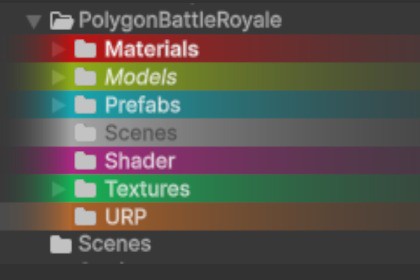
Folder Customizer is a lightweight Unity Editor tool that lets you color-code folders and style their names (bold, italic) in the Project view.📁 Folder Customizer – Color Your Project ViewFolder Customizer is a lightweight Unity Editor extension that lets you style your folders in the Project window with custom background colors and font styles.Visually organize your project structure, highlight key folders, and bring clarity to your workflow — all without affecting builds or project assets.✨ New feature in v3.0 - [NEW FEATURE] Set wallpaper to the project browser- [NEW FEATURE] Add showing folder size information (list view only)- [BUG] Fix grid view bug when only the text is styled✨ Features🎨 Add solid background colors to any folder in the Project view🖋️ Customize folder name appearance: Bold, Italic, or Bold + Italic🧠 Automatically remembers settings using Unity’s asset metadata💼 Seamlessly integrated into right-click context menu🚀 Editor-only, no runtime impact or dependencies🖼️ [NEW] Wallpaper on your browser? Why not?📂 [NEW] Folder size📌 Perfect ForLarge projects with complex folder structuresTeams who want visual cues in shared repositoriesDevelopers who love tidy, readable workspacesStyle your folders. Focus your workflow.Make Unity feel a little more yours.Feel free to reach me out on:Discord | Email: lthieu1599@gmail.comThis package makes use of field "userData" in .meta folder to store styling data. This behaviour is supposed not to affect anything in your project unless you already made use of this field before importing this package.

