







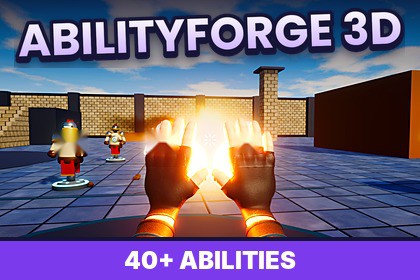
AbilityForge 3D: First-Person Abilities & Throwable Weapons
RageRun Games
$17.49
$34.99
50%OFF
(no ratings)
Jump AssetStore
First-person abilities and weapons with realistic hands: 25 abilities, 24 weapons incl. swords, bow and crossbow, combos and runes, plus a no-code Ability Creator with live 3D preview.Throw the axe. Call it back. Catch it mid-air. Now with swords, a greatsword that cracks the ground, a frost scythe, a longbow and a repeating crossbow.Try it in your browser: Play the web demoAbilityForge 3D is a complete first-person ability system built around your character's hands. Every ability has a wind-up, a cast and a recoil. Fire pours from your palms, shields bounce between enemies and come back, pillars burst from the ground and meteors land where you aim. Hit-stop, screen feel, sound and effects are tuned and ready.New in 1.1 (free update):Melee weapons: Rune Sword, Ember Greatsword, Viper Fang dagger, Quake Mace and Frost Reaper scythe. Three-hit combos with a heavy finisher (ground smash, lunging thrust, 360° spin), and every one can be thrown and called back.Bow and crossbow: draw, hold and release a longbow (power grows with the draw; hold too long and your arms shake), or fire a repeating crossbow that cocks itself with a sliding lever.Smoother, more realistic hands: one skinned hand and forearm that bend naturally at the wrist, whole-arm swings and throws, weapon lag and sway by weight, an Inspect key, and support for your own animated first-person arms.New weapon models for every throwable, and elemental auras on held weapons: flames, frost, crawling lightning, water, wind, earth and arcane motes, with swing smears and element trails.A big effects pass on every ability: rock eruptions with glowing cracks and physics chunks, meteor craters, honeycomb shield domes, spiralling beams, a black hole with accretion rings, a golden time bubble and more.16 demo loadouts with number keys, a chain kunai that yanks enemies to you (YOINK!), and armoured training knights to hit.25 abilities and 24 weapons, ready to play, in 16 loadouts: Rune Warrior, Elementalist, Agent, Tidecaller, Arcanist, Engineer, Champion, Ranger, Marksman, Shadow, Stormbreaker, Blademaster, Berserker, Assassin, Earthshaker and Reaper.Fire Stream, Water Whip, Chain Lightning, Arc Beam, Air Blast, Force Push, UpdraftEarth Pillar, Pillar Wave, Cataclysm, Glacier, Ground Slam, Meteor StrikeBlack Hole, Time Bubble, Shield Dome, Barrier Wall, Blink, Dash, GrappleSmoke Orb, Flashbang, Recon Dart, Sentry Turret, Storm Totem and decoys that draw enemy aggroWeapons with rules, each with its own way to swing, fly, hit and return:melee: rune axe, rune sword, ember greatsword, viper fang, quake mace and frost reaper;thrown: a ricochet shield that bounces between enemies and blocks shots, a storm hammer that returns with lightning, a boomerang, a sun chakram, a chain kunai, chain blades, a meteor hammer, a javelin you charge, a rolling ripsaw, hex cards and seeker stars;ranged: rune longbow and repeater crossbow;from the hands: fire jabs, kunai, ice shards, arcane orbs and a bolt caster.First-person hands. Skinned hands and forearms with skin detail and nails, and gear that bends with every finger: fingerless gloves, leather gloves with knuckle pads, or hand wraps, plus a buckled leather bracer with a glowing rune inlay. Pick skin tones, gear colour sets and three sizes in one click. Each weapon shape has its own grip, tuned live with the Hold Pose Tuner. Want your own animated arms? Animated Arms plays your Animator states for every gesture and keeps weapons and effects in your hands.Effects that read at a glance. Every element has its own colour palette. Ground abilities warn, then erupt with cracks, dust waves and tumbling rocks. Layered impacts with sparks and shockwaves, soft particles, textured trails and beams, and surface-aware hits (metal sparks, wood chips, stone grit). Each ability has its own Screen Feel: shake, flash, vignette and a field-of-view kick.Elemental reactions. Soak enemies with water, then hit them with lightning to Electrocute. Freeze, then smash to Shatter. Fire on frost makes Steam.Combos. Cast one ability right after another for a named bonus such as "Sky Crash!", with extra power, hit-stop and a callout.Build your own abilities without code. The Ability Creator is one window for everything:Live 3D preview: every ability replays on a stage against a dummy, with damage, range, DPS and plain-language checks. Side, Behind and Top cameras, and play, step and reset keys.Every setting, grouped and searchable: Basics, Timing, Mechanic, Effects on hit, Hands & sound, Screen Feel, Combo. Type "burn" or "knock" to jump to the field.Mechanics and effects: pick one of 26 mechanics and stack effects such as burn, chill, stun, knockback, lifesteal, critical hits and execute.Activation: press, hold, aim, or hold to charge, with an aim preview.Weapons from rules: shape, swing combo, flight, what happens on enemies and walls, how it comes back. 16 presets in one click, swords and scythe included.Loadouts and runes: build loadouts by clicking slots; runes upgrade abilities while you play.Test in one key: F5 opens the Ability Gallery, presses Play and puts your ability on Q.Use your own art. On the Visuals tab, make a Look for an ability in one click and drop your prefabs on it: each model and effect goes into the slot it fits (held, flying, placed or falling models; cast, trail, impact, enemy hit, channel and more). Snap grip lines up a held weapon in one click.Try every ability in one click. The Ability Gallery scene is a test range with training knights at set distances, a group for area abilities, ricochet walls and live enemies. Number keys switch between 16 loadouts, and Tab opens a clickable list of every ability in your project, including your own.Enemies and AI included. Training knights in three colours, a bright Brute that charges in, a Sentinel that keeps its distance, and casters that use the same ability assets as the player, all animated by the included Enemy Animator. A short slow-motion kill cam plays when you clear a fight.One Setup Window. It checks your project and fixes problems in one click, builds the demo and gallery scenes, restyles the hands, sets up animated arms, and adds a ready player (camera, hands, HUD, audio), enemies, weapon pickups or the Ability Gallery to your own scene.Nothing extra to import. Models, hands, weapons, materials, textures, icons, effects and sounds are original and included, and every sound has a slot for your own clip.For programmers:ScriptableObject abilities, with mechanics and effects as serialized classes you can extend;events for casts, hits, kills, combos and gestures;scripted input for attract modes and tests, and an editor API to drive the Ability Creator from your own tools;a damage filter, an aggro system, pooled VFX and one time-scale manager with named sources.Works with Unity 6 on URP and the Built-in Render Pipeline, with the Input System package or the old Input Manager. Includes a Quick Start and a Documentation PDF with a start-to-finish Ability Creator guide.Contact: ragerungames@gmail.com · Join our Discord communityFeaturesFirst-person ability caster with realistic hands: one skinned hand and forearm with skin and nail detail; fingerless gloves, leather gloves, hand wraps and a buckled bracer that bend with every gesture; skin tones, gear colour sets, 3 sizesArm solver with whole-arm swings and throws, weapon lag and sway by weight, raise and lower on weapon change, Inspect keyAnimated Arms: use your own Animator-driven first-person arms (gesture to state map, hand-bone weapon attach, Setup Window checks)Hold Pose Tuner: grip, lean and offset per weapon shape, saved to an asset26 mechanics: projectiles, beams, streams, channels, area, placed, falling, movement, deployables, thrown weapons, melee and bow / crossbow18 effect types: damage, statuses (burn, chill, wet, stun, blind, reveal), knockback, launch, heal, lifesteal, crits, execute, bonus vs status, explode on kill, zones, every-Nth-hit and chance effectsMelee: three-hit combos per weapon shape with heavy finishers (ground smash, thrust, 360° spin), throw, recall and perfect catchBow (draw, hold, shake, full-draw bonus) and crossbow (auto-cocking slide, magazine), with sticking arrowsProcedural weapon models with glowing edges; elemental weapon auras, swing smears and element trails; surface-aware impactsGround effects: warnings, eruptions, glowing cracks, physics rock chunks, ground waves, cratersElement palettes, soft particles, layered impacts, textured trails and scrolling beamsScreen Feel per ability (shake, flash, vignette, FOV kick); screen flashes settingElemental reactions: Electrocute, Freeze, Shatter, Steam, Firestorm, BrittleThrowable weapon system: shapes, flight, sticking, ricochet, bounce, chains, homing, recall, perfect catch, block and reflect (16 presets incl. 5 melee)Press, hold, aim and charge activation; cooldowns, charges and ultimatesCombos between abilities, runes, loadouts (16 in the demo, number keys and [ ]), weapon rack and pickupsAbility Creator window: Abilities, Loadouts, Runes and Visuals tabs; docked live 3D preview; setting search; one-click tabs; checks; icon generator; prefab drop zone and one-click LooksCustom models and VFX per ability (Looks), tinted to the ability colour, with pooled effectsAbility Gallery test scene and in-game Tab menu; one-key Try in GallerySetup Window with project checks, one-click fixes, hands card, animated arms card and "add to my scene" buttonsEnemies: training knights (3 colours), Brute, Sentinel and casters with procedural Enemy Animator; aggro and decoysPhysics props that stay still until hitHit-stop with a shared budget, kill cam, damage numbers, photo mode and audio with clip slotsTwo demo scenes: Sandbox playground and Ability Gallery, plus a demo menuAssembly definitions; namespace RagerunGames.AbilityForge3D; full C# sourceSupported platformsWindows, macOS and Linux standalone; WebGL (see the web demo)Keyboard and mouse, and gamepad. No touch controls; drive abilities from your own UI with the caster API.Supported OSEditor: Windows, macOS and Linux (Unity 6)Render pipelinesURP and Built-in. After switching pipeline: Setup Window > Rebuild materials.DocumentationQuick Start and Documentation PDFs in the package's Documentation folder.

