






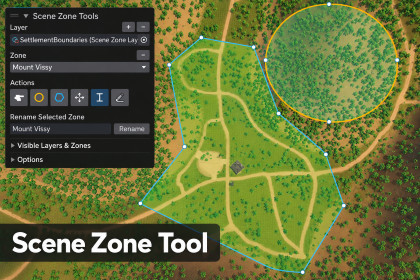
Draw, organize, validate, and query polygon or circular scene zones directly in the Scene view.Compatible with the Built-in Render Pipeline, Universal Render Pipeline, and High Definition Render Pipeline. Scene Zone Tool uses pipeline-independent editor rendering and requires no additional Asset Store packages.Scene Zone Tool is a Unity editor extension for creating, organizing, validating, and querying two-dimensional zones directly in the Scene view.Designers can draw polygon or circle zones over any Unity scene without requiring terrain, physics colliders, a NavMesh, or a specific render pipeline. Zones are stored as lightweight world-space X/Z coordinates inside reusable ScriptableObject layer assets rather than as scene GameObjects.The Scene view authoring overlay provides tools for creating, selecting, naming, reshaping, and deleting zones. Polygon points can be moved or inserted, existing coordinates can be reused to create exact shared borders, and complete outlines can be replaced without changing a zone’s stable identity or breaking serialized references.Layers make it possible to organize zones by purpose. Zones on the same non-overlapping layer may touch or share edges but cannot occupy the same area. Intentionally overlapping or nested zones—such as a settlement inside a region—can be placed on separate layers.The included runtime API allows scripts to find the first zone at a world position, retrieve every containing zone, look up zones by stable ID or display name, access their geometry, and calculate their horizontal area. An optional runtime line-rendering component can display polygon and circle boundaries in Built-in, URP, and HDRP projects.The package is suitable for many genres, including:• Open-world and exploration games• Role-playing games• Strategy and simulation games• City builders and management games• Survival games• Tactical and territory-control games• Adventure games• Racing and sports games• Procedural or custom map systemsExample uses include settlements, districts, biomes, encounter regions, AI territories, patrol areas, audio regions, quest locations, jurisdictions, safe zones, restricted areas, and custom gameplay regions.The package is customizable. Developers can configure layer names, colors, overlap behavior, authoring height, drag-drawing spacing, zone names, notes, line colors, fill colors, and line widths. The exposed runtime API can be connected to custom gameplay, AI, audio, quest, spawning, map, and user-interface systems.Scene Zone Tool focuses on storing and querying two-dimensional world regions. Elevation is intentionally ignored. Runtime procedural authoring, height-aware volumes, geospatial conversion, filled runtime meshes, and game-specific behavior are outside the current scope though a planned feature for future releases.The package includes complete documentation, troubleshooting and upgrade guidance, a Basic Usage sample, an Edit Mode query preview, a playable runtime demonstration, and optional runtime outline rendering.Scene view authoringCreate polygon and circle zones directly in the Unity Scene view using a movable authoring overlay, accessible from Tools > Scene Zone Tools or the Scene view Overlays menu. An overlay-position reset command is included for off-screen recovery.Create new SceneZoneLayerAsset files or select existing layers from the overlay. Layers are automatically associated with the active scene and can be explicitly rebound when needed.Draw polygons by clicking individual points or using optional freehand-style drag drawing with configurable point spacing. Existing vertices can be reused to create exact shared coordinates and borders.Complete polygons by clicking the first point, double-clicking, pressing Enter, or selecting Close. Backspace, right-click, and Undo Point remove the last draft point; Shift-drag repositions draft points; Escape or Cancel discards the unfinished shape.Create circles with separate center and radius clicks. A pending circle center can be repositioned with Shift-drag, and unfinished circles can be cancelled safely.Select zones by clicking inside their boundaries or choosing them from the Zone dropdown. Zones can then be renamed, redrawn, or deleted.Move existing polygon points and Shift-click a point to insert a new point after it.Replace a complete polygon or circle outline while preserving the zone’s stable ID, name, Unity object identity, and serialized references.Zone creation, point movement, insertion, renaming, outline replacement, and zone deletion integrate with Unity Undo and Redo. Authoring state refreshes immediately after undoing or redoing an operation.Visual feedback and navigationZones display distinct translucent fills, configurable outlines, automatically positioned name labels, and screen-size-aware point markers that remain usable at different Scene view zoom levels.The active zone retains a gold outline and point markers, while hovered zones and reusable vertices receive brighter temporary highlighting.Invalid or overlapping geometry is highlighted in red. Error messages identify the conflicting zone and provide rounded X/Z segment information when applicable.Normal Scene view navigation remains available with Alt and middle mouse. Pressing Q, W, E, or R returns control to Unity’s View, Move, Rotate, or Scale tools; selecting a zone action resumes authoring.Display Height moves editor visualization vertically without changing the stored zone coordinates.Layers, overlap, and visibilityNamed zones are organized inside reusable layer assets. Each layer stores a stable ID, display name, scene association, outline color, overlap setting, and references to its embedded zones.Same-layer overlap prevention supports polygon-to-polygon, circle-to-circle, and polygon-to-circle checks. Zones may touch at points or share complete edges but cannot occupy the same positive area when overlap prevention is enabled.Geometry validation rejects self-intersections, duplicate consecutive points, zero-area polygons, invalid circle radii, non-finite coordinates, invalid centers, and other unusable shapes.Intentionally overlapping or nested regions can be placed on separate layers. Multiple layers may be associated with the same scene, while one preferred authoring layer is remembered per scene.Visibility can be controlled per layer or per zone. Show All, Hide All, and Show Active Layer presets are included; the active zone remains visible, and visibility choices affect only the current authoring session rather than saved data.Long layer and zone lists use a bounded scrolling area so the overlay remains usable.Scene association and project settingsLayer assets store the associated scene’s GUID, path, and display name. Preferred scene-to-layer mappings use stable asset GUIDs so moving a layer asset normally does not break the association.A layer associated with another scene cannot be edited until the correct scene is opened or the layer is explicitly rebound.Project Settings > Scene Zone Tool provides defaults for the layer save folder, visualization height, drag drawing, and drag-point spacing.Repair Scene Bindings removes missing or obsolete scene-to-layer mappings.Inspector featuresThe SceneZoneLayerAsset Inspector displays its stable ID and scene information, allows editing its display name, outline color, and overlap setting, lists its embedded zones, reports validation problems, detects zone-list mismatches, provides Repair Embedded Zone List, and can open the layer in the Scene Zone overlay.The SceneZoneAsset Inspector displays the stable ID, name, owning layer, shape, geometry, center information, and data version; allows editing developer notes, line color, and line width; reports validation errors; and can open the owning layer in the Scene Zone overlay.Zone identity and geometry fields are read-only in the Inspector. Geometry is edited through the Scene view overlay so validation, overlap checks, Undo, and reference preservation are applied correctly.File storage and version controlEach layer is stored as a standard Unity .asset file, with its SceneZoneAsset objects embedded as ScriptableObject sub-assets rather than scene GameObjects.Polygon geometry is serialized as an ordered list of world X/Z coordinates. Circle geometry is serialized as a center and radius. Authored coordinates are rounded to three decimal places.Zone data includes its stable ID, display name, notes, shape, geometry, center information, colors, line width, owning-layer reference, and serialized data version.With Force Text serialization enabled, the data is stored as standard Unity YAML. The layer’s .asset and .meta files should both be committed to version control.Project-wide authoring defaults and preferred scene-layer associations are stored in ProjectSettings/SceneZoneToolSettings.asset.Removing Assets/SceneZoneTool uninstalls the package but intentionally leaves separately created user layer assets, such as those under Assets/SceneZones, intact.Runtime APISceneZoneLayerAsset provides its complete Zones collection; GetZoneAt for the first zone containing a position; GetZonesAt for every containing zone; TryGetZone and GetZone for stable-ID lookup; FindZoneByName for case-insensitive name lookup; GetZonePoints and GetZoneWorldPlanePoints for polygon coordinates; and Validate for layer validation.SceneZoneAsset provides Contains for point-in-zone testing; ApproximateHorizontalArea for two-dimensional area calculation; and access to its stable ID, display name, notes, layer, shape, circle center, radius, polygon points, authored or calculated center, colors, line width, data version, and usability state.Runtime containment operates entirely on the X/Z plane and ignores the supplied Y coordinate.Runtime visualizationSceneZoneLineRenderer optionally displays polygon or circle outlines in Edit Mode or during gameplay and supports configurable circle-segment count, display-plane height, vertical offset, and material override.The line renderer listens for changes to its assigned zone and refreshes automatically.SceneZoneMaterialFactory creates temporary unlit materials and automatically selects a compatible shader for Built-in, URP, or HDRP, avoiding the need to ship pipeline-specific material assets.Validation, repair, and deletionTools > Scene Zone Tools > Validate Project scans all layer assets for invalid ownership, missing or duplicate identities, duplicate names, invalid geometry, authored-center problems, and disallowed same-layer overlap.Validation can remove abandoned incomplete circle or polygon sub-assets and deterministically repair missing or duplicate layer and zone identities. Remaining problems are reported in the Unity Console.Zone deletion supports Unity Undo. Before a zone or layer is deleted, the tool performs a best-effort search for serialized asset references and reports assets that may require reassignment.Complete layer deletion moves the layer asset and all embedded zones to the operating system’s Recycle Bin after confirmation.Included sample and documentationThe Basic Usage sample includes polygon and circle zones, runtime outline renderers, an Edit Mode query preview, and a movable Play Mode query marker with WASD and arrow-key controls.The sample displays the current zone on screen, logs zone changes to the Console, provides a Query Current Position component command, and allows keyboard movement to be disabled.Sample movement uses IMGUI events and does not require either Unity input package.Included documentation covers installation, authoring, runtime API usage, troubleshooting, upgrading, support, version history, and third-party notices.Dependencies, assemblies, and compatibilityThe tool does not require terrain, physics colliders, a NavMesh, a game framework, an external Asset Store dependency, or a specific render pipeline.SceneZoneTool.Editor contains editor-only authoring functionality and is excluded from player builds. SceneZoneTool.Runtime contains runtime-safe data, query, material, and visualization functionality.Authoring and data storage are render-pipeline independent. Optional runtime materials support Built-in, URP, and HDRP.Version 1.0.3 has been validated with Unity 6000.5.4f1 on Windows.Current scopeZones are two-dimensional world X/Z boundaries. Elevation is ignored during containment queries, and Display Height affects only editor visualization.Boundary authoring occurs in the Unity Editor. Runtime procedural authoring, height-aware volume querying, and geospatial projection are not included.Optional runtime outline rendering is included. Game-specific triggers, AI behavior, spawning, quest logic, minimap rendering, filled meshes, and other gameplay behavior are left to the developer.Future scopeEditable 3D heightmapsAutomatic shape correctionMore shape typesAI-assisted tools was only used during final packaging and error handling to review validation results, diagnose and correct issues with Unity release, verify documentation, and prepare the release package. All resulting changes were manually reviewed and tested by the publisher before submission.

