







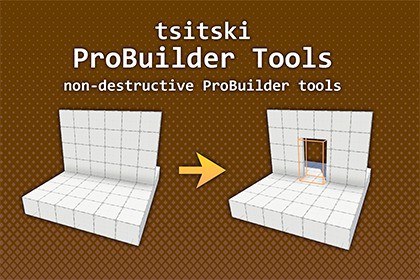
Live, non-destructive level design tools for Unity ProBuilder: boolean cutting for doors, windows and tunnels, generators for floors, roofs, stairs, trims and walls, and Blender-style modelling tools.Demo scene only compatible with URP, though these are level design tools so they are compatible with any rendering pipeline.Tested and compatible with all Unity versions past 2021.3.15f1.Documentation: https://tsitski.com/probuilder-toolsSupport: https://discord.gg/rPv4JSuhNRI built these tools while doing level design for Partizan, my immersive sim FPS. They've saved me a lot of time, so I'm making them available to other devs building levels in ProBuilder.ProBuilder CutterA shape that cuts a hole through any ProBuilder mesh it overlaps, live in the editor, and builds the inside walls so the opening looks like a real cut. Move, scale or rotate the cutter, or edit the mesh, and the cut updates immediately. Your original mesh is never modified, and nothing runs in play mode or in builds.Cutter shapes:Box: plain or with rounded corners, for doors, arches and windows.Cylinder: round holes, portholes and pipe openings.Polygon: any outline, drawn in the Scene view.Path: a box swept along a path, for corridors, trenches, vents and stairwells.Explosion: a jagged blast hole.Mesh: cuts away the exact shape of any mesh.GeneratorsLive, non-destructive generators that rebuild as you edit them. Cutters cut through them too.Trim: a 2D profile swept along a path for skirting, mouldings, pipes, kerbs and railings.Array: copies a mesh along a path.Stairs: straight, winding or spiral stairs, with landings and an optional stairwell cutter that matches the top step.Pillar: a profile revolved into a pillar that stretches to fit its height.Floor Plan: walls around a floor's outline that update as you edit the floor, with an optional roof over every closed loop.Polygon: one or more outlines extruded into a slab for floors, ceilings and platforms, with holes anywhere.Roof: hip, valley and gable roofs from the center lines of a building's wings, including mansard, gambrel and curved profiles.Path: raised strips for sidewalks, kerbs and paths, with per-point width and height and junctions where branches meet.All tools share the same Scene view point editing, with rounded corners and copy-paste between objects. Stats assets let many objects share one set of settings, and generators have their own material slots. Outline Trim adds trims or arrays around any mesh or floor plan in one click.Modelling toolsBevel, Inset Faces, Bridge Faces and Collapse, with Blender-style live settings.Workflow toolsSetup Materials: puts materials on every selected mesh in one step, sorting faces into walls, floors, roofs and trims.Placement: snap to grid, oriented grid or walls, and Step Physics.Split Path, Center Transform To Mesh and Convert To Polygon: for every generator.Generate Lightmap UVs: a custom unwrapper for generated and cut meshes.Everything is in the Tools menu and in a searchable Alt+X popup in the Scene view, which you can add your own tools to.Supports Unity 2021.3 or newer with ProBuilder 5.0.3 or newer, including Unity 6. Full source code included.ProBuilder CutterLive boolean cut through any ProBuilder mesh it overlapsAutomatic inside walls, per axis, with their own materialNon-destructive: the original mesh is never modifiedPrefabs can cut their own openingsCut result gets a matching Mesh ColliderShapes: Box (rounded corners), Cylinder, Polygon, Path, Explosion, MeshOptional smoothing angle and per-face cuts applied to the ProBuilder meshGeneratorsLive and non-destructive, can be cut by cuttersOnly rebuild when their settings change; hand-painted materials and edited UVs are keptStats assets share settings across many objectsMaterial slots per generator (locked or free to paint)Polygon: one or more outlines extruded into a slab, holes anywhere, negative thickness, Convert To Polygon from existing meshesRoof: hip, valley and gable roofs from wing center lines; custom profile (mansard, gambrel, curved); adjustable thickness, filled roofs, gable walls, smoothing angleTrim: 2D profile swept along a path, with mirroring, rounding and end capsOutline Trim: trims or arrays around any mesh or floor plan outlineArray: copies a mesh, prefab or pillar along a pathStairs: path or spiral mode, flights, landings, winding steps, stairwell cutter, ramp collider, separate tread, riser and side materialsPillar: revolved profile with fixed base and capitalFloor Plan: walls around a floor's outline, open or closed, with an optional roof over every closed loopPath: raised strips for sidewalks and kerbs, per-point width and height, junctions between branchesEditingScene view point editing: selection, W/E/R handles, insert, round, copy/pasteSplit Path and Center Transform To Mesh on every generatorModelling tools: Bevel, Inset Faces, Bridge Faces, CollapseAlt+X Scene view popup with search and number keys, plus the Tools menuAdd your own tools to the popup with [TsitskiMenu]Full Undo supportWorkflowSetup Materials: one-click materials sorted into walls, floors, roofs and trims (Real Blend supported)Placement: Snap To Grid, Oriented Grid, Wall and Step PhysicsCustom lightmap UV unwrapper for generated and cut meshesCompatibilityUnity 2021.3 or newer, including Unity 6ProBuilder 5.0.3 or newer (prompts to install if missing)Built-in, URP and HDRPEditor only: zero runtime costNo third-party dependenciesFull source code and demo scene includedClaude has been used to help write the boolean math.

