






PC Accessibility Kit: Colorblind, Text Size, Subtitles, Contrast
ShipYourGame
$29.00
(no ratings)
Jump AssetStore
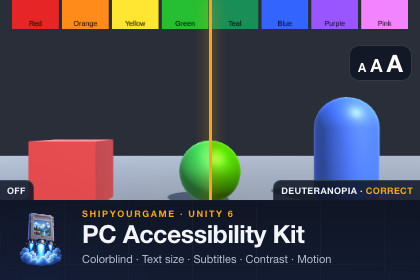
Colorblind filters (Built-in + URP), 100-200% text scaling (TMP, UI Toolkit), subtitles with captions, high contrast, reduce motion, a finished settings panel and JSON save. Full C# source.The accessibility options PC players expect, as drop-in components you can ship this week.PC Accessibility Kit gives you the six options that show up on every "does this game have..." checklist, wired to one settings class and one finished settings panel. Full C# source, no DLLs, no external services, 95 EditMode tests behind it.WHAT IS INSIDE- Colour-vision filters: protanopia, deuteranopia and tritanopia. Simulate shows your game as those players see it (catch red/green health bars before your players do); Correct shifts confusable hues so they become distinguishable, with a strength slider. Built-in Render Pipeline image effect and a URP renderer feature (RenderGraph, Unity 6), both driven by the same setting and both previewable in the Scene view; the output was verified on screen by pixel-sampling a Play-mode render against the published matrices. Screen Space - Overlay canvases are drawn after the filter (keep colour-coded HUD on a Screen Space - Camera canvas). Plus an editor window that runs any texture or a swatch strip through the filter.- Text scaling: one global 100-200% text size. TextScaleTarget scales every TextMeshPro and legacy UI Text below it (auto-size aware, never compounds, per-element opt-out); a UI Toolkit target scales font sizes or the panel. The Small Text Audit window lists every text that would render under 18 px on a 1280x800 screen, click to select.- Subtitles and captions: a ScriptableObject line database (speaker, text, colour, duration, sound caption), a queue with timing and gaps, speaker-name and sound-caption toggles, S/M/L presets that follow the text scale, a uGUI overlay prefab and a UI Toolkit view (UXML/USS included).- High contrast: a palette asset with semantic roles (background, surface, text, accent, focus, positive, negative, warning, disabled). Registered uGUI Graphics and class-tagged UI Toolkit elements recolour while the option is on and restore when it is off. Contrast-ratio helpers included.- Reduce motion: a single flag plus MotionGate, the one-liner that turns screen shake, camera bob, flashes and UI slides down or off. Camera shake example included.- Screen-reader bridge (experimental): on Unity 6.3 and newer, uGUI Selectables and focusable UI Toolkit elements are published to the operating-system screen reader through Unity's AssistiveSupport API with label, role, value and activate action. On every version a FocusAnnouncer event hands you the focused control's label for your own speech or logging.- Settings: AccessibilitySettings static class with change events, JSON persistence in persistentDataPath/accessibility.json, a bootstrap component, an adapter interface to host the options inside your own settings menu, and a finished uGUI Accessibility panel prefab: colour filter dropdowns and strength, text size slider, subtitles on/off and size, speaker names, sound captions, high contrast, reduce motion; Apply / Revert / Defaults / Close; keyboard and gamepad navigation with the first widget selected on open.ALSO INCLUDED- Demo scene (Built-in RP) showing every feature with keyboard and gamepad navigation.- A Steam accessibility feature tags checklist: which store tags this kit helps you support and what you still have to do for each.- Documentation: five-minute Quick Start and a full reference.- Generators for the panel and subtitle prefabs so you can restyle them from code.REQUIREMENTS- Unity 6 (compiled, tested and rendered on 6000.6; Unity 6.0-6.5 are not compile-verified). Unity 2022.3 is not supported.- uGUI 2.0+ with TextMeshPro (import TMP Essential Resources once).- Optional: Universal RP 17 for the URP filter (the URP part compiles only when URP is installed; Built-in projects are unaffected). Optional: Input System (the demo uses it when active, legacy input otherwise).- Windows, macOS and Linux standalone targets.WHAT IT DOES NOT DO- It does not make your game compliant with any accessibility law, standard or store requirement. It gives you the building blocks; you decide what to ship and you test it.- The screen-reader bridge is experimental: it compiles and its node building is unit tested, but it has not been verified with a real screen reader (Narrator, VoiceOver). Test on the target OS before advertising it.- No text-to-speech engine, no input remapping, no localization, no console or mobile testing.Built with AI assistance under human direction, tested in Unity 6000.6.Unity 6 (tested on 6000.6; package minimum 6000.0) - uGUI 2.0+ with TextMeshPro - optional URP 17 (Unity 6) - optional Input System - C# source only (no DLLs, no native plugins, no network calls)Assemblies: ShipYourGame.Accessibility.Runtime, ShipYourGame.Accessibility.URP (compiled only when URP is present), ShipYourGame.Accessibility.EditorRuntime: 6 modules, 40 scripts, 2 shaders, 2 prefabs (AccessibilityPanel, SubtitleOverlay), UXML/USS subtitle templateEditor: Small Text Audit window, Colour Vision Preview window, panel / overlay / demo scene generatorsSample: Demo scene, subtitle database, palette, materials, Steam accessibility tags checklistFiles written at runtime: persistentDataPath/accessibility.json onlyPlatforms: Windows, macOS, Linux standalone (no platform-specific code; player builds are not part of the automated tests)Dependencies: com.unity.ugui 2.0.0 (plus the built-in UI, UI Elements and Accessibility modules)Package size: about 1.3 MB on diskThe C# code, shaders, prefab generators, documentation and tests were written with an AI coding assistant under human direction and review. Verification was done in Unity 6000.6: batch-mode compilation for Built-in and URP, 95 EditMode tests, and a Play-mode render check that samples pixels through the colour filters. No AI-generated art or models are included; all screenshots are real captures of the demo scene unless labelled as a composed illustration.

