




Cobweb Weaver - Paint Spider Webs Onto Your Geometry
wave0084
$7.50
$15.00
50%OFF
(no ratings)
Jump AssetStore
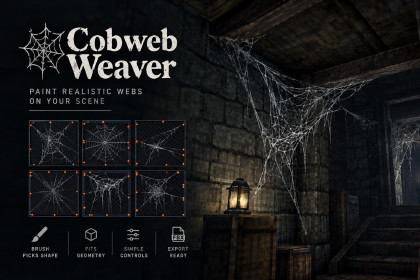
A brush that paints hand-painted spider webs onto the geometry you already have. Each web nails itself to the walls, corners and beams around the cursor. 66 verts a web. Exports to FBX.💬 DISCORD | 📖 DOCUMENTATION | 🎮 DEMOEvery cobweb asset on this store gives you a web.None of them gives you the web THIS corner needs.So you place one by hand, rotate it, scale it, nudge it until the silk stops floating a centimetre off the brick — and then you do that ninety more times, and the room still reads as stickers.Cobweb Weaver paints them instead. Drag over the geometry you already built. Each dab reads the space under the cursor, picks a shape for it, and nails the web to what is actually there.━━━━━━━━━━━━━━━━━━━━HOW IT WORKS, IN ONE PARAGRAPH━━━━━━━━━━━━━━━━━━━━A cobweb texture is not an arbitrary decal. The artist drew threads leaving the frame, and every one of them is a statement that the web is tied to something over there. Cobweb Weaver reads those out of the alpha channel, then casts a short ray at each one into your scene. The ones that find a surface become pins; the ones that find nothing hang free — they carry the sag, they fray at the edges, and they are what the wind moves. Then the cloth warps to fit the pins it got.That is why a painted web looks like it grew on the wall rather than like it was dropped in front of it.━━━━━━━━━━━━━━━━━━━━WHAT YOU GET━━━━━━━━━━━━━━━━━━━━▶ A BRUSH THAT READS THE ROOM• Drag over any geometry in the scene view. Hold Shift to erase, Escape to stop• Each dab casts a fan of rays out of the surface under the cursor and measures the space: how enclosed it is, whether there is a second wall at a wide angle, which way the open air lies• From that it picks one of four forms without being told — Sheet on flat wall, doorways and gaps; Corner when a second surface sits close at a wide angle; Cluster in a nook or a pipe mouth enclosed on nearly every side; Drape hanging off a downward-facing surface with air below it• The scene-view cursor shows the resolved form and how open the space is BEFORE you click• The brush paints from a SET of styles, each with a mix weight and its own selection of webs — because a room dressed from a single sheet reads as stencilled however good that sheet is▶ THREE CONTROLS, NOT THIRTYEverything else has a defensible default. These do not, so they are on the front of the Studio window and write straight back to the style asset:• Reach — how far a web may look for a surface to nail itself to. The one control that decides whether webs look attached or dropped in• Size — metres across the longest axis; every dab picks from the range• Webs in use — click the thumbnails to include or exclude▶ PINS YOU CAN EDIT, IN THREE DIMENSIONS• Click a pin to select it, Ctrl-click to add to the selection, drag one handle to move any number of them anywhere in 3D, Shift-click the cloth to place a new one, Delete to remove what is selected• The cloth rebuilds on every drag event — the warp, the sag and the sway weight follow the pin as it moves rather than catching up on mouse-up• Green pins hold the silk. Amber ones hang free, sag, fray and move most• Moving a pin by hand marks it as holding, because that is what dragging one onto a beam means. Release undoes that▶ ANCHORS YOU CAN EDIT, ON THE SHEET• A canvas of the web at the size a single thread is visible, on a transparency checkerboard. Select drags an anchor, Add places one, Remove deletes one• The wheel over an anchor re-weights it, arrow keys nudge it, Ctrl snaps it to the silk's own box• Each anchor's tick points out of the border it belongs to, and its radius is how much silk arrives there• Re-measure puts one cell back the way the reader found it without touching the other eight▶ EXPORT THE ROOM TO FBX• One Mesh — everything welded together: one renderer, one submesh per material• A Mesh Per Web — every web its own mesh and its own node, in one file. A draw call each, and each keeps its own origin• Materials survive. Webs drawn with different materials become different submeshes, and the file carries a material index per polygon to match• The writer is part of this package — Unity's FBX Exporter is neither used nor required. FBX has no four-component UV, and a cobweb vertex carries four in TEXCOORD0, so the extra pair travels as its own UV set and an AssetPostprocessor folds it back on import. Only files carrying this package's own header marker are ever touched• The painted webs are NOT deleted on export — they move into a deactivated child under the imported model, so the room can still be re-exported after a style change or a round of pin editing▶ THE SILK ALREADY SPEAKS WIND DYNAMICS• Every built mesh carries Deepwave Wind Dynamics' fabric vertex layout, because a cobweb and a tarpaulin are the same animation problem: a sheet pinned at some points and free at others, carrying a wave that grows as it leaves the fixings• This package computes the distance from a vertex to the nearest pin that found a surface and calls it the sway weight; Wind Dynamics reads vertex colour alpha and calls it the anchor weight. Both are 0 where the cloth is nailed and 1 where it hangs free• So a painted web drops onto Deepwave/WindDynamics/Fabric and moves correctly with no preparation step. Wind Dynamics is optional and nothing here references it, imports from it, or fails without it• CobwebVertexLayout documents every channel for anyone writing their own shader▶ BRING YOUR OWN SHEETSAny grid of webs works — white silk in RGB, the web itself in alpha. Create a Cobweb Style, assign the texture, set the grid, press Read Sheet, and check the orange dots on the thumbnails: those are the anchors. If they are in the wrong places, the grid is wrong.━━━━━━━━━━━━━━━━━━━━WHO IT'S FOR━━━━━━━━━━━━━━━━━━━━━Environment artists and level designers dressing interiors — cellars, attics, crypts, abandoned rooms, haunted houses — who want cobwebs that sit in the corners and beams that are actually there, placed in minutes instead of by hand, and merged so the room still culls. It is an editor tool: you place webs while building the level, then ship static meshes (or export them to FBX). No coding required to use it; full C# source is included if you want it. Works whether your project renders on Built-in, Universal or HDRP.━━━━━━━━━━━━━━━━━━━━WHAT IT DELIBERATELY IS NOT━━━━━━━━━━━━━━━━━━━━Read this before buying. A clear "no" prevents a refund.• Not a cloth simulator. Sag, slack and wind are authored and shader-driven. Nothing is solved at runtime• It does not tear or break webs at runtime. A patch is a static mesh• It does not generate silk. The webs come from the texture. Adding a tenth web to a sheet is an art task, not a code task• No impostors. A cobweb at twenty metres is sub-pixel filaments; it fades out instead of billboarding• There is no re-pin, deliberately. Generated placement is a starting point; once it has been touched by hand it is authored data, and authored data does not get regenerated• This package does not touch materials. It generates meshes and stops. Any material will draw the silk━━━━━━━━━━━━━━━━━━━━TECHNICAL━━━━━━━━━━━━━━━━━━━━• Unity 6000.3 and newer. It does not run on 2021, 2022 or earlier Unity 6 versions, and there is no back-port• Dependencies: com.unity.mathematics, and Universal RP 17.3 as a package dependency — that is what guarantees the core render-pipeline shader library the sample's Universal SubShader includes. The project itself may run on Built-in, Universal or HDRP• Full C# source included — 45 scripts, commented, no DLLs: 11 runtime, 20 editor, 6 sample, 8 test• Assembly definitions for runtime, editor, samples and tests; nothing leaks into your build• 59 EditMode tests covering the sheet reader against the shipped art, the mesh warp and trim, placement into a real two-walled corner, the vertex packing, the FBX handedness flip and unit scale, and the submesh split• No other Deepwave package is required. The package compiles and runs with none installed• FBX export has no dependency: the writer is part of this package• Honest note: Universal and Built-in are compiled and verified in this project. The HDRP sample shader has not been run because the project does not have HDRP installedWHAT IS INCLUDED• Runtime and editor source (31 scripts), plus 6 in the sample and 8 test files• Cobweb Studio, the style inspector with its anchor canvas, the patch inspector, the FBX exporter and importer• Two hand-painted cobweb sheets, nine webs each, with their styles and materials• The Cellar sample: a lit brick room, the sample silk shader for Universal, Built-in and HDRP, CobwebWindDriver and CobwebDisturber• README.md, CHANGELOG.md, and a Vietnamese summarySUPPORT• Documentation in the package and online• Email support, typically answered within one working day• Discord for the community• A brush: drag over your geometry and webs attach themselves as you go• Anchors are read out of the artwork's alpha, then raycast into your scene• Four forms picked automatically — sheet, corner, cluster, drape• 66 vertices a web, against ~12,000 for a strand generator• 97 painted webs ship as 2 renderers, merged in one Awake• Meshes are generated, never serialised — 77% off the sample scene file• Pins are editable by hand in 3D; the cloth rebuilds as you drag• Anchors are editable on a canvas of the web itself• Export a dressed room to FBX: one mesh, or a mesh per web• Silk already carries Deepwave Wind Dynamics' fabric vertex layout• Sample silk shader on Built-in, Universal and HDRP• Bring your own sheets — any grid, one button to measure it• Full C# source, 59 tests, no DLLs, Unity 6000.3+Textures. The two cobweb texture sheets (Samples/Art/Textures/cobweb_a.png and cobweb_1_a.png, 4096x4096, nine webs each) were generated with Chat GPT. Work done by Deepwave on top of the generated images: the individual webs were selected from a larger set of generations and composited into a 3x3 sheet; the alpha channel was rebuilt by hand so that only the silk is opaque.

