




SettingsNow: Settings Menu and Key Rebinding
schnurbusch
$17.49
$24.99
30%OFF
(no ratings)
Jump AssetStore
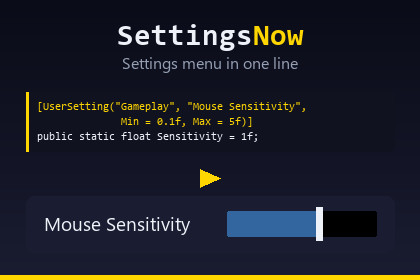
A settings menu in one line: audio, display, quality, language and full key rebinding. Your own settings need one attribute on a variable you already have.No shaders or materials, so every render pipeline works.Key rebinding needs Unity's Input System. Without it the package still compiles and only omits the Controls tab. The menu works under both input paths.TextMeshPro draws the text: a fresh project needs Window > TextMeshPro > Import TMP Essential Resources once, and the menu says so if it is missing.A settings menu that is finished in ten minutes, not in an afternoon.One line puts it on screen:SettingsMenu.Show();No prefab to drag in. No canvas to prepare. No manager component, no scene file, no wizard to click through. The menu builds itself at runtime and takes itself down when the player closes it.YOUR OWN SETTINGS ARE ONE ATTRIBUTEThis is the part that sets SettingsNow apart. Mark the variable you already have:[UserSetting("Gameplay", "Mouse Sensitivity", Min = 0.1f, Max = 5f)]public static float Sensitivity = 1f;That is the whole thing. The row appears under a Gameplay tab, the value is stored, it is applied again before the first scene of the next run, and your variable always holds what the player chose. Read it exactly the way you did before.float and double become sliders. int becomes a whole number slider. bool becomes a switch. Any enum becomes a choice of its values, with readable names. The value you wrote in code is the default, so Reset restores exactly that.Private fields work. Static properties work. There is no registration call anywhere.WHAT YOU GET OUT OF THE BOXAudio: master, music and effects. Drives an AudioMixer if you have one, or raises two events you hook up in a line each if you do not.Display: resolution, window mode, refresh rate, monitor, VSync and a frame rate limit. Rows that mean nothing on the current platform are not drawn, so on WebGL and on phones only the frame rate limit remains.Quality: the levels from your project settings.Language: your list, connected to whatever localization you use through one event. No dependency on any localization package.Controls: full key rebinding for the Input System.KEY REBINDING THAT SURVIVES CONTACT WITH PLAYERSClick a row, press a key, done. Escape cancels. What is underneath took longer than it looks:- Composite parts get their own rows. A WASD stick is four lines, not one unusable entry. Where two rows would read the same, the composite is named: "Move Up (WASD)" against "Move Up (Arrow Keys)".- Conflicts resolve instead of blocking. Pick an input that is in use and the older binding is cleared, with the footer naming the action that lost it. Refusing every clash sounds safer but is unusable on a gamepad, where every button is taken from the start.- Unity's own UI action map is never offered. Rebinding Click leaves a player unable to click the button that would undo it, and the broken state would survive a restart. Its inputs still count as taken, so they cannot be stolen either.- The action is switched off while a row listens, otherwise the very key press being captured also fires the action.- Mouse position, mouse delta, scroll and anyKey are never captured.- A rebind gives up after a few seconds and says why, instead of waiting forever for an input that cannot match the selected control scheme.- Control schemes are rebound separately. Reset one row, one tab, or every binding.Bindings are stored as the Input System's own override JSON, so a change your player made survives you editing the action asset.BUILT FOR A GAMEPAD, NOT JUST CLAIMEDNavigation between controls is wired explicitly rather than left to Unity's geometric guessing, which skips a narrow arrow next to a wide label and leaves rows unreachable. Escape and the gamepad B button are routed through the EventSystem, so cancelling works under the old input manager and the Input System alike.NOTHING TO BREAKNot one image, material, shader or prefab ships with this package. Built-in, URP and HDRP behave identically because there is nothing pipeline specific in it. Full C# source, no DLLs, no dependencies beyond what Unity already gives you.The Input System support sits in its own assembly behind a define constraint, so the package compiles and works with that package absent.SHAPE ITThe setup window holds the heading text, full screen or a window of your size, maximum content width, control width, row, tab and footer heights, three type sizes and six colours. It writes a config asset the first time you change something, which is why the package works straight after import with nothing configured.What it does not do is draw a menu in your own art direction. If you need that, use SettingsNow for the logic, the storage and the rebinding, and build your own front end on top of its catalogue.STORAGEPlayerPrefs by default, under prefixed keys so it cannot collide with your game. A JSON file backend is included, and the backend interface is public, so a cloud save is three methods away. Numbers are written with invariant culture, so a German locale does not turn 0.5 into 0,5 and break the file on someone else's machine.THE MANUAL IS TEN SECTIONSNot a hundred and eighty pages. If you find yourself needing more, that is a bug in the tool and I would like to hear about it.Support: daniel.schnurbusch@web.deSetup- One call: SettingsMenu.Show(). No prefab, no canvas, no manager component, no scene file.- Your own settings: one [UserSetting] attribute on a static field or property. No registration call.Built-in groups- Audio: master, music, effects. AudioMixer parameters in decibels, or events when no mixer is used.- Display: resolution, window mode, refresh rate, monitor, VSync, frame rate limit. Rows hide themselves where the platform makes them meaningless.- Quality: your project's quality levels.- Language: your list, connected through one event. No localization dependency.- Controls: key rebinding, see below.[UserSetting] attribute- float, double: slider with Min and Max- int: whole number slider- bool: switch- enum: choice of its values, names made readable- Works on private members and on static properties- The value in your code is the default- Storage key defaults to Namespace.Type.Member, or set your own- Narrow the scan with [assembly: ScanForUserSettings], or switch it off entirelyKey rebinding (Input System)- Interactive rebind, Escape cancels, timeout with an explanation- Composite parts on separate rows, disambiguated by composite name- Conflicts clear the older binding and name it, or refuse if you prefer- Unity's UI action map excluded by default and protected from being taken- Action disabled while listening; mouse position, delta, scroll and anyKey never captured- Per control scheme; reset one row, one tab, or everything- Overrides stored as the Input System's own JSONInput- Works with the old input manager and with the Input System.- Rebinding lives in a separate assembly behind a define constraint, so the package compiles without the Input System package installed.- Legacy UnityEngine.Input is never called, so it works with Active Input Handling set to "Input System Package (New)".- Cancel is routed through the EventSystem, not through a specific input API.- Navigation between controls is wired explicitly, so every control is reachable with a gamepad.Storage- PlayerPrefs by default, keys prefixed to avoid collisions- JSON file backend included, in Application.persistentDataPath- ISettingsBackend is public for anything else- Numbers written with invariant cultureCustomisation- Setup window: heading, full screen or window size, maximum content width, control width, row/tab/footer heights, three type sizes, six colours- Config asset is optional; without it the defaults applyContents- 21 files, full C# source, no DLLs- Four assemblies: Runtime, Rebinding, Editor, Demo- No images, materials, shaders, prefabs or scenes- Demo builds its interface at runtime, so there is no scene file to openCompatibility- Unity 2021.3 and newer, including Unity 6- Built-in, URP, HDRP and custom pipelines behave identically; nothing in the package is pipeline specific- Desktop, mobile and WebGLVerified- 37 edit mode tests and 34 play mode tests- Compiles warning free with warnings as errors, on the modern and the legacy code pathSupport: daniel.schnurbusch@web.deThe C# source, the documentation and the store artwork were written with the help of a large language model (Anthropic Claude), directed and reviewed by me throughout.How it was used: I described the behaviour I wanted and reviewed what came back, rather than accepting generated code as it was. Several defects were found and fixed that way, including key bindings that could be assigned to Unity's own UI actions and leave a player unable to operate the menu at all.What is verified rather than assumed: the package compiles warning free with warnings as errors on both the modern and the legacy code path, and it is covered by 37 edit mode tests and 23 play mode tests. It was then imported into a separate clean project without the Input System package to confirm it compiles there and that the rebinding assembly is correctly left out. Every behaviour that automated tests cannot reach, in particular interactive key rebinding with a keyboard and a gamepad, was checked by hand.The package contains no AI generated art, audio or third party content. It ships no images, materials, shaders or audio files at all, only C# source and two text documents.

