




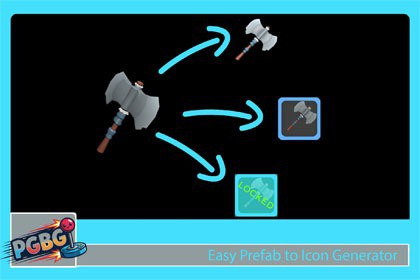
Fast and easy way to make your 3D models/prefabs to Unity Icons/SpriteCompatible and tested on all major Unity versions from Unity 2019 to Unity 6.4.Easy Prefab to Icon Generator is a simple tool letting you transform your models to icons and use them in your game.The tools is intuitive but you will get step-by-step instruction video tutorial how to work with it.YoutTube video tutorial There are no models included in this package!All models on the images and videos are only for reference to showcase functionalities!Features included:- No external dependencies- Tested on all major Unity versions from Unity 2019 till Unity 6.4.- Easily add or remove prefabs using drag and drop functionality.- Rotate objects, zoom in or out or adjust the camera position, rotation and scale.- Customize: Background , add Border and simple text to your items- Resolution selection from 32x32 up to 16384x16384 (depends of your Unity version)- Export to prefer path , resolution and file type (PNG, Sprite or both)- Auto creation of the Export folders separated by resolutionFor more information please watch the video tutorial in YouTube.Compatibility: Unity 2019.4 LTS or higherPlatform: Works on all platforms supported by the Unity Editor (Windows, macOS, Linux)Dependencies: No external dependencies requiredFile Size: Lightweight package, under 1MBDocumentation: Included with step-by-step instructions and video tutorialsOutput Settings:Customizable output folder path , resolution and file type (PNG, Sprite or both)Preview Feature: Displays all selected modelsAutomatic Bounds Calculation: Ensures optimal camera position and size to capture the entire prefab

