





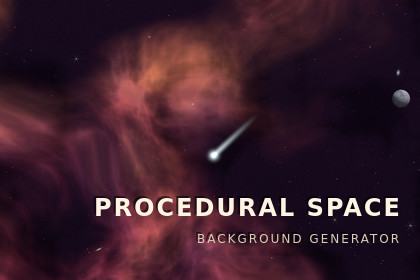
Procedural Space turns a single number into a complete space backdrop — planets, moons, rings, nebulae and star fields, generated on the GPU with no textures. Pixel art or smooth, from one switch.Instead of tiling a starfield image and dropping a planet sprite in the corner, you pick a seed. A sky appears, a ringed gas giant at the edge of the frame, a moon crossing in front of it, coloured gas behind. Press Randomize until you find one you like, then keep it: the same seed always builds the same sky, so a backdrop costs one integer to save.It moves on its own, slowly. Planets turn, moons pass behind their worlds, stars twinkle, and now and then a meteor crosses. Every layer drifts against your camera at its own rate, so moving gives you real depth.Two looks, one switch, pixel art with a real pixel grid, posterized shading and dithering, or smooth with soft edges and continuous gradients.13 presets, each with a line saying what it is for, from a quiet backdrop that stays out of the way to a four-colour Game Boy sky.Tune anything in a tabbed settings panel with search, and see it update live in the editor.Snapshots save a seed together with every setting, so a sky you liked survives you changing your mind about the settings later.No textures at all. One draw call, tiny download, sharp at any resolution and aspect ratio.2D and 3D URP, orthographic or perspective. Sits behind your sprites by sorting layer.Drivable from script, change the seed on level load, force a nebula sky for one chapter, swap the whole preset between scenes.Drop in the prefab and it already looks like something.RequirementsUniversal Render Pipeline. The shader is written for URP and does not compile under the Built-in pipeline or HDRP.Unity 2022.3 LTS or newer. Developed on Unity 6.3 (6000.3, URP 17.3) and verified against Unity 2022.3 LTS (URP 14) as well, on Vulkan and on OpenGL core, with both the 2D Renderer and the Forward renderer.Input System - required only by the Demo folder, and only for the mouse-look camera in the sample scene. The runtime code does not use it, and deleting Demo/ removes the dependency entirely.Works with both the URP 2D Renderer and the standard URP renderer; orthographic and perspective cameras are both supported.How it rendersThe entire sky is composed per fragment on a single quad: one draw call, one material, and zero texture assets of any kind. Star fields, gas, dust, galaxy discs, asteroid belts, planet surfaces, moons, rings and meteors are all evaluated from mathematics at the pixel being shaded.Consequences worth knowing:Package size is source code only - there are no images to download or import.Resolution independent. There is nothing to become blurry, no atlas to rebuild, no seams, and no mip levels to get wrong.Cost scales with screen pixels, not with scene contents. Adding planets is close to free; rendering full-screen is what costs.Per-instance data is uploaded through a MaterialPropertyBlock, so any number of backgrounds in a scene share one material asset without instancing breaks.Composition modelEach sky is drawn from a seed in three tiers:Archetype - what dominates the frame. Eight of them: Deep Space, Solar System, Nebula Field, Planet Orbit, Star Cluster, Galaxy Vista, Asteroid Field, Orbital System. This is what makes skies differ in structure rather than only in colour.Generator - within that archetype: gas density and style, star density across three depth layers, how many bodies and at what scale.Planet kind - eight, each with its own surface generator: Rocky, Gas Giant, Ice, Lava, Terran, Star, Desert, Toxic.Limits per sky: 6 planets and 6 moons on screen at once. Bodies can be tiled so sustained camera travel or drift never empties the frame.DeterminismThe same (profile, seed, camera size) always produces the same sky, on every machine, platform and Unity version.All lattice hashing is integer arithmetic, so results are bit-identical across graphics backends rather than depending on a driver's floating-point choices.The generator uses a fixed PRNG of its own rather than System.Random, whose algorithm is not contractual between .NET versions.Decisions are drawn from independent streams addressed by seed, domain and slot. Practically, this means changing one setting changes one thing: adjust the planet-kind weights and the planets change kind, while their positions, moons, lighting and nebula stay exactly as they were.Safe for procedurally generated levels, replays, and "this planet is that planet" identity - a sky costs one integer to store.What is animatedPlanet rotation with longitude-locked surface features, cloud layers turning at their own rate, moons on inclined 3D orbits passing in front of and behind their planet, ring shadows cast onto the planet by ray–plane intersection, twinkling and occasionally blinking stars, drifting asteroid rubble, shooting stars, and a constant sky drift so the view travels even with a static camera.Motion is deliberately slow. A backdrop that can be watched is a backdrop that pulls attention off the game.Rendering modesOne shader, one switch:Pixel art - world-space grid snapping, luminance posterization to a chosen number of levels, ordered (Bayer) dithering confined to transitions, hue-shifted shading, and a per-body surface resolution that keeps detail density even across body sizes. The grid is in world space, so match Pixels Per Unit to your camera - the inspector checks the ratio and offers to align either side.Smooth - anti-aliased limbs, continuous terminators with a twilight band, relief-normal surface lighting, atmospheric scattering shells, limb darkening, diffraction spikes on the brightest stars, and distant unresolved galaxies.Interstellar dust, which absorbs the layers behind it, is drawn in both modes.ParallaxSix independently configurable layers: nebula, far / mid / near star fields, and a body band interpolated by each body's own depth. On-screen shift is camera displacement × parallax, plus an optional constant drift velocity. A master strength scales the whole ladder without disturbing the ratios between layers, which is what actually produces the sense of depth.CustomisationSpaceBackgroundProfile - a ScriptableObject holding 67 settings. Thirteen presets ship with the package (seven pixel art, six smooth), each with a one-line description of what it is for.Settings panel - tabbed by subject (Style, Sky, Motion, Deep Sky, Light), with a search box across every setting, a per-tab reset, and rarely used controls folded away. Editable inline on the component or on the asset.Live - edits apply to every background using that profile immediately, in edit mode, without entering play.Seed history - step back and forward through the seeds you have rolled, so passing a sky you liked does not lose it.Snapshots - a seed alone is only half a coordinate, since it means something only against a given profile. A snapshot asset stores the seed, the archetype mode and a complete copy of the settings, and restores that exact sky afterwards even if the profile has moved on. Stored as JSON, so it diffs in source control and a snapshot from an older version still loads under a newer one.Scriptingusing BirichStudio.ProceduralSpace;var bg = GetComponent();bg.Rebuild(12345); // compose a specific seedbg.RandomizeSeed(); // roll a new onebg.SetArchetype(SkyArchetype.NebulaField); // force an archetype (null = from the seed)bg.Profile = myProfile; // swap the whole style presetSkyArchetype current = bg.Archetype; // what this seed composedbg.LoadSnapshot(mySnapshot); // restore a saved sky, settings and allIncludedRuntime and Editor assemblies (assembly definitions provided)The shader and its material13 preset profilesA configured prefab and a GameObject > creation menuA demo scene that cycles through every presetFull documentation and a changelogSetupGameObject > Birich Studio > Procedural Space > Space Background, or drop in the prefab. Both arrive with a preset already assigned and the camera fit attached; there is nothing to configure before it looks like something.Judge framing in the Game view - the sky anchors to whichever camera renders it, so in the Scene view it follows the Scene camera by design.LimitationsURP only.6 planets and 6 moons per sky.The backdrop is a screen-facing quad; it is a background, not a place you can fly into.Full-screen fragment cost. On low-end mobile, reduce the render target or turn down the deep-sky layers - dust, distant galaxies and diffraction spikes are each a separate setting that can go to zero.Built with AI-assisted coding.

