




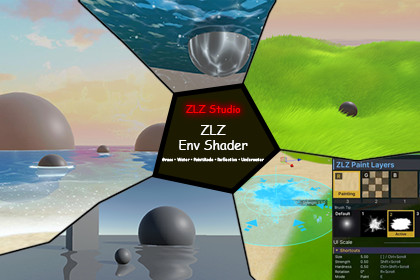
Rendering PipelineUniversal Render Pipeline (URP)Forward RenderingForward+ RenderingWhat is ZLZ Env Shader, and what is it for?ZLZ Env Shader is a toolset for building anime-style environments in Unity URP, covering ground surfaces, grass, water, fog and FX in a single package.Everything in one package - Build a whole scene from one asset, not five that may not fit togetherMade for ZLZ Anime Shader - One shared art direction, so characters and environments never clashPerformance first - Every feature is designed around its rendering cost from day one, not optimized after the factReal PC and Mobile support - Scale quality to your target platform without changing how you work-------------------------------------------------------------------------------▶ Demo (WebGL | 1920 ×1080) : DemoShowcasing the rendering results of ZLZ Env Shader on WebGL-------------------------------------------------------------------------------⭐ Features - Environment ShaderPaint Mode : Blend up to 4 surface layers by painting, with custom brush supportTriplanar : UV-free texture mapping with no stretching on cliffs or sloped groundPlanar Reflection : True reflections from real scene geometry, with adjustable blur, distortion and layer filteringNormal Map : Normal map support for added surface detail without extra polygonsSpecular & Metallic : Control over glossiness and metalness, tuned for anime-style artStochastic Sampling : Breaks up visible texture tiling across large areasSurface Accumulation : Adds snow, sand or dust layers that build up based on surface directionWind : Wind system for leaves and foliage, driven from a single global controllerEmission : Controls emissive color and intensity for glowing objects in the sceneFog : Stylized height fog blended with the sky, adding depth to every shot-------------------------------------------------------------------------------🧩 Features - GrassGrass Grow : One click grows grass across the whole scene, following a mask textureGrass Paint Brush : Add or remove grass by hand in the Scene view, with the automatic placement left intactGrass Material : Grass materials with presets for color, height and blade shapeGrass Global Wind : One global wind drives every blade across the map in the same directionGrass Optimized : GPU-instanced rendering with every blade sharing one meshGrass Color Camera : Grass picks up the ground color beneath it to blend with the terrainGrass Interaction : Blades bend and part around characters or objects moving through themGrass LOD : Distance-based detail reduction to hold framerate in large scenesGrass Edges : Define grass boundaries to carve paths and clearings without erasing blade by bladeGrass Resolution : Renders grass color at half or quarter resolution to cut overdrawGrass Mesh Baker : Bakes a grass texture into a real silhouette mesh-------------------------------------------------------------------------------✨ Features - WaterWater Interaction : Ripples that trail characters or objects moving across the surfaceWater Waves : Surface waves with adjustable direction, height and frequencyWater Floater : Floating objects that rise, fall and tilt with the real wave motionWater Foam : Foam along shorelines and around objects moving through the waterWater Ring Wave : Expanding ring waves from impact points, for objects dropped in or hits landingWater Sparkle : Shimmering light on the water surface for an anime lookWater Caustics : Animated refracted light patterns projected onto the underwater floorUnderwater : A full underwater view with depth-based fog and a seamless above/below surface transition-------------------------------------------------------------------------------📌 TutorialsWebsite : https://zlz-studio.github.io/#envDocumentation : https://zlz-studio.github.io/env/shader/paint-mode/Youtube : https://www.youtube.com/@ZLZ-zhugeliangz-------------------------------------------------------------------------------📧 SupportIf you encounter any issues or have further questions,please contact: zlzstudio.production@gmail.comThank you for supporting ZLZ Env ShaderAI-assisted tools were used during development to speed up parts of the coding work. All code was reviewed and tested by the developer. The demo scene includes one third-party 3D model (mushroom house) that may have been created with AI by its original author. It is used for demonstration only and is not required for the shaders to work.

