





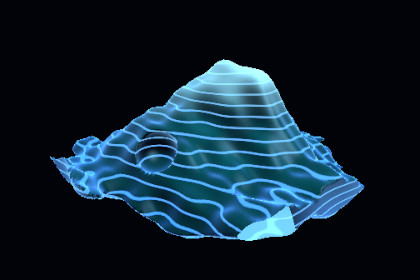
Generate and animate GPU-driven marching-cubes terrain in realtime with editable topology, glowing contours, and a ready-to-use URP showcase.Realtime Marching Cubes Terrain is a focused Unity 6 URP toolkit for producing animated procedural surfaces entirely on the GPU. A compute shader evaluates the scalar field and emits the visible terrain mesh while the included runtime component exposes practical controls for resolution, scale, threshold, animation, and bounds.The package includes a configured prefab, a polished demonstration scene, a purpose-built URP surface shader, and a detailed PDF manual. The showcase demonstrates moving cavities, layered ridges, contour illumination, and continuous topology changes without requiring preauthored terrain meshes.Use the system for sci-fi landscapes, holographic maps, magical formations, organic growth, experimental worlds, or as a foundation for your own signed-distance field. The compute shader is supplied as editable source so experienced users can replace the sample field with project-specific logic.- GPU compute-shader scalar-field evaluation and triangle generation- Runtime marching-cubes topology updates- Adjustable grid resolution, world scale, iso level, and animation speed- Configurable bounds for correct visibility and culling- URP shader with base, accent, emission, rim, and height-contour controls- Ready-to-use GPU Marching Cubes Terrain prefab- Prefab-based sci-fi showcase environment- Demonstration scene with cinematic presentation- Editable C# runtime source, compute shader, and URP shader- Detailed PDF user manual with setup, customization, API, performance, and troubleshooting guidance- No third-party runtime assets or dependencies- One organized product root folderRequirements and compatibility- Unity 6000.0.30f1 or newer Unity 6 patch release- Universal Render Pipeline (URP)- Compute shader support- Shader Model 4.5-capable target hardwarePerformance noteGrid resolution directly affects compute cost and generated triangle capacity. Start with the supplied prefab values, profile on the lowest target GPU, and increase resolution only after measuring the complete scene.AI was used during code refactoring and scene preparation.

