




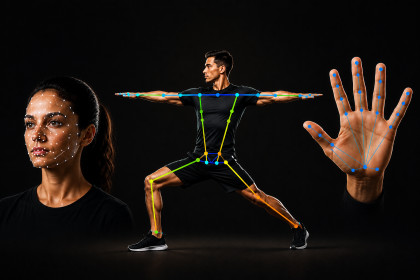
Add live face, pose, hand, and gesture and more tracking to your Unity project using on-device ML. Runs on your device. Four demo scenes and simple C# examples. Works on Windows and MacImperello Vision adds live face, pose, hand, and gesture tracking to your Unity project using on-device ML. It runs on the player's device, no cloud and no API keys.Use it for avatars, UI, fitness games, gesture controls, object-aware gameplay, background effects, stylized portraits, and similar features.What you can doFace tracking - follow facial points for avatars or effectsPose tracking - follow body joints for movement and gamesHand tracking - follow hand points for interactionGesture recognition - detect gestures like thumbs up or open palmObject detection - find objects in the webcam or your own video fileImage classification - label the whole frame (for example everyday objects)Face bounds detection - lightweight face boxesImage segmentation - person/selfie mask for background removal and effectsFace stylizer - turn a face capture into a stylized avatar-style lookHolistic landmarker - face, pose, and hands together on one frameFitness Trainer sample - pose-based rep counter for Squats, Jumping Jacks etcFitness Trainer sample (new in 1.2.0) Ship a workout-style experience without building pose logic from scratch:Counts Squats, Jumping Jacks, and Arm Raises from a live webcamOn-screen coach guide, rep goal, timer, and Pause / Resume / Reset / FinishFull-body tracking check so out-of-frame guesses do not falsely completeEditable sample scripts you can copy into your own fitness gameOpen via Tools → Imperello Vision → Open Fitness Trainer SampleHow to startImport the package into Unity.Open a sample scene (Face, Pose, Hand, or Gesture).Press Play with a webcam connected.Optional: use Tools → Imperello Vision → Setup Tools to confirm plugins and models are OK, or to open samples from one place.More help: Documentation/ImportGuide.mdCode examples: Documentation/GettingStarted.mdAI SkillsAI Skills Imperello Vision includes project AI Skills under AI/Skills/ to help you set up and integrate faster with AI agents:Works with Unity AI Assistant (Unity 6 → Edit → Preferences → AI → Skills)Compatible with coding agents that read your project (Cursor, Claude, GitHub Copilot, Windsurf, and similar)Skills cover setup, all ten vision features, and the Fitness Trainer showcaseWhat's includedImperello libraries ready to useNative plugins for Windows and MacModel files for all supported vision features10 editable demo scenes with short in-scene help overlaysEditable demo scenes with short in-scene help overlaysPlatformsWindows - Editor and built gamesMac - Editor and built gamesRequirementsUnity 6.0 or newer (tested on 6.3 LTS)Webcam for live demosTested on Windows 64-bit and Mac (Apple Silicon)You can use this in commercial Unity projects. Open-source parts are licensed under Apache 2.0 and similar terms; see Third-Party Notices.txt in the package.Key featuresLive face, pose, hand, and gesture tracking from a webcamOn-device ML - runs on the player’s device, no cloud, no API keysFour tracking modes: Face, Pose, Hand, GestureAI Skills included, five project skills for Unity AI Assistant and compatible coding agents (Cursor, Claude, Copilot, Windsurf, and similar tools)Works in Unity Editor and in built games (Windows and Mac)Four ready-to-use demo scenes (editable sample scripts)Simple C# examples for your own scenesOptional Setup Tools window to check plugins and modelsML model files included (Face, Pose, Hand, Gesture)Native plugins for Windows and Mac includedDocumentation: Import Guide and Getting Started code guideCommercial use allowed (see EULA in the package)Third-party open-source licenses included (see Third-Party Notices.txt)Assistance in documentation, minor code refinements.

