







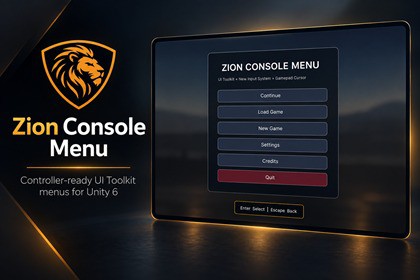
Add gamepad-ready main and pause menus, save and load screens, and runtime input rebinding to your Unity 6 game with UI Toolkit.Zion Console MenuStop rebuilding the same menus every time you start a new Unity project.Zion Console Menu is a Unity 6 menu system built with UI Toolkit and the New Input System, with controller-ready navigation, settings, input rebinding, Save/Load screens, pause menus and game-flow integration.It gives you a complete foundation for a Main Menu, Pause Menu, Settings Menu, Controls Menu and Save/Load UI without forcing you to adopt a particular gameplay, scene-loading or save framework.Designed for Unity 6 and tested in Unity 6.0, 6.3 and 6.6.Complete Unity 6 Menu SystemThe package includes a polished Main Menu and Pause Menu, Settings, Controls, Credits, Save and Load screens, confirmation dialogs and a loading overlay.Navigation history is handled automatically, so opening Settings from the Pause Menu returns to Pause, while opening it from the Main Menu returns there instead.Version 1.1 adds dedicated Save Game and Load Game screens with configurable slots. Zion Console Menu provides the UI and integration layer rather than forcing its own save format. Your save system can provide slot information and handle save, load, overwrite and delete requests through the supplied provider interface.A demo provider is included so you can test the complete workflow straight away.Controller and Gamepad Menu SupportGamepad support is built into the system rather than added as an afterthought.Features include:Left-stick virtual cursorD-pad navigationSubmit and Cancel controlsRight-stick and trigger scrollingAutomatic keyboard, mouse and gamepad promptsRuntime keyboard and gamepad rebindingCorrect UI layering for menus, dialogs and the virtual cursorMaster, Music and SFX AudioMixer controlsFullscreen, resolution and VSync settingsPlayerPrefs persistenceIndividual binding reset and Reset AllDuplicate binding checksSave and Load slot UIReusable confirmation dialogsNew Game, Continue, Resume and Return to Main Menu hooksAsynchronous loading-screen supportIntegrates with Your Existing Save and Game SystemsZion Console Menu does not require ZionTPS or any other gameplay framework.The Game Flow Bridge can use built-in scene loading or connect to your own systems through UnityEvents. Continue availability can also be driven by your save system, so the button can respond automatically when save data becomes available.The same approach is used for Save and Load. Zion Console Menu owns the menu experience; your project remains responsible for the actual game data.Unity Menu Setup Wizard and DiagnosticsThe included Zion Setup Wizard handles much of the repetitive scene configuration, including menu registration, Panel Settings, Input Actions, supporting services, Save/Load screens and confirmation dialogs.Built-in diagnostics help identify common problems such as missing screen IDs, incorrect UIDocument ordering, mismatched Input Action Assets, missing input actions and configuration errors.A copyable diagnostic report is also included to make troubleshooting and support easier.Included documentationThe package includes a Quick Start guide, full User Guide, Game Flow documentation, Save System integration guidance and troubleshooting information.Frequently Asked QuestionsDoes Zion Console Menu require coding?No coding is required for the standard setup. Developers can optionally connect custom systems through UnityEvents and the provided interfaces.Does it support gamepads?Yes. Gamepad support includes D-pad navigation, a left-stick virtual cursor, gamepad prompts, scrolling and runtime rebinding.Does it include a save system?No. Zion Console Menu provides Save and Load screens and integration hooks while your project remains responsible for the actual save data.Does it require ZionTPS?No. Zion Console Menu is completely independent and can be used in any Unity 6 project.Does it work with Unity UI Toolkit?Yes. The runtime menu system is built with UI Toolkit.RequirementsUnity 6Tested with Unity 6.0, 6.3 and 6.6New Input System onlyRuntime UI ToolkitNo third-party runtime framework required.Selected demo sounds from Kenney UI Audio are included under the CC0 licence. Full details are provided in the Third-Party Notices file.Documentation: https://docs.ziongames.co.uk/docs/zion-console-menuProduct page: Zion Console Menu | Controller-Ready Unity 6 Menu SystemWebsite: https://ziongames.co.ukDiscord: Here

