



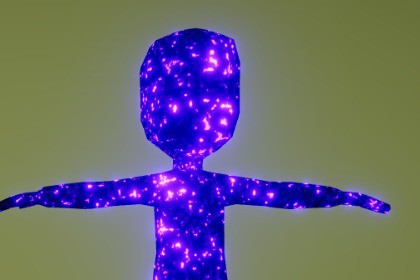
Customizable URP Shader Graph for animated dark energy, shadow magic and corrupted surface effects, including demo materials, character animations and a showcase scene.Animated Dark Energy Shader URP is a customizable Shader Graph package for creating animated dark energy, shadow magic, corruption and supernatural surface effects in Unity projects using the Universal Render Pipeline.The shader combines a base texture and primary color with animated procedural noise, a secondary energy color and HDR emission. The moving noise patterns create a flowing energy appearance across the surface of a mesh without requiring particle systems or runtime animation scripts.The effect is suitable for characters, enemies, bosses, magical creatures, weapons, armor, artifacts, portals, energy objects, corrupted environments and fantasy or science-fiction props.All major visual properties can be adjusted directly through the Material Inspector. Users can control the main texture, primary color, secondary color, emission color, emission intensity, animation speed, noise tiling, noise scale, noise distribution, metallic value and smoothness.Two configured demonstration materials are included:• Dark Energy configured demonstration materials are included:• Dark Energy Character• Dark Energy CubeThe package also includes a ready-to-use demonstration character, three animation clips, an Animator Controller and a demo scene. The included Idle, Run and Jump animations help demonstrate how the animated dark energy pattern behaves on a moving and deforming character mesh.The complete Shader Graph is included and can be opened, inspected and modified. The core energy pattern is procedurally generated, while an optional main texture can be assigned to add surface details.Bloom is recommended for obtaining a stronger glow around the HDR emission areas.Render Pipeline• Universal Render Pipeline• Created with Unity Shader Graph• Built-in Render Pipeline is not supported• High Definition Render Pipeline is not supportedIncluded VFX• Animated Dark Energy Surface• Flowing Shadow Magic Pattern• Procedural Corruption Effect• HDR Energy EmissionShader features• Animated procedural noise• Flowing dark energy pattern• Primary and secondary color controls• HDR emission color• Adjustable emission intensity• Adjustable animation speed• Adjustable noise tiling• Adjustable primary noise spread• Adjustable secondary noise spread• Adjustable noise dimension• Optional main texture• Main texture intensity control• Metallic control• Smoothness control• URP PBR surface rendering• Works on static and animated meshes• No particle system required• No runtime animation script requiredIncluded content• 1 editable URP Shader Graph• 1 main animated dark energy VFX• 2 configured materials• 1 demonstration character model• 3 character animation clips• 1 Animator Controller• 1 character prefab• 1 demonstration scene• 1 reflection probe texture• URP Renderer asset• Universal Render Pipeline asset• Third-party license noticeIncluded materials• Dark Energy Character• Dark Energy CubeIncluded animations• Idle• Run• JumpMaterial controls• Main Texture• Main Texture Power• Main Color• Secondary Color• Emission Color• Emission Intensity• Animation Speed• Main Noise Spread• Secondary Noise Spread• Main Noise Dimension• Noise Tiling• Metallic• SmoothnessTextures• Core dark energy pattern is procedurally generated• No external noise texture is required• 1 included reflection probe texture• Reflection probe resolution: 768 × 128• Reflection probe format: EXRCharacter license• Demo character source: Kenney• Original asset: Animated Characters Protagonists• License: CC0 1.0 Universal• Commercial use permitted• Attribution is not required• License notice included in the packageRequirements• Universal Render Pipeline• Shader Graph• HDR enabled for stronger emission results• Bloom recommended for visible glowNumber of VFX• 1Custom shaders• Yes• 1 fully editable custom URP Shader GraphKnown limitations• Designed specifically for the Universal Render Pipeline• Final appearance depends on lighting, exposure and post-processing settings• Bloom is required for emission to create a visible surrounding glow• The effect follows the UV layout of the assigned mesh

