







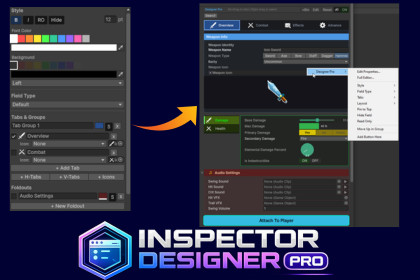
Inspector Designer ProThe Complete Visual Inspector Customization Tool for UnityStop writing boilerplate custom editor code. Inspector Designer Pro lets you fully customize any MonoBehaviour inspector through a visual editor window — no C# scripting, no custom drawers, no PropertyAttributes. Right-click any field, pick your options, see results instantly.And when you're happy with it, one click bakes your design into a standalone C# editor script that doesn't need this tool at all.100% OFF FOR LIMITED TIME. [DOCUMENTATION] | [VIDEO TUTORIAL]⭐ BAKE TO CODE — ZERO DEPENDENCY⭐This is what sets Inspector Designer Pro apart.Design visually, then hit Bake. You get a complete, readable [CustomEditor] script in Assets/Editor/ with no reference to Inspector Designer Pro whatsoever.Ship without the dependency — Asset Store publishers and studios can deliver polished inspectors without requiring customers to own this toolDelete the tool after baking — every baked inspector keeps working exactly as designedNo runtime cost — plain UnityEditor code in an Editor folder, nothing in your buildOwn the result — readable, commented, yours to hand-edit if you want to take it furtherTeam-friendly — ordinary source files, diffable and reviewable in pull requestsThe baker reproduces your full design: field types, styling, tabs, foldouts, cards, headers, images, icons, fonts, buttons, conditions, validation, search, and pinned fields. Fonts, icons and images are referenced by asset path, so the file stays genuinely standalone.Use it as a design tool and remove it, or keep it installed and re-bake whenever you iterate.⭐KEY FEATURES⭐Visual Editor — Zero Code RequiredCustomize any MonoBehaviour from a dedicated editor window or straight from right-click context menus. Everything saves to reusable ScriptableObject profiles — one per component type, version-controlled and shareable across your team.12 Field Type OverridesChange how any field is displayed:Slider with custom fill, track and thumb color · Progress Bar with format labels · Knob rotary dial · Curve Editor inline · Percentage Field · Toggle Button · Styled Dropdown · Button Tabs for enums and ints · Reorderable List · Image Preview · Text Box — a proper string field with rounded background, placeholder text, multi-line mode, max length and a live character counter.Smart type filtering means you only ever see options that work for that property.Tab GroupsThree orientations — horizontal, vertical, and icon-only. Control active and inactive tab colors, text colors, font size, tab bar background, selected outline, content background and border, gradient fills, per-tab icons (built-in or your own textures), height and padding.Foldouts & CardsCollapsible foldouts with styled headers, icons, content backgrounds, borders and padding. Or use cards — elevated panels with header bars, rounded corners, drop shadows and icons. Pair cards or foldouts side by side in two columns to make real use of inspector width.Header Images & Clickable BannersGive your inspector an identity. Drop a hero banner at the top, or place images anywhere between fields. Full control over height, width, alignment, offset, margins, borders and background — and attach a URL to make any image clickable, with a link cursor and tooltip. Ideal for branding, docs links or support buttons baked right into your component.Custom FontsSet one font for an entire inspector, then override it on individual fields where you want emphasis. Bakes correctly into generated editors.Conditional Visibility — With Bulk AssignmentShow or hide fields based on other values, using 8 operators (Equals, Not Equals, Greater/Less Than, Greater/Less or Equal, Is True, Is False).The time-saver: marquee-select every audio setting, choose Show When → Enable Audio is ON, and they're all wired in one step. A Custom Condition dialog handles enum, int and float sources for the whole selection at once.Field ValidationRange checks, Not Null for object references, Not Empty for strings, positive-number enforcement, and custom messages — all with inline visual feedback.Layout ElementsHeaders with background colors, icons and bold styling · separators · adjustable spacing · box groups · inline images.Custom ButtonsAdd buttons that call any public method on the component. Style the label, background, text and outline colors, corner radius, size and font. Group buttons into rows, place them before any field or at the bottom.Field StylingPer-field font color, size, bold, italic, font override, background color, text alignment, built-in icons, custom display names and tooltips.Workflow ToolsMarquee multi-select — drag to select, then bulk-apply styling, grouping, field types, visibility, pinning and read-onlyPinned fields & search — keep key properties at the top, find anything by nameDrag-to-reorder — arrange fields exactly how you wantRight-click everything — fields, headers, foldouts, cards and tabs7 style presets — Minimal, AAA Dark, Designer Friendly, Technical, Mobile UI, Modern Pro, RPG StyleFull undo — every profile change is Ctrl+Z reversibleAudioClip playback — preview clips in the inspector without entering Play modeGlobal StylingSet per-inspector defaults for background, font, font color, size and spacing. Fields you've individually restyled keep their own look; everything else follows the global values — so one change restyles a whole component.WHO IT'S FORAsset Developers — ship professional inspectors with your packages, baked to standalone code so customers never need this toolStudios & Agencies — hand off client projects with no third-party editor dependenciesGame Designers — organize gameplay inspectors without waiting on a programmerTechnical Artists — build material-editor-quality inspectors for tool componentsSolo Developers — save hours of editor boilerplate on every projectTeam Leads — enforce consistent inspector layouts across the whole projectLarge Components — tame 50+ field monsters with tabs, foldouts, cards, search and pinningWHAT IT SOLVESCustom editors and PropertyDrawers are slow, repetitive, and permanent maintenanceUnity's default inspector is flat and unreadable for complex componentsNon-programmers can't touch inspector layoutsInspector styling drifts between scripts in the same projectNo built-in way to add tabs, foldouts or cards without codeEvery other inspector tool locks your project into a permanent dependency — this one lets you bake and walk away

