






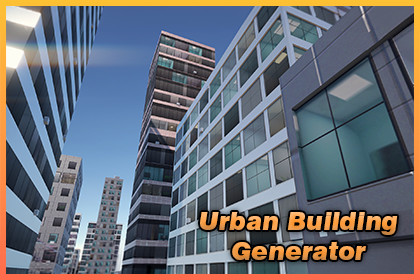
Create optimized city buildings in seconds! Generate city with buildings and roads for driving games, open world maps and more without the cost of performance.Fill your scene with optimized, great looking background buildings in seconds. Urban Building Generator creates static, single draw call building prefabs. Mobile ready city backdrops for driving games, open worlds, and more, without the cost of high poly models.Buildings range from clean low poly boxes to detailed facades with balconies, cornices, and fake window interiors. You choose the detail level per building.Includes the generator window, a zone district component, a demo city scene, and full documentation.🎯 Update V2.0.0 - Now you can generate city with roads!Please check the release notes.WebGL Demo & Documentation 📚Key FeaturesOne material, one draw call per building: Flat shaded geometry mapped onto a single albedo and emission atlas, with normal maps for richer lighting. Built for background fill and mobile budgets.Built-in, URP and HDRP supported: Easily convert materials with one-click for any render pipeline.4 archetypes: Tower, Shop, Apartment, and House. Each has its own massing, window relief, and roof style: gabled roofs and chimneys on houses, roof clutter elsewhere.4 massing models: Slab, Setback, Podium, and L plan keep towers from looking repetitive.Generate city with roads: Asphalt / gutter / curb / sidewalk ribbon, square-return junction pads with dropped-curb crosswalk sockets, and a separate markings layer (zebra crosswalks, dash centerline, edge lines). One drivable MeshCollider shares the exact mesh the renderer draws.3 detail levels: Simple, Standard, and Detailed. From lean mobile boxes to facades with sills, balconies, cornices, pilasters, and recessed storefronts. Automatic LODs swap detail out by distance.Seeded and reproducible: The same seed always rebuilds the same building or block, at every detail level. Your city stays deterministic and version control friendly.No overlapping buildings: A built-in placement guard nudges every new building to the nearest free spot, so rows and zones never clip or intersect. It also avoids obstacles you mark and can snap buildings to terrain.Fake InteriorsWindows show parallax room interiors behind tinted glass, rendered entirely in shader with no extra draw calls. Each window is different: some blinds drawn, some clear, with grazing angle reflections and lit rooms at night. One global toggle. Works on Built-in and URP, with a clean fallback on HDRP.Detail & ExtrasAdd facade extras like AC units and wall vents for extra realism. Use the Detailed tier for close up hero buildings while keeping distant fill on Standard or Simple. All optional and seed stable.WorkflowsSingle building: Set parameters and Generate + Place, or paint buildings directly into the Scene view with a stamp brush.Street: Fill a road with a varied row of buildings on both sides in one click, straight or along a path.Zones: Drop a BoxCollider district marker, pick an archetype mix and palette pool, and fill it with a seeded block of buildings.City Blocks: Generate a whole grid of styled districts with avenues and skyline falloff in one click.Manage: A live inventory of every generated building. Overview stats, a filterable district list, click to select, and per building health flags with bulk fixers.District PresetsIncluded presets capture a full district look: archetype mix, palette, gaps, and detail. Apply a consistent style across zones and city blocks, or capture and save your own.Modern Editor UIBuilt on Unity's UI Toolkit with a clean dark theme and two clear zones: Build (Single / Street / Zones) and Manage. A pinned action bar keeps the Generate button, a live material health badge, and a Tools menu (Regenerate All, Bake UVs, Clean Unused, and more) always in reach.Built-in, URP, HDRPAll three pipelines are auto detected with zero configuration. If you switch pipelines, the Fix Materials button rebuilds all facade materials in one click, and a live material health badge warns you before any building renders pink. The problem never reaches your build.Palettes4 baked facade atlases (Light Gray, Brick, Graphite Curtain, White Plaster) with matching emission, normal, and specular maps for realistically lit night windows. The atlas layout is documented, so you can author your own in any image editor.Day & Night, GI ReadyA Night Lights dial controls per facade window emission, with Day, Dusk, and Night presets. It tints the shared facade materials, so one draw call per building is preserved. Need baked lighting? Turn on Bake Lightmap UVs to generate per building lightmap UVs and mark buildings GI contributing.Runtime GenerationGenerate buildings at runtime, not just in the editor. The geometry engine ships in a Runtime assembly with no editor dependencies, so your game can build cities on the fly.Fits Your PipelinePlace buildings as lightweight scene instances or save them as prefab assets. Your choice. Regenerate every prefab in place with GUIDs preserved and automatic LODs. The Clean Unused tool scans your whole project, lists unreferenced generated meshes and prefabs, and deletes after you confirm.Getting StartedA full user guide takes you from import to your first city in minutes, and a changelog tracks every update.• Minimum supported and compatible Unity editor version is Unity 6.3.Outputs static prefab + mesh assets; nothing runs at runtime.• One material, one draw call per building: Single 1024×2048 albedo + emission atlas, flat-shaded.• URP, HDRP and Built-in render pipelines, auto-detected; one-click Fix Materials when you switch pipeline.• Clean, assembly-isolated code (Runtime + Editor asmdefs), namespace BoneCrackerGames.BuildingGen, no third-party dependencies.• Includes a demo city scene and full documentation (user guide and atlas-layout spec).

