



UNI VFX 6D: Special Effects - Dissolve and 4 others in 1
Asset Mage W
$19.99
$39.99
50%OFF
(no ratings)
Jump AssetStore
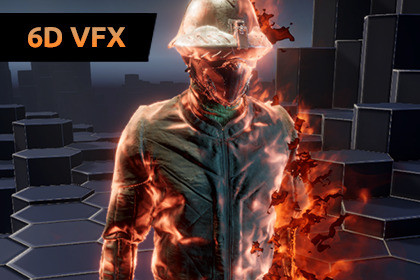
Advanced system combining VFX and material effects, allowing up to 5 Special Effects on your characters/objects at once. Features a high-fidelity Dissolve for stunning character transitions.Requires Visual Effect Graph and Shader Graph. You can install those via Package Manager. These packages must be installed before this VFX. After installing them, restart the editor before importing the VFX pack.If using HDRP, import the HDRP package in the UNI VFX 6D folder.Detailed Manual is included in 'UNI VFX 6D' folder.✨ UNI VFX 6DUniversal visual effects for Unity URP and HDRPCombines VFX and material effects that are both controlled by the script.Each character/object can use 5 Special Effects: Overlay, Additional Emission, Highlight, Pulse and Dissolve.You can freely combine Special Effects with each other to display multiple statuses of your characters at the same time. Editor tools are included to make the integration with your characters a breeze.Uses performant GPU particle systems made in Visual Effect Graph.Enhanced with 6-way smoke lighting and other lit elements that seamlessly blend effects into your environment.Easily customisable VFX without the need to enter the Visual Effect Graph Editor.Up to 4k textures for maximum detail. Flipbooks use motion vectors for silky smoothness and the effects look great even in slow motion.A total of 120 Special Effects. Full content breakdown in the 'Technical details' below.✔️ Let's have a look at the detailsVisuals:Pulse and Dissolve can use Object Axis Direction - ie. Dissolve from top to bottom of the character. Particles spawn along the dissolving material edge for high-end visual effects.The script allows you to use animation curves to create more interesting animations for turning Special Effects on and off.World space particles can inherit some of the character's velocity. This looks good, for example, with fire particles that seem to trail slightly behind a moving character instead of staying where they spawned.Uses HDR colors - in combination with Bloom (Post Processing Effect), you have full control over the glow amount.Technical:Integrate tool included - easily apply Special Effects to your characters/objects using predefined templates.Thoughtfully designed tools give you the flexibility to create custom templates for the Integrate tool to speed up your workflow.You can choose between high-fidelity VFX variant with mesh sampling or cheap variant without mesh sampling, so you have full control over the performance.Special Effects shader made in Shader Graph used on your objects combines a rich feature set with optimized performance.The script utilizes Material Property Block to ensure the most efficient material effects control and rendering without creating material instances.Uniform baker tool is included for evenly distributed particles on the meshes.Special features:Special Effects work with multiple renderers on a single character (characters divided into multiple body parts). You can configure each renderer to use either high-fidelity VFX with mesh sampling, cheap VFX variants, or keep material-only effects to achieve optimal performance.You can use VFX overrides if you want to display VFX only for certain Special Effects. It can be also used to mix VFX from different templates.Utilizes greatly improved custom uber effect shader for VFX (compared to the previous generation of UNI VFX) made in Shader Graph.⚙️ RequirementsRequires Unity 6 or newer with Visual Effect Graph and Shader Graph. Install those via Package Manager before installing this Pack. After installing them, restart the editor before importing the VFX pack.Works in URP 3D and HDRP (import the HDRP package in the UNI VFX 6D folder). Visual Effect Graph has limited compatibility with mobile devices (including WebGL platform).All screenshots and videos were taken in URP. The URP demo scene uses post-processing: tonemapping, bloom, color adjustments, screen space lens flare and vignette.📒 Have a look at the manual which contains much more information and useful tips. Don’t hesitate to contact me directly: AssetMage@Webyw.cz🔗 Only the robot character is included. Other characters and objects were available for free at the time of the release of the asset:Time Ghost by Unity TechnologiesMagic Sword by JomoLow Poly Cubic Humans by Shokubutsu StudiosFemale Warrior Assassin by RetroStyle GamesStylised Animated Chest by ZeatrexZombie by PxltigerFederation Corvette F3 by CGPitbullDragon by Dungeon MasonList of all prefabs:Burning: Fiery, Magical, CorrosiveEnergetic: Blue, Red, VioletBlessing: Gold, Bright, GreenGeometric: Hexagonal, Triangular, DarkFrozen: Cyan, Bronze, IndigoGory: Blood, Alien, SlimePossession: Purple, Emerald, VermilionPetrification: Gray, Sand, ClayAll of them have two variants: Standard with mesh sampling and cheap variant without mesh sampling - a total of 48 prefabs. Each of them can use all 5 Special Effects.72 textures: 16 - 4K, 50 - 2K.6 meshes optimized for VFX, plus sample meshes: robot character and key object.Good to know:Special Effects shader supports: Albedo, smoothness, normal, occlusion, emission, transparency and metallic or specular. For the Dissolve to work, the material must use alpha clipping.For characters divided into multiple body parts (multi-renderer setups), inconsistencies may occur with effects based on object axes (top-to-bottom dissolve or pulse). For these complex setups you can use omnidirectional options, such as the texture-guided Triplanar Dissolve, for a perfectly reliable result.Low poly style characters usually use scrambled UVs to achieve the desired look. This means that Overlay Special Effect may require additional adjustments for these meshes. Check out the manual for tips on how to work with it.Note for HDRP: To ensure correct rendering on Skinned Mesh Renderers, choose between disabling GPU Instancing on the materials or Motion Blur, as HDRP currently cannot use both simultaneously.

