



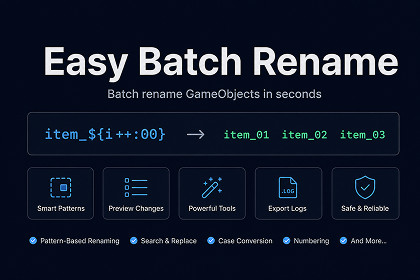
Powerful inline batch renaming tool for GameObjects and Assets. Use templates with smart counters, string formatting, and variables. Rename directly in Inspector with preview and full undo support.**Easy Batch Rename** is a professional Unity Editor tool that revolutionizes how you organize and rename GameObjects and Assets in your projects. Say goodbye to tedious manual renaming and repetitive tasks!### 🎯 Why Choose Easy Batch Rename?**Inline Inspector UI** - No separate windows or dialogs. Select multiple objects and rename them directly in the Inspector where you're already working.**Template-Based Patterns** - Create powerful naming patterns using variables and expressions. Transform "GameObject (1)", "GameObject (2)" into "Player_01", "Player_02" with a single click.**Smart Counter System** - Auto-increment counters with custom formatting. **String Formatting** - Convert names to lowercase, UPPERCASE, or slug-case (kebab-case) automatically. Perfect for maintaining consistent naming conventions.**Dual Mode Support** - Works seamlessly with both Scene GameObjects and Project Assets (prefabs, materials, textures, etc.).**Preview Before Apply** - See exactly what your objects will be renamed to before committing changes. No surprises!**Full Undo Support** - Made a mistake? Every rename operation is fully undoable through Unity's standard undo system (Ctrl/Cmd+Z).---### 🚀 Key Features✅ **Inline Inspector UI** - Appears automatically when you select 2+ objects✅ **Template Variables** - Use `${orig}`, `${parent}`, `${scene}`, and `${index}`✅ **Counter Operations** - `${index++}`, `${index=5}`, `${index+=3}`, and more✅ **String Formatters** - `:lower`, `:upper`, `:slug`, `:00`, `:000`✅ **GameObject & Asset Support** - Works with both scene and project objects✅ **Preview Mode** - See changes before applying✅ **Undo/Redo Support** - Fully integrated with Unity's undo system✅ **Multiple Access Points** - Inspector, GameObject menu, context menu✅ **No Dependencies** - Works out of the box✅ **Clean Code** - Well-documented and easy to extend---### 📦 What You Get- Complete source code (well-documented C#)- Inline Inspector UI system- Template parsing engine- Counter and variable system- String formatting utilities- Full documentation (PDF)- Quick start guide- Script reference for developers---### 🔧 Technical Requirements- **Unity Version:** 2022.3 or later (works with Unity 6)- **Platform:** All platforms (Editor tool only)- **Dependencies:** None- **Size:** ~50KB---### 💡 Perfect For- Level designers organizing scene hierarchies- Technical artists managing large asset libraries- Indie developers maintaining consistent naming- Teams enforcing naming conventions- Anyone tired of manual renaming!---### 📚 Documentation Included- Quick Start Guide (PDF) - Get up and running in 5 minutes- User Manual (PDF) - Complete feature documentation- Script Reference (PDF) - For developers who want to extend functionality- README with examples and troubleshooting---### 🤝 Support- Comprehensive documentation included- Example scenes and patterns- Email support: support@poppod-studio.com- Regular updates and improvements---### ⚡ Get Started in Minutes1. Import the package2. Select 2+ GameObjects or Assets3. See the "Batch Rename" panel in Inspector4. Enter your pattern (e.g., `Item_${index++:00}`)5. Click Preview, then Rename6. Done! ✨Transform hours of tedious work into seconds. Make your project organized and professional with Easy Batch Rename!---**Made with ❤️ by Poppod Studio**## 📋 Package Information**Package Name:** Easy Batch Rename**Version:** 1.0.0**Publisher:** Poppod Studio**Category:** Editor Extensions > Utilities---## 🔧 Technical Specifications### Unity Compatibility- **Minimum Unity Version:** 2022.3 LTS- **Tested Unity Versions:** 2022.3 LTS, 2023.1, 2023.2, Unity 6- **Maximum Unity Version:** Unity 6 and beyond- **Render Pipeline:** Universal (URP), High Definition (HDRP), Built-in- **Platform:** Editor Only (not included in builds)### System Requirements- **Operating Systems:**- Windows 10/11 (64-bit)- macOS 10.15 or later- Linux (Ubuntu 20.04 or later)- **Unity Editor:** Must be installed- **Disk Space:** ~50KB- **RAM:** No additional requirements- **Dependencies:** None (standalone package)---## 🔐 Security & Safety### Data Safety- ✅ **No Network Calls** - All processing is local- ✅ **No Data Collection** - Zero telemetry or analytics- ✅ **No External Dependencies** - Self-contained package- ✅ **Read-Only Scene Access** - Only modifies object names- ✅ **Undo Support** - All changes are reversible### Code Quality- ✅ **Zero Compiler Warnings** - Clean codebase- ✅ **No Deprecated APIs** - Uses modern Unity APIs- ✅ **Memory Safe** - No memory leaks or allocations issues- ✅ **Thread Safe** - All operations on main thread- ✅ **Exception Handling** - Robust error handling---## ⚡ Performance Characteristics### Benchmarks- **1-10 Objects:** < 1ms processing time- **10-100 Objects:** < 5ms processing time- **100-1000 Objects:** < 50ms processing time- **1000+ Objects:** < 500ms processing time### Resource Usage- **CPU:** Negligible (Editor-only, on-demand)- **Memory:** < 1MB allocated during operation- **Disk I/O:** None (unless renaming assets)- **GC Pressure:** Minimal (< 100KB per operation)## 📞 Support & Contact### Documentation- Quick Start Guide (PDF) - In package- User Manual (PDF) - In package- Script Reference (PDF) - In package- Online README - GitHub repository### Support Channels- **Email:** support@poppod-studio.com- **Response Time:** Within 48 hours

